

Pika (pronounced pi·kuh, like picker) is an easy to use, open-source, native colour picker for macOS. Pika makes it easy to quickly find colours onscreen, in the format you need, so you can get on with being a speedy, successful designer.
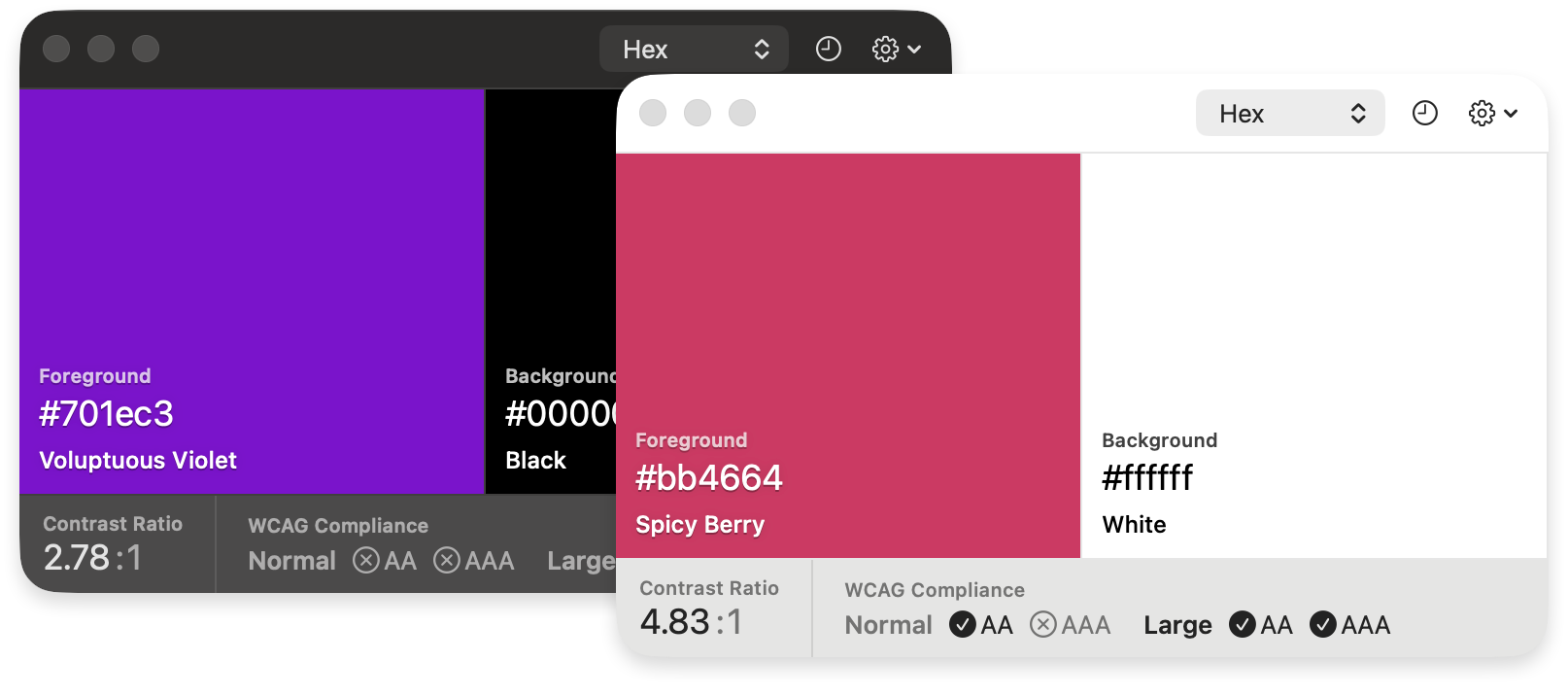
Download the latest version of the app at:
superhighfives.com/pika
Or install with Homebrew:
brew install --cask pika- Pick colours from anywhere on screen, with the macOS sampler or Pika's Pro picker and its live loupe
- Check contrast between a foreground and background with WCAG 2 or APCA
- Hex, RGB, HSB, HSL, LAB, OpenGL and OKLCH formats, in sRGB or Display P3
- Click, type, scrub or step any colour value
- Colour names, history, undo and redo
- Global shortcuts and a
pika://URL scheme for automation
Learn more about the motivations behind the project, and the product vision.

- macOS Sonoma (Version 14) and newer
Colour contrast is the difference in lightness between text and whatever’s behind it. With too little, words blur into their background. That’s a real problem for people with low vision or colour blindness, and it catches everyone else too, like reading a phone in the sun or a laptop turned down low.
Accessibility guidelines set minimum contrast levels so text stays readable for as many people as possible. WCAG 2 is the standard most guidelines and laws point to, and APCA is a newer method that also weighs up font size and weight. Checking early is much easier than reworking a design later.
That’s where Pika comes in. Pick a foreground and background from anywhere on your screen, whether it’s a design file, a website or a screenshot, and Pika shows the contrast straight away, alongside the colours in the format you need, ready to copy.
- Foreground and background: The foreground is text or an icon; the background is the surface behind it. Press X to swap them.
- Why check contrast: Low-contrast text is hard to read, especially with low vision, colour blindness or glare.
- WCAG and APCA: WCAG 2 gives a ratio (AA needs 4.5:1 for text). APCA gives an Lc value that accounts for size and weight, but isn’t a standard yet.
- Ways to pick a colour: Basic uses the macOS sampler. Pro adds a live loupe and needs Screen Recording. ⌘ S opens the macOS colour panel.
- Editing values: Click a value to type, drag or two-finger scroll to scrub, and press ↑ or ↓ to step. ⌘ Z undoes.
- Colour spaces: sRGB matches CSS, Figma and most design tools, and is the default. Display P3 covers the more vivid colours of recent Macs. Contrast always uses sRGB.
Learn more about WCAG contrast and APCA.
Most shortcuts need Pika in front. Show/hide Pika and Pick pair (⌥ ⌘ D) work from any app; set them in Settings → Global Shortcut.
| Group | Shortcut | Action |
|---|---|---|
| Pick | ⌘ D | Pick foreground |
| Pick | ⌘ ⇧ D | Pick background |
| Pick | ⌥ ⌘ D | Pick foreground and background |
| Copy | ⌘ C | Copy foreground |
| Copy | ⌘ ⇧ C | Copy background |
| System picker | ⌘ S | Use for foreground |
| System picker | ⌘ ⇧ S | Use for background |
| Change format | ⌘ 1 | Format Hex |
| Change format | ⌘ 2 | Format RGB |
| Change format | ⌘ 3 | Format HSB |
| Change format | ⌘ 4 | Format HSL |
| Change format | ⌘ 5 | Format LAB |
| Change format | ⌘ 6 | Format OpenGL |
| Change format | ⌘ 7 | Format OKLCH |
| Actions | X | Swap colors |
| Actions | H | Toggle history |
| Actions | C | Toggle compliance |
| Actions | P | Toggle colour preview |
| Actions | ⌘ Z | Undo last pick |
| Actions | ⌘ ⇧ Z | Redo last pick |
| Actions | ⌘ , | Preferences |
| Actions | ⌘ Q | Quit Pika |
You can also trigger Pika using the pika:// URL scheme.
When picking or copying, you can append a format to the URL — <format> is one of hex, rgb, hsb, hsl, lab, opengl, or oklch. For example, pika://pick/foreground/hex.
| Group | URL | Action |
|---|---|---|
| Pick | pika://pick/foreground |
Pick foreground |
| Pick | pika://pick/background |
Pick background |
| Pick | pika://pick/contrast |
Pick foreground and background |
| Pick | pika://pick/foreground/<format> |
Pick foreground in a specific format |
| Pick | pika://pick/background/<format> |
Pick background in a specific format |
| System picker | pika://system/foreground |
Use for foreground |
| System picker | pika://system/background |
Use for background |
| Copy | pika://copy/foreground |
Copy foreground |
| Copy | pika://copy/background |
Copy background |
| Copy | pika://copy/foreground/<format> |
Copy foreground in a specific format |
| Copy | pika://copy/background/<format> |
Copy background in a specific format |
| Copy | pika://copy/text |
Copy all colours as text |
| Copy | pika://copy/json |
Copy all colours as JSON |
| Change format | pika://format/hex |
Format Hex |
| Change format | pika://format/rgb |
Format RGB |
| Change format | pika://format/hsb |
Format HSB |
| Change format | pika://format/hsl |
Format HSL |
| Change format | pika://format/lab |
Format LAB |
| Change format | pika://format/opengl |
Format OpenGL |
| Change format | pika://format/oklch |
Format OKLCH |
| Actions | pika://swap |
Swap colors |
| Actions | pika://undo |
Undo last pick |
| Actions | pika://redo |
Redo last pick |
| Set colour | pika://set/foreground/<hex> |
Set foreground |
| Set colour | pika://set/background/<hex> |
Set background |
| History | pika://history/show |
Show history |
| History | pika://history/hide |
Hide history |
| History | pika://history/toggle |
Toggle history |
| Compliance | pika://compliance/show |
Show compliance |
| Compliance | pika://compliance/hide |
Hide compliance |
| Compliance | pika://compliance/toggle |
Toggle compliance |
| Preview | pika://preview/show |
Show colour preview |
| Preview | pika://preview/hide |
Hide colour preview |
| Preview | pika://preview/toggle |
Toggle colour preview |
| Windows | pika://window/about |
Open About |
| Windows | pika://window/help |
Open Help |
| Windows | pika://window/preferences |
Open Preferences |
| Windows | pika://window/splash |
Open Splash |
| Windows | pika://window/resize/<w>/<h> |
Resize window |
| Appearance | pika://appearance/light |
Force light appearance |
| Appearance | pika://appearance/dark |
Force dark appearance |
| Appearance | pika://appearance/system |
Restore system appearance |
Make sure you have mint installed, and bootstrap the toolchain dependencies:
brew install mint
mint bootstrap
Open Pika.xcodeproj and to run the project. Sparkle requires that you have a team and signing profile set for the project, or it will crash with a dyld / signal SIGABRT error.
If you run into any problems, please detail them in an issue.
Any and all contributions are welcomed. Check for open issues, look through the project roadmap, help translating the app and submit a PR.
- Sparkle software update framework
- Defaults
- Keyboard Shortcuts
- Launch At Login
- NSWindow+Fade
- Sweetercolor colour extension library for Swift (slightly tweaked for NSColor, rather than UIColor)
- Color names
- Metal shader code in part thanks to Smiley
And a huge thank you to Stormnoid for the incredible 2D vector field visualisation on Shadertoy.