
Note: The updates are only in the Chatbot_trans.py file. For all other files please refer to the original project. https://github.com/shiro102/Chat-bot-team-20
https://drive.google.com/file/d/1_FKNQh3XlUMmmUHKq60klVV1JbeSDznw/view?usp=sharing
- Action anime
- Adventure anime
- Drama anime
- Fantasy anime
- Comedy anime
- Favorite anime
- Manga
- Top Manga
- Favorite manga
- Recent manga
- Recommend manga
- About Manhwa
- Famous Manhwa
- Otaku Culture
- Anime Convention
- Famous Conventions
- Bucket List Conventions
- About Jump Festa
- Video Games
- Gacha
- Famous Gacha
- RPG
- Famous RPG
- Japanese Culure
- Japanese People
- Japanese Religion
- Japanese Sport
- Japanese Food
- Samurai
In this assignment, I have incorporated two extra APIs: Flickr API and Google Translate API.
The Flickr API searches what the user is asking in certain situations and returns a related image. First applying for a key on its website is required, after getting the key, you could go generate a link that is used for fetching images in JSON format. The link could be copied into the file where it is used, then the searching content is specified from reading user's input. After getting results in JSON format, it could be read into a python object with its attributes turning into the object's. After this, another website that is specified by Flickr is used to retrieve the actual image using JSON and its attributes. Details will be shown in the method.
A function named flickr_search(str) is defined in class GUI, and when calling it from outside the class, an instance of GUI class named "app" is created, then app.flickr_search(str) is called. Here is the code:
    def flickr_search(self,tag):
        tag = tag.strip()
        tag = tag.replace(" ","+")
        ur = 'https://www.flickr.com/services/rest/?method=flickr.photos.search&api_key=6a87e58a6a39d92c88487c747867f394&text='+tag +'&format=json&nojsoncallback=1'
        fil = urllib.request.urlopen(ur)
        fil = fil.read()
        #def _json_object_hook(d): return namedtuple('X', d.keys())(*d.values())
        dat = json.loads(fil,object_hook=lambda d: SimpleNamespace(**d))

        photos = dat.photos.photo
        count = 0;
        im = None
        for photo in photos:
            if(count>0):
                break
            count+=1
            result = 'http://live.staticflickr.com/' + str(photo.server) + '/' + str(photo.id) + '_' + photo.secret + '.jpg'
            fd = urllib.request.urlopen(result)
            image_file = io.BytesIO(fd.read())
            tmpimg = Image.open(image_file)
            tmpimg = tmpimg.resize((250,150), Image. ANTIALIAS)
            im = ImageTk.PhotoImage(tmpimg)
            global search_img
            search_img = im
            ChatLog.image_create(END, image = search_img)
            ChatLog.insert(END, "\n\n")
        return im
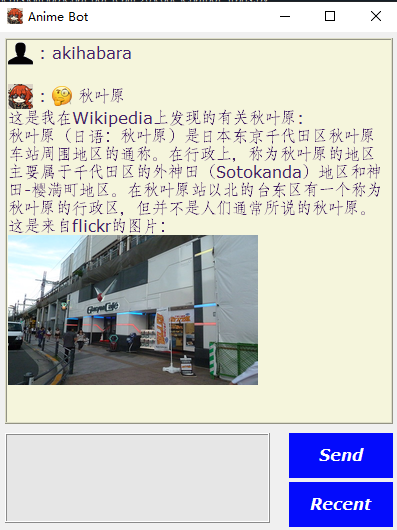
The Google Translate API could translate the reply of the bot into different languages. In this project, it is specified to Chinese. Basic steps for setting up the environment for Google Translate API is the same as Flickr API. First you need to apply for a key, then you need to download the key in a JSON file and store it. Then set up in python like this:
path="C:/Users/sword/Documents/GitHub/Chat-bot-team-20/code/my-key.json"
os.environ['GOOGLE_APPLICATION_CREDENTIALS'] = path
where the path references the path where the key is stored, then add it to the system environment. Also a function is defined in the website. It is incorporated with some minor modifications:
def trans(target, text):
    """Translates text into the target language.

    Target must be an ISO 639-1 language code.
    See https://g.co/cloud/translate/v2/translate-reference#supported_languages
    """
    import six
    from google.cloud import translate_v2 as translate

    translate_client = translate.Client()

    if isinstance(text, six.binary_type):
        text = text.decode("utf-8")

    # Text can also be a sequence of strings, in which case this method
    # will return a sequence of results for each text.
    result = translate_client.translate(text, target_language=target)

    return result["translatedText"]
When calling the method, the first parameter specifies the target language, which is Chinese here, denoted by "zh". Then the second parameter is the text you want to translate. And the function returns the text in Chinese in string.
Note: This API is incorporated in a separated file named Chatbot_trans.py as opposed to the original file named Chatbot.py. It is basically the same as the original file but with the modifications incorporated.
There are several limitations of the API implemented. For the Flickr API, sometimes the images retrieved are not exactly related to the topic. This is mainly due to the search engine of Flickr and it tends to perform poorly on certain topics. And all this implementation in this project is just to retrieve the first image that comes up.
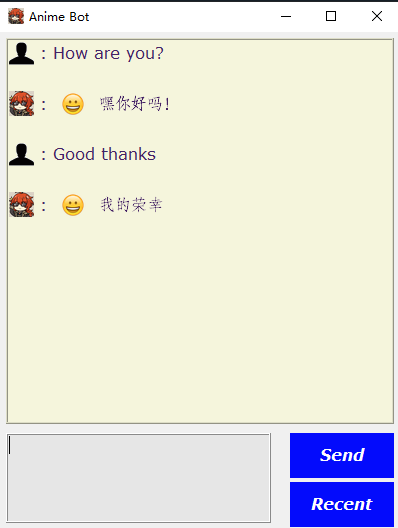
Also for the Google Translate API, sometimes the translation looks very interesting and deviates from its original meanings. This might be due to the difficulties of translating some jargon or names in a certain field like in Japanese anime.
After incorporating so many APIs (Wikipedia, Flickr, Google Translate, etc.), the response time for a reply tends to last very long and could be improved.
Github URL:
https://github.com/shiro102/Chat-bot-team-20
In this project, we developed an interactive conversational agent that responds to user input. In response to the user, the agent generates sentences as output. There are 2 types of target users. The first type of target users includes anime and manga lovers who would love to talk about them and know more about it. The second type of target users includes anyone who are interested in Japanese culture. There are 2 types of topics as well. The first type of topic of the conversation is about the general information and personal preference of anime. The second type of topic of the conversation is about the general information of Japan such as people, religion, food, samurai and so on.
To compile the code, we run in terminal these 2 lines of codes - “python train.py” and “python chatbot.py”. The first code is to train the model so that the GUI might function properlyl. The second code is to run the app. Further instructions are in the README file in the CODE folder.
There are five stages of the development for the code: data importing and loading, data preprocessing, data training and testing, model building, and GUI developing.
There are 12 classes used in the code: nltk, json, pickle, numpy, keras, and tkinter, Wikipedia, Stanford Corenlp, Sentimental Analyser, GUI, Home, and Recent.
-
Class “nltk” contains a group of libraries which provide statistical processing for English Language and is commonly used for Natural Language Processing. It is used throughout all the developing stages except the model building stage and the GUI development stage.
-
There are 4 critical methods within this class: “nltk.stem.wordnetlemmatizer”, “nltk.word_tokenize”, “nltk.pos_tag” (instead of Stanfordnlp’s POS tagging to simplify the implementation) and “nltk.corpus”
1. The first method, “nltk.stem.wordnetlemmatizer”, converts a word into its lemma form, groups different words to be analyzed as a single item based on similar meaning, and then creates a pickle file to store the Python objects which we will use while predicting. 2. The second method, “nltk.word_tokenize”, is used to cleanup and break the whole text into small parts, such as words. 3. The third method, “nltk.pos_tag”, tags every word as “Proper Nouns”, “Verb”, “Adjectives” etc. It is used for one of the new features we added - POS tagging - and it works in the similar pattern as Stanford Corenlp’s POS tagging. We will explain Stanford Corenlp later. 4. The fourth method, “nltk.corpus”, is used to access “wordnet” which helps us to implement a new feature that we added to this code - synonym recognition. -
Class “json” is the data file which predicts the user inputs and gives responses. It is used for importing and loading data, preprocessing data, and getting random responses for the GUI. Json is also used implicitly throughout the program as the fundamental data in chatbot - conversation patterns.
-
Class “pickle” is to make the data operations more efficient by removing object hierarchy when dumping our data or when loading our data from the dataset as it converts/treats the data as a single stream. Pickle is used throughout the stages except the data importing stage and the GUI development stage. It was also used to save a model for one of the new features that we added to this code - sentiment analysis.
-
Class “numpy” is to increase the efficiency of the operation of lists in python. It is used in 2 stages - “creating data for training and testing” and “predicting classes for GUI”.
-
Class “keras'' is to build and import the deep neural network model for the trained data. It is used in the stages of building and importing the model to GUI.
-
Class “tkinter” is used to develop a graphical user interface by powerful libraries and functions within the class. It is used to develop the final GUI.
-
Class “Wikipedia” is used to initiate online searches on Wikipedia in real time. It is an additional feature for our chatbot that functions when the chatbot doesn’t recognize a “Proper Noun” that is found by one of the new features we added - POS tagging.
-
Class “Stanford Corenlp” is a service for natural language processing. Instead of creating a wrapper ourselves, we used a wrapper for this class called stanfordcorenlp. The link is put under the reference list at the end of the README file.
-
“Sentimental Analyser” is a different python file created to help us with Sentiment Analysis. We create a naïve bayes model to decide between “Negative” and “Positive” Sentences. This model is used to analyze how users react to it.
-
“GUI” is a class that is used to initialize everything related to our Graphical User Interface such as images, pages, etc.
-
Class “Home” is the class for our home page in the Graphical User Interface and it contains all features present on that page.
-
Class “Recent”, is used to record and store recent conversation dialogue in our recent conversation page in the Graphical User Interface. It contains all features present on that page.
-
Level 0:
-
Image:
-
Explain: This is our level 0 DFD, as you can see we have two entities namely, the user that is using the chatbot and the developers, which would be our entire team. The way the developers interact with the chatbot is by implementing new features fixing any bugs etc.
-
-
Level 1:
-
Image:
-
Explain: This right here is our level 1 DFD. Like the level 0 DFD we still have our developer and user as our entities. We have our synonym recognition, POS tagging and sentiment analysis as our processes. Our synonym recognition process works on the intents that is already in the dataset. Whereas the POS and sentimental works when only when the user has typed something on the UI and the bot prepares its response by picking required response from the dataset which is symbolized by the datastore at the bottom. We have another datastore that stores the conversation log named “conversation log”, the option to store this conversation comes from the UI.
-


-
POS Tagging: includes the ability to searching on wikipedia and give responses based on that.
-
Python file "SentimentalAnalyzer": a file that implements sentiment analysis
-
Our chat bot: an application for others to view and modify.
-
The method "remove_noise": removes all unnecessary words from a sentence
-
Our Graphical User Interface
-
Synonym recognition
-
Function: It identifies synonyms within sentences and give corresponding answers. It allows users to make inputs more diversified and give correct answers at the same time
-
Snippet:
-
-
Sentiment analysis
-
Function: It recognizes user input that contains positive, negative, or neutral emotions and give corresponding answers without us having to code. It makes dialogue turns more lively and realistic.
-
Snippet:
-
-
POS tagging
-
Function: It gets the information about Proper Nouns that our bot doesn't know and searching them real time on wikipedia. With this feature, our chatbot is able to answer topics that are outside of our designed topic and the users might get more satisfaction throughout conversations.
-
Snippet:
-
-
Recent Conversation Page
-
Function: It saves dialogue information everytime our users say "bye" or close the app. With this feature, our users are able to check the dialogue history which is convenient.
-
Snippet:
-


- Khai Hung Luong (Hung): I'm 3rd year comsci student who loves reading books !
- Anshul Dhariwal (Anshul): I am 3rd year COSC student and loves anything that is interesting to do!!
- Jayant Puri (Jayant): I'm a 3rd year COSC student who loves watching anime!
- Sirus Wang (Sirus): I'm a 3rd year COSC student who loves taking photos!
- Shaohua Jiang (Joseph): I'm a 3rd year math student who loves snowboarding!
Here is the link of an open-source program that helps us build our chatbot https://data-flair.training/blogs/python-chatbot-project/
Here is the link of stanfordcorenlp which is a Python wrapper for Stanford CoreNLP. https://github.com/Lynten/stanford-corenlp