
Smart irrigation for Home Assistant — knows exactly when your garden needs water, calculates how long to run the valve, and makes sure it actually closes.



If NeverDry is useful to you, leave a star ⭐ — it helps others find the project.
🌱 Vision — what NeverDry is for, and why:
docs/VISION.md. 🤝 Want to contribute? SeeCONTRIBUTING.mdand the design notes. 💧 Which valves work?docs/valve-compatibility.md— tested hardware, and how to add yours. 🔌 Where NeverDry stops: it consumes Home Assistant entities, never your hardware — no MQTT, no Zigbee, no vendor APIs. If your device buries a value where no entity exists,docs/hardware-interface.mdshows how to surface it.
Your garden tells you when it's thirsty — NeverDry listens.
NeverDry tracks how much water your soil has lost to heat and wind, and how much it got back from rain. When the deficit crosses your threshold, it opens the valve for exactly the right amount of time. No fixed timers. No guessing. 1 mm of deficit = 1 liter per m² of water needed.
And it makes sure the valve always closes.
If a valve stops responding, NeverDry keeps trying — six attempts, with a growing pause between them, because a radio hiccup is not a broken valve — and only then blocks that zone and shows a warning on your dashboard. Three independent mechanisms make sure water can't run indefinitely — hardware timeout, software watchdog, and a per-valve state machine that remembers what happened.
- Knows when your garden is thirsty — tracks heat, evaporation, and rainfall in real time; irrigates only when needed
- Four ways to work out the water balance, and it picks one for you — temperature-only, Hargreaves, Penman-Monteith, or a soil probe. Automatic takes the best your sensors support and tells you which one is running, because the number depends on it. Add a humidity or wind sensor and NeverDry moves up a tier on its own; add nothing and it works exactly as before
- Each plant gets its own schedule — 10 plant profiles (lawn, citrus, succulents, roses, ...) with seasonal variation; NeverDry knows your lawn drinks more in July than your lavender ever will
- Same plants, different spot — a bed shaded by the house from 14:00 doesn't drink like the one baking against a south-facing wall; set each zone's exposure and NeverDry scales its water accordingly, all season long
- Knows how much water to deliver — calculates exactly how many liters each zone needs; if you have a flow meter, it measures delivery directly; otherwise it computes run time from flow rate
- Measures your system instead of believing you — the flow rate you type in decides how long a valve stays open and how much water NeverDry thinks it delivered. One button runs a supervised one-minute test and tells you the real figure. On the garden this was built for, three zones declared 100, 200 and 100 L/h were actually running at 264, 360 and 24 — a fifteenfold spread, same brand of valve
- Zones are independent — the rose bed and the lawn dry out at different rates; each zone tracks its own deficit
- Skips irrigation after rain — tracks how much rain actually fell and subtracts it from the deficit
- Tells you when a valve goes quiet — a flat battery valve keeps reporting a perfectly ordinary "off", so nothing looks wrong while the zone dries out; NeverDry warns on the card as soon as a command goes unanswered, and tells a radio problem apart from a valve that answers and delivers no water
- Valve always closes — if a valve is still not responding after six tries, NeverDry blocks it, shows the state on the dashboard, and waits for you to check
- Two scheduling modes — water when the deficit crosses a threshold (Mode A) or every night based on current deficit (Mode B)
- Rests for the winter, or while you're away: one selector on the hub. Stopped sends no command to any valve and no notification until spring, while the water balance keeps counting the rain; Away keeps watering and stops asking you to water by hand. Takes effect at once and survives a restart
- Works without valves too — no hardware? NeverDry sends a notification when watering is needed and by how much
- Emergency stop — one button closes all valves immediately
- Grabbed the hose? Just tell NeverDry — "Mark as irrigated" button keeps the deficit accurate even when you water manually
- See everything at a glance — a bundled Lovelace card shows each zone's status, deficit, next/last session and action buttons; auto-registered, no setup needed
- Survives restarts — your deficit history is saved across HA restarts
- Update in one click — HACS notifies you when a new version is available; your settings are always preserved
- Set up from the UI — no YAML required
- Zero dependencies — pure Python, no extra packages
Integration-level:
| Entity | Native unit | Description |
|---|---|---|
sensor.et_hourly_estimate |
mm/h | Instantaneous evapotranspiration rate |
sensor.never_dry |
mm | Reference soil water deficit (Kc=1.0) |
sensor.water_balance_method |
— | Which of the four methods is running |
sensor.<derived quantity> |
varies | What the running method derived, one entity each so Home Assistant keeps the history: diurnal temperature range, daily minimum and maximum, and for the full-weather tier daily solar radiation, net radiation and wind speed at 2 m |
select.<hub>_operating_mode |
- | Operating mode of the hub: active, away or stopped (see the user manual, section 7.5) |
Per zone (grouped under each zone's device card):
| Entity | Native unit | Description |
|---|---|---|
sensor.<zone>_volume |
L | Volume needed by the next session; attributes: duration_s, deficit_mm, kc, plant_family, irrigating, ... |
sensor.<zone>_deficit |
mm | Zone water deficit; attributes: valve_fsm_state, valve_in_maintenance, irrigating, flow_rate_lpm |
sensor.<zone>_duration |
s | Expected duration of the next session (live remaining-time estimate while irrigating with a flow-rate meter) |
sensor.<zone>_last_irrigated |
timestamp | When the zone was last irrigated |
sensor.<zone>_last_source |
— | What triggered the last irrigation (service, button, schedule, ...) |
sensor.<zone>_last_volume |
L | Water delivered by the last session |
sensor.<zone>_last_duration |
s | Duration of the last session |
sensor.<zone>_session_water |
L | Water delivered in the current session |
sensor.<zone>_yearly_water |
L | Cumulative water delivered this year |
sensor.<zone>_rain_yearly |
L | Rain this zone received this calendar year: the yearly rain in mm times the zone's area |
sensor.<zone>_kc |
— | Current crop coefficient (seasonal) |
sensor.<zone>_flow_rate |
L/h | Design flow rate: what the zone was built to deliver |
sensor.<zone>_measured_flow_rate |
L/h | What the last supervised valve test measured, kept as a series so a slow decline reads as clogging emitters |
sensor.<zone>_water_meter_resolution |
L | Smallest increment this zone's meter has ever reported — the limit of detection behind any measured figure |
sensor.<zone>_threshold |
mm | Configured trigger threshold |
sensor.<zone>_area |
m² | Configured irrigated area |
sensor.<zone>_efficiency |
— | Configured system efficiency |
sensor.<zone>_irrigation_mode |
— | Scheduling mode (manual / reactive / scheduled) |
sensor.<zone>_irrigation_time |
— | Daily irrigation time (scheduled mode) |
sensor.<zone>_valve |
— | Mirror of the physical valve state (open/closed) |
sensor.<zone>_battery |
% | Mirror of the valve battery sensor |
sensor.<zone>_flow_meter |
as the meter | Mirror of the flow meter, in the unit the meter itself reports |
button.<zone>_irrigate |
— | Start an irrigation session now |
button.<zone>_mark_irrigated |
— | Reset the deficit without opening the valve |
button.<zone>_stop |
— | Stop the zone's irrigation immediately |
button.<zone>_reset_valve |
— | Unlock a valve that NeverDry blocked after repeated failures |
All sensors that carry a physical unit declare the proper HA device_class (e.g. precipitation, volume_storage, volume_flow_rate). Home Assistant automatically converts the displayed unit to your system preference: go to Settings → System → General → Unit system to switch between metric and imperial. Deficit values appear in mm or inches; volumes in litres or gallons; ET rate in mm/h or in/h. Flow rates appear in L/h or gal/h: Home Assistant does not convert flow rates between unit systems, so NeverDry picks the unit from the same setting.
NeverDry ships a custom Lovelace card that shows everything about one zone at a glance. The card is bundled with the integration and auto-registered — no manual resource to add: after install it appears directly in the "Add card" picker as NeverDry Zone Card. Pick the zone in the card editor and you're done.
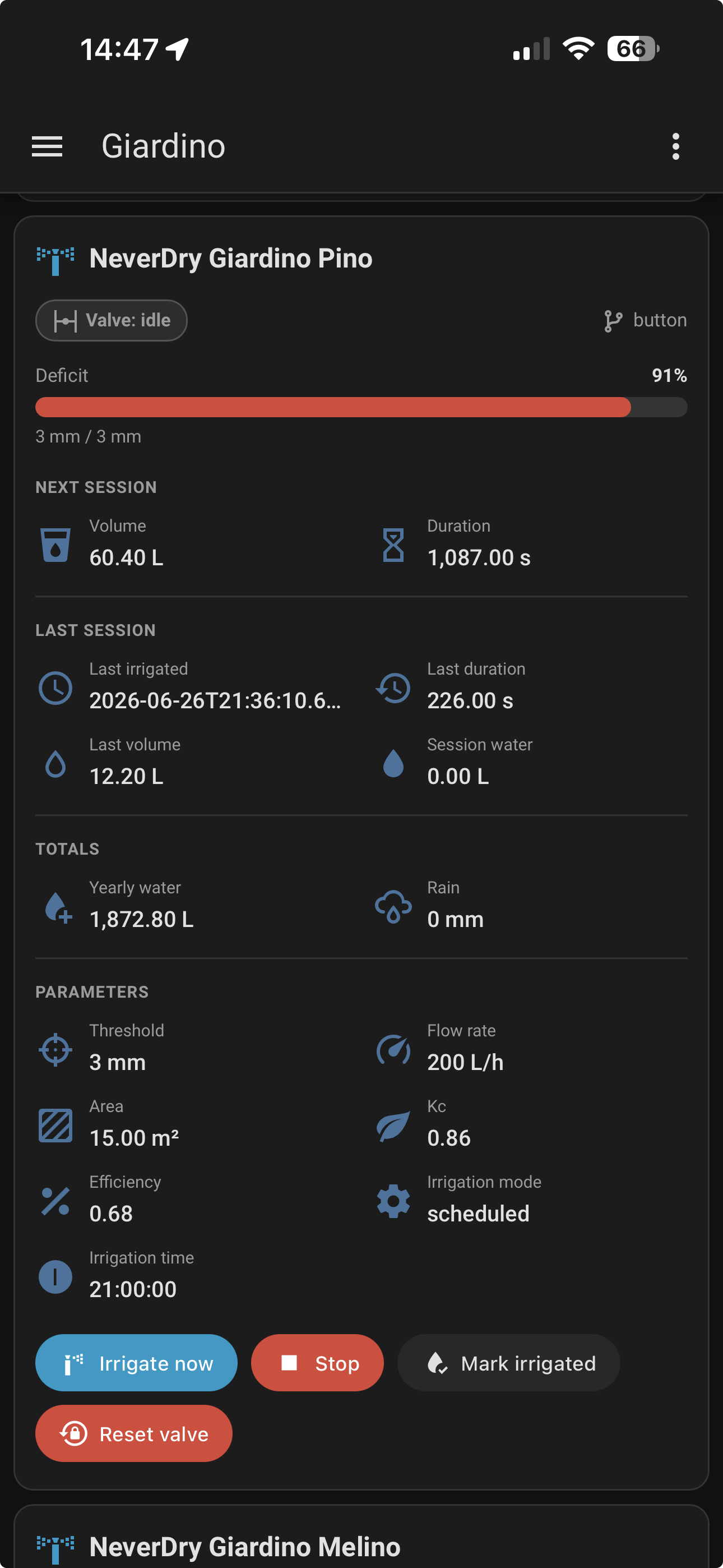
Each card groups a zone's entities by time horizon:
- Status chips — valve state, irrigating / maintenance, and the source of the last irrigation
- Deficit vs threshold — a bar showing how close the zone is to needing water
- Next session — planned volume and run duration
- Last session — last irrigated, duration, volume, and water delivered
- Totals — yearly water and cumulative rain
- Parameters — threshold, flow rate, area, Kc, efficiency, mode
- Actions — Irrigate now, Mark as irrigated, and Reset valve as real buttons
Labels and units follow your Home Assistant language and unit system automatically; entity resolution is rename-safe (it prefers each entity's stable unique_id). Add one card per zone for a complete dashboard.
| Service | Description |
|---|---|
never_dry.irrigate_zone |
Open valve, water for the calculated duration, close, update zone deficit |
never_dry.irrigate_all |
Water all zones one by one, then mark all as done |
never_dry.stop |
Emergency stop — close all valves immediately |
never_dry.stop_zone |
Stop irrigation for a single zone and close its valve |
never_dry.mark_irrigated |
Reset a zone's deficit without opening the valve — for when you watered manually |
never_dry.reset |
Reset all zone deficits to zero |
never_dry.reset_valve |
Unlock a valve blocked by NeverDry after repeated close failures |
never_dry.set_deficit |
Set the deficit of one zone (or all zones) to an arbitrary mm value — useful for testing and manual calibration |
Each zone can be assigned a plant family with seasonal Kc values (northern hemisphere — auto-flipped for southern):
| Family | Winter | Spring | Summer | Autumn |
|---|---|---|---|---|
| Lawn / Turf grass | 0.45 | 0.85 | 1.00 | 0.70 |
| Vegetables (seasonal) | 0.30 | 0.70 | 1.10 | 0.50 |
| Fruit trees (deciduous) | 0.35 | 0.70 | 0.95 | 0.55 |
| Ornamental shrubs | 0.40 | 0.65 | 0.80 | 0.55 |
| Herbs (Mediterranean) | 0.30 | 0.55 | 0.70 | 0.40 |
| Citrus / Evergreen fruit | 0.60 | 0.65 | 0.70 | 0.65 |
| Roses | 0.35 | 0.75 | 0.95 | 0.55 |
| Succulents / Cacti | 0.15 | 0.25 | 0.35 | 0.20 |
| Native ground cover | 0.25 | 0.45 | 0.55 | 0.35 |
| Mixed garden (default) | 0.40 | 0.70 | 0.90 | 0.55 |
You can also set a manual Kc override per zone (0.1–2.0) if you know the exact value. Not sure which Kc fits your setup? Use NeverDry Planner to calculate the irrigated area and the right Kc to copy directly into NeverDry.
Two zones can hold the same plants and still lose water at different rates — one is shaded by the house from 14:00, the other bakes next to a south-facing wall. Site exposure captures that with a per-zone factor that multiplies the Kc, so the zone keeps its seasonal curve instead of being frozen at one value by a fixed Kc override:
Kc_effective = Kc(plant family or override) × microclimate_factor
| Exposure | Factor |
|---|---|
| Deep / all-day shade | 0.60 |
| Morning sun, afternoon shade | 0.75 |
| Morning shade, afternoon sun | 0.85 |
| Full sun, open (default) | 1.00 |
| Windy / exposed | 1.15 |
| Reflected heat (paving, south-facing wall) | 1.20 |
| Advanced (custom factor) | 0.1–1.5, your value |
The presets come from the landscape coefficient method (K_L = k_s × k_d × k_mc, Costello, Matheny & Clark 2000), where the plant family plays the species factor k_s and exposure the microclimate factor k_mc. Values above 1.0 are deliberate: paving and walls really do push a zone past reference ET. Leaving exposure at Full sun, open changes nothing, so existing zones keep behaving exactly as before.

Or manually:
- Open HACS in Home Assistant
- Go to Integrations and search for NeverDry
- Click Install, then restart Home Assistant
- Settings > Devices & Services > Add Integration > search NeverDry
- Copy
custom_components/never_dry/into your HAconfig/custom_components/directory - Restart Home Assistant
- Add the integration from the UI
Via HACS: HACS notifies you when a new version is available. Click Update and restart HA.
Manual: Download the latest never_dry.zip from Releases, replace the custom_components/never_dry/ folder, and restart HA.
Your configuration and sensor history are preserved automatically. If the new version changes the config schema, settings are migrated seamlessly — no need to remove and re-add the integration.
NeverDry is configured entirely through the UI — no YAML required.
| Field | Required | Default | Description |
|---|---|---|---|
| Temperature sensor | Yes | — | Outdoor temperature [°C] |
| Rain sensor | Yes | — | Precipitation sensor [mm] |
| Rain sensor type | No | event | event (mm per event, tipping bucket) or daily_total (cumulative mm since midnight) |
| Alpha (α) | No | 0.22 | ET coefficient [mm/°C/day] |
| Base temperature | No | 9.0 | Below this, ET = 0 [°C] |
| Max deficit (D_max) | No | 100.0 | Upper clamp [mm] |
| VWC sensor | No | — | Soil moisture (bypasses ET model) |
| Field | Required | Default | Description |
|---|---|---|---|
| Zone name | Yes | — | Display name |
| Valve | No | — | Entity controlling the valve — switch.* or valve.* (omit for monitoring-only mode) |
| Area | Yes | - | Irrigated area [m², ft² in imperial] |
| System type | Yes | — | Drip / micro-sprinkler / sprinkler / manual |
| Efficiency | No | (from type) | Override distribution efficiency [0.1–1.0] |
| Plant family | No | — | Sets seasonal Kc profile |
| Custom Kc | No | — | Override Kc [0.1–2.0] — use NeverDry Planner to estimate it |
| Site exposure | No | Full sun, open | Sun/wind exposure preset — multiplies the Kc [0.60–1.20] |
| Custom microclimate factor | Advanced only | — | Explicit exposure factor [0.1–1.5], used when exposure is Advanced |
| Guard flow rate | For timer mode | - | Valve flow rate [L/h, gal/h in imperial]. Required for timer-based zones; recommended for flow-meter and volume-dosing zones too, where it drives the expected duration and the safety-timeout scaling |
| Threshold | No | 20.0 | Mode A trigger [mm, in in imperial] |
| Battery sensor | No | — | Valve battery sensor — mirrored in the zone device card |
| Flow meter sensor | No | — | Either a cumulative volume counter or an instantaneous flow rate — both work, and NeverDry tells them apart by the unit. See valves tested for what your model exposes. Mirrored in the zone device card |
This is the setting most likely to be wrong on your installation, and the one that quietly decides how much water your plants get.
The guard flow rate you type into a zone is not decoration. It decides how long the valve stays open to deliver the litres the water balance asked for, and — when you have no meter — it is also what NeverDry credits as delivered. Which makes the calculation circular: the run time comes from your number, and the water credited is that same number multiplied by the run time. No contradiction can ever arise, so a wrong value is invisible from the inside and stays wrong for seasons.
How wrong can it be? On the garden this integration was built for, three zones had been declared in good faith and measured like this:
| Zone | Declared | Actual | Effect |
|---|---|---|---|
| A | 100 L/h | 264 L/h | received ~2.6× the water intended |
| B | 200 L/h | 360 L/h | received ~1.8× the water intended |
| C | 100 L/h | 24 L/h | received ~¼ of the water intended |
Same brand of valve, same installation, fifteenfold between the slowest and the fastest. Nobody can estimate this by eye — which is why NeverDry measures it.
NeverDry keeps three different flow rates apart, because they answer different
questions (see
docs/design/flow-rate-provenance.md):
- Design flow rate — what you configure: the sum of the rated output of the zone's emitters, from their datasheet or your irrigation plan. Required, since without it a volume cannot become a watering duration.
- Measured flow rate — the median of what the zone has really delivered, collected automatically from every metered session. Shown beside the design rate with the gap between them; a zone at 205 L/h against a design of 360 is losing water to pressure or to clogged emitters.
- Water meter — the raw cumulative counter, in litres.
Each zone with a valve also has a Valve test button in its Diagnostic section: it opens the valve for a chosen number of minutes (1–5, five by default), watches the meter and publishes what it found. Its result becomes the first sample of the measured history — useful on a new zone, which has no sessions yet. It is never written over the design rate: those two numbers only mean something as a pair.
The test also answers two questions you cannot get from a config file:
- Can your meter even see a short run? It reports the smallest change the meter ever made and how many times it changed. A counter that steps once a minute cannot describe a one-minute run, however precise its unit looks. That pair is the meter's limit of detection.
- How fast does your valve answer? Open and close confirmation times, which is what the adaptive safety timeout is built from.
- Water will run. The test is supervised on purpose: stand where you can see the zone. It is a diagnostic, not an automation — never call it unattended.
- It refuses to run when it cannot see. If the valve or the meter has not reported yet — normal for a battery valve just after a restart — it declines and tells you to wake the valve first. Putting water down while blind teaches nothing.
- One test is a snapshot, not a constant. Flow depends on mains pressure, so on the time of day and on who else is drawing water. Run it two or three times at the hours you actually irrigate, and save the middle value rather than the last.
- Saving is deliberately a separate press. Whether that minute was representative is a judgement only you can make, standing there. A test that rewrote your configuration by itself would turn one unlucky minute into a permanent number.
A zone with a delivery measurement configured closes on the volume actually delivered rather than on a computed duration, so a wrong flow rate stops mattering for accounting. Two cautions from the field, both worth a glance at the valve register:
- Prefer a session counter — one that restarts at zero each run — because at the end its value already is the volume delivered. A counter that resets on a calendar boundary produces a decrease for a run crossing midnight, and a decrease is never delivery.
- A coarse counter can be worse than a well-calibrated timer. One tested valve steps ~21 L every five minutes: closing on that overshoots a 31 L target by 40 %. There, the honest setup is a timer with a measured rate.
NeverDry tracks how much water your soil has lost to heat (evapotranspiration) and gained from rain, and computes the difference — the water deficit — in millimetres. 1 mm = 1 litre per m². When the deficit crosses your threshold, NeverDry calculates the volume needed and runs the valve for exactly that long. Every rain event reduces the deficit; every irrigation session resets it. Plants that drink more in summer (lawn, vegetables) get a higher multiplier; drought-tolerant plants (lavender, succulents) get a lower one — that multiplier is called Kc.
The model is based on FAO-56 (Allen et al., 1998):
D_zone(t) = clamp(D_zone(t-1) + ET_h × Kc × Δt − ΔP,  0,  D_max)

ET_h = max(0, α × (T − T_base) / 24)     [mm/h]  evapotranspiration
Kc   = f(day_of_year, plant_family) × k_mc [—]     crop coefficient × site exposure
ΔP   = rain_delta(sensor_type)             [mm]    precipitation increment
V    = D_zone × Area / Efficiency          [L]     volume needed
t    = V / FlowRate × 60                   [s]     irrigation duration
Key design choices:
- Integration is event-driven (forward Euler, variable Δt) — no fixed polling interval
- Each zone tracks its own deficit scaled by Kc, not a shared global value
- Rain is always processed as a delta (increment since last reading), not a raw value — this correctly handles both tipping-bucket sensors (mm per event) and cumulative daily-total sensors (mm since midnight)
- User Manual
- FAQ: the questions people actually ask, with the best current answer
- Developer Manual
- Preparing your hardware — the interface contract: the three entities NeverDry needs, and recipes for devices that hide them
- Valves tested — what each valve really exposes, model by model and firmware by firmware, plus the tricks some need. Add yours.
- Project Homepage
Found a bug or have an idea? Open an issue — reports from real gardens are what drive this project forward:
- 🐛 Report a bug — include your HA version, NeverDry version, valve hardware, and the relevant
custom_components.never_drydebug log lines - 💡 Request a feature — describe your irrigation setup and what you're trying to achieve
- 💬 HA Community thread — for setup questions and general discussion
NeverDry is free and open source. If it's useful to you, leave a star — it costs nothing and helps others find the project:

NeverDry is a hobby project for residential use. It is not certified for agricultural, commercial, or safety-critical applications. The authors accept no liability for crop damage, water waste, property damage, or any other loss resulting from the use of this software.
The ET model is a simplification of the FAO-56 standard and is not a substitute for professional agronomic advice. Crop coefficients (Kc) are approximate seasonal averages for typical residential plants — actual water needs depend on soil type, microclimate, plant health, and many other factors.
Always monitor your irrigation system and verify that valves open and close correctly. Use the emergency stop service (never_dry.stop) if anything goes wrong.
Developed by drake69 with AI assistance (Claude by Anthropic).
Site exposure contributed by philipgiuliani (#147).
Speak a language NeverDry does not? docs/translations.md lists what ships,
who checked it, and how to add one.
NeverDry is shaped by people who never pushed a commit as much as by people who did. A field report that explains why a valve times out is worth more than the patch it leads to, and this list counts it that way — code, ideas, bug reports and testing on real gardens all appear.
If you have reported a bug, tested a pre-release or shaped a design note, you belong here. If you are missing, say so on any issue and it will be fixed.
 Luigi Corsaro 💻 📖 🤔 🚧 |
 Philip Giuliani 💻 🤔 |
 Vito Ammirata 💻 |
 Rajan Patel 🐛 📓 |
 dietklein 🐛 📓 |
 MetheLittle 🐛 📓 |
 Filip Pytloun 🤔 |
 MrEcosse 🤔 |
NeverDry is based on established agronomic science. The key references are:
- Allen, R.G., Pereira, L.S., Raes, D., Smith, M. (1998). Crop evapotranspiration: guidelines for computing crop water requirements. FAO Irrigation and Drainage Paper 56. Rome: FAO. — Full text (FAO)
- Hargreaves, G.H., Samani, Z.A. (1985). Reference crop evapotranspiration from temperature. Applied Engineering in Agriculture, 1(2), 96–99. DOI: 10.13031/2013.26773 — PDF
- Penman, H.L. (1948). Natural evaporation from open water, bare soil and grass. Proc. R. Soc. London A, 193(1032), 120–145. DOI: 10.1098/rspa.1948.0037
- Monteith, J.L. (1965). Evaporation and environment. Symp. Soc. Exp. Biol., 19, 205–234. — Rothamsted Repository | PubMed
- Fereres, E., Soriano, M.A. (2007). Deficit irrigation for reducing agricultural water use. J. Exp. Bot., 58(2), 147–159. DOI: 10.1093/jxb/erl165
MIT — Luigi Corsaro