

Turn an OpenAPI specification into validated MCP tools.
One command. No endpoint wrappers.


Quick start · Client setup · Architecture · Configuration · Compatibility · Roadmap
Openwire is a Model Context Protocol server for REST APIs. Give it a local OpenAPI file or a remote specification URL, and it exposes API operations as tools that an MCP client can discover and call over stdio.
Use it to connect an existing API to an AI assistant, point the same tools at staging or a local mock, or explore an API without maintaining a separate integration for every endpoint.
| Capability | What you get |
|---|---|
| Tools from your spec | Operation names, descriptions, parameters, and JSON request bodies become tool definitions at startup. |
| Validation before execution | Arguments are checked against generated schemas with AJV, including supported string formats, before an API request is made. |
| Configured authentication | Inject static authorization or proxy headers into spec downloads and API requests. |
| Control over responses | Opt into depth, array, string, and serialized character limits to manage model context usage. |
| Predictable failures | Validation failures, network errors, and HTTP 4xx/5xx responses are returned as MCP tool errors. |
| A small runtime | Node.js, built-in fetch, and a stdio connection. No separate HTTP service to deploy. |
Requirements: Node.js 20.19 or newer and an OpenAPI 3.0.x or 3.1.x specification. See compatibility for supported features.
Run directly with npx:
npx --yes openwire --spec ./openapi.yamlOr install the CLI:
npm install -g openwire
openwire --spec ./openapi.yaml
Remote JSON and YAML specifications work too:
npx --yes openwire --spec https://api.example.com/openapi.jsonOpenwire is a stdio subprocess for an MCP client. A terminal waiting for input is expected; connect it to your client to discover and call tools.
Add Openwire to a client that supports local stdio MCP servers. The following uses the common mcpServers configuration format; the file location and settings interface depend on your client.
{
  "mcpServers": {
    "openwire": {
      "command": "npx",
      "args": ["--yes", "openwire", "--spec", "/absolute/path/to/openapi.yaml"],
      "env": {
        "API_BASE_URL": "https://api.example.com"
      }
    }
  }
}
For a global installation, set "command": "openwire" and use "args": ["--spec", "/absolute/path/to/openapi.yaml"]. For a source checkout, use "command": "node" with the absolute path to dist/index.js followed by --spec and your spec path.
Use an absolute local spec path: the client's working directory may differ from your terminal. Restart the connection after changing the specification or configuration; the tool list is built once at startup.
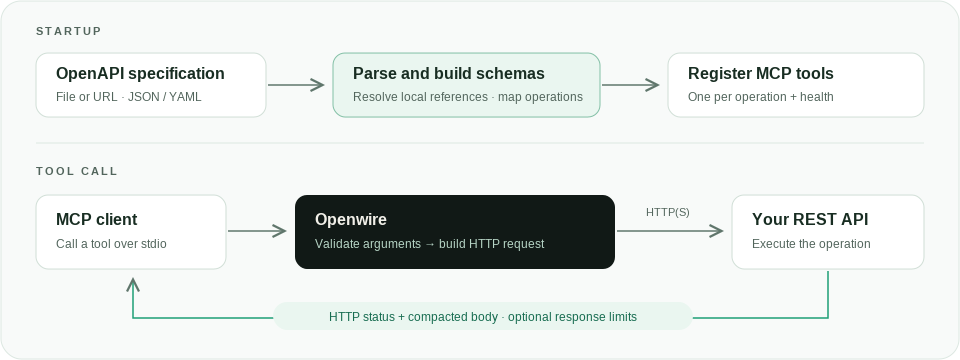
At startup, Openwire loads the spec, resolves supported local references, normalizes schemas, and registers a tool for each operation plus a built-in health tool. At runtime, it validates arguments, builds and executes the HTTP request, then compacts the response under any configured limits.
Given this operation:
openapi: 3.0.3
info:
  title: Pet API
  version: 1.0.0
servers:
  - url: https://api.example.com
paths:
  /pets/{petId}:
    get:
      operationId: getPetById
      summary: Find a pet by ID
      parameters:
        - name: petId
          in: path
          required: true
          schema:
            type: string
      responses:
        "200":
          description: A pet record
Openwire exposes a getPetById tool. Calling it with:
{ "petId": "pet-123" }makes a GET https://api.example.com/pets/pet-123 request. A successful response is returned as text with its HTTP status, for example:
HTTP 200 OK
{"id":"pet-123","name":"Rex"}
| Mapping | Behavior |
|---|---|
| Tool name | Normalize operationId to camelCase; fall back to the method and path. Collisions receive numeric suffixes. |
| Tool arguments | Path, query, header, and cookie parameters become top-level properties. Unknown arguments are rejected. |
| Request body | Expose JSON payloads under body; require it when the spec does. |
| Base URL | Use operation, path, then document servers, unless API_BASE_URL is set. |
| Health check | The reserved health tool accepts an optional echo string. An API operation named health becomes health2. |
openwire [options] [source]
| Argument | Description |
|---|---|
-s, --spec <source> |
Local spec path or HTTP(S) URL. Overrides OPENAPI_SOURCE. |
<source> |
Positional alternative to --spec. |
-H, --headers <json> |
JSON object of headers. Overrides header environment variables. |
-h, --help |
Print CLI usage and available environment settings. |
| Variable | Default | Purpose |
|---|---|---|
OPENAPI_SOURCE |
Required without a CLI source | Local spec path or HTTP(S) URL. |
API_BASE_URL |
Selected server from the spec | Override the base URL for every API call. |
API_TIMEOUT_MS |
30000 |
Timeout in milliseconds for spec downloads and API requests. |
OPENAPI_MAX_TOOLS |
100 |
Maximum number of spec operations. Specs above this limit are rejected; health is additional. |
API_HEADERS |
Unset | JSON header map sent on spec downloads and API requests. |
API_AUTH_HEADERS |
Unset | Header map fallback; API_HEADERS takes precedence. |
API_MAX_RESPONSE_CHARS |
Unlimited | Serialized response-body character budget. |
SANITIZE_MAX_DEPTH |
Unlimited | Maximum JSON nesting depth retained; root depth is zero. |
SANITIZE_MAX_ARRAY_LENGTH |
Unlimited | Maximum number of elements retained per array. |
SANITIZE_MAX_STRING_LENGTH |
Unlimited | String content retained before an optional truncation marker. |
ALLOW_INSECURE_HTTP |
false |
Permit plain HTTP for spec downloads and API requests. |
LOG_LEVEL |
info |
debug, info, warn, or error. Logs go to stderr. |
SERVER_NAME |
openwire |
MCP server identity reported to the client. |
SERVER_VERSION |
Package version | MCP server version reported to the client. |
Configure precomputed Bearer tokens, Basic authorization values, API-key headers, or custom proxy headers:
export API_HEADERS='{"Authorization":"Bearer YOUR_TOKEN","X-API-Key":"YOUR_KEY"}'
openwire --spec https://api.example.com/openapi.json
For client-managed subprocesses, put API_HEADERS in the client's env configuration. Keep real credentials out of committed configuration files.
Header precedence is --headers → API_HEADERS → API_AUTH_HEADERS: the highest-priority value replaces the entire header map. Configured headers override same-name header parameters supplied in a tool call.
The same headers are sent to the spec URL and the selected API server, so use trusted endpoints. Security schemes are metadata: Openwire does not perform OAuth/OpenID flows, refresh tokens, or automatically inject query/cookie API keys. Use a suitable proxy or restart with updated static credentials when tokens rotate.
Limits are opt-in. For example:
export API_MAX_RESPONSE_CHARS=20000
export SANITIZE_MAX_DEPTH=8
export SANITIZE_MAX_ARRAY_LENGTH=50
export SANITIZE_MAX_STRING_LENGTH=2000
openwire --spec ./openapi.yaml
The character budget includes JSON escaping, punctuation, and embedded markers. HTTP status lines and the separate [response truncated] notice sit outside that budget. JSON remains valid when a value fits; otherwise the response body is empty.
Responses are buffered before sanitization. These options limit output to the client, rather than download size or peak memory usage.
export API_BASE_URL=http://localhost:8080
export ALLOW_INSECURE_HTTP=true
openwire --spec ./openapi.yaml| Area | Current support |
|---|---|
| Transport | Local stdio MCP server. |
| Specifications | OpenAPI 3.0.x and 3.1.x, JSON or YAML, local file or HTTP(S) source. |
| Schema validation | AJV draft-07 with OpenAPI 3.0 normalization; full JSON Schema 2020-12 semantics are not implemented. |
| References | Supported local references; external references and recursive schema cycles are rejected. |
| Request bodies | application/json and application/*+json; other encodings return an error when a body is supplied. |
| Parameters | Scalar/JSON serialization; OpenAPI style and explode are not fully implemented. |
| Servers | Operation/path/document precedence and a global override; server variables are not expanded. |
| Authentication | Static HTTP headers; no token acquisition or refresh. |
Parameter names share one argument namespace. Duplicate names across locations, or a parameter named body, can collide with the request-body argument.
Plain HTTP is refused by default. Configured credentials are not added to tool schemas, and logs omit request headers; upstream response bodies can still echo sensitive information. Invalid specifications prevent initialization; invalid arguments, network failures, and HTTP 4xx/5xx responses produce tool errors.
git clone https://github.com/mtellami/openwire.git
cd openwire
npm ci
npm run build
npm start -- --spec ./openapi.yaml| Command | Purpose |
|---|---|
npm run dev -- --spec ./openapi.yaml |
Run the CLI with source watching. |
npm run typecheck |
Check TypeScript types. |
npm run lint |
Lint source files. |
npm run format:check |
Check repository formatting. |
npm test |
Run unit and MCP integration tests. |
npm run test:package |
Build, pack, install, and verify both CLI names and MCP behavior. |
CI runs checks on Node.js 20, 22, and 24. Brand assets live in assets/brand, and README diagrams live in assets/diagrams. The README uses absolute image URLs so the same branding renders on GitHub and npm.
For bug reports, include your Node.js version, a minimal specification with secrets removed, the command or client configuration, and the observed error. Use GitHub Issues for reports and feature requests, or open a pull request with a focused change and relevant validation.
npm uninstall -g api-mcp-bridge
npm install -g openwire
Update the MCP command to openwire, or use npx --yes openwire. Existing environment variable names and CLI arguments remain compatible. The old command is retained as an alias in Openwire 1.2.x; the default server identity is now openwire.
- Changelog — release history and migration notes.
- Roadmap — operation filtering, bounded downloads, OpenAPI compatibility, and authentication improvements.
- MIT license — maintained by Moad Tellami.
Openwire is an OpenAPI-to-MCP server, unrelated to the Apache ActiveMQ OpenWire protocol.