
A deep-research harness that writes living briefs — documents that assemble themselves in front of the reader. The models live inside the app: no API key, and nothing on the inference path touches the network.
Ask a question and the brief begins. The outline drafts itself from the planner's own stream, and editing it — rewrite a line, strike one, add one — IS editing the plan. Sections fill in place, each carrying its line of inquiry: searching, reading, waiting honestly through a rate limit, writing. Click any inquiry open to watch the model think. Hold the run, drop a line, or close the brief early and keep what it has. When it settles, the document takes the room — citation chips, a sources grid, the deliberation on request — and every settled brief joins a library that the next brief can search, cite, and build on.
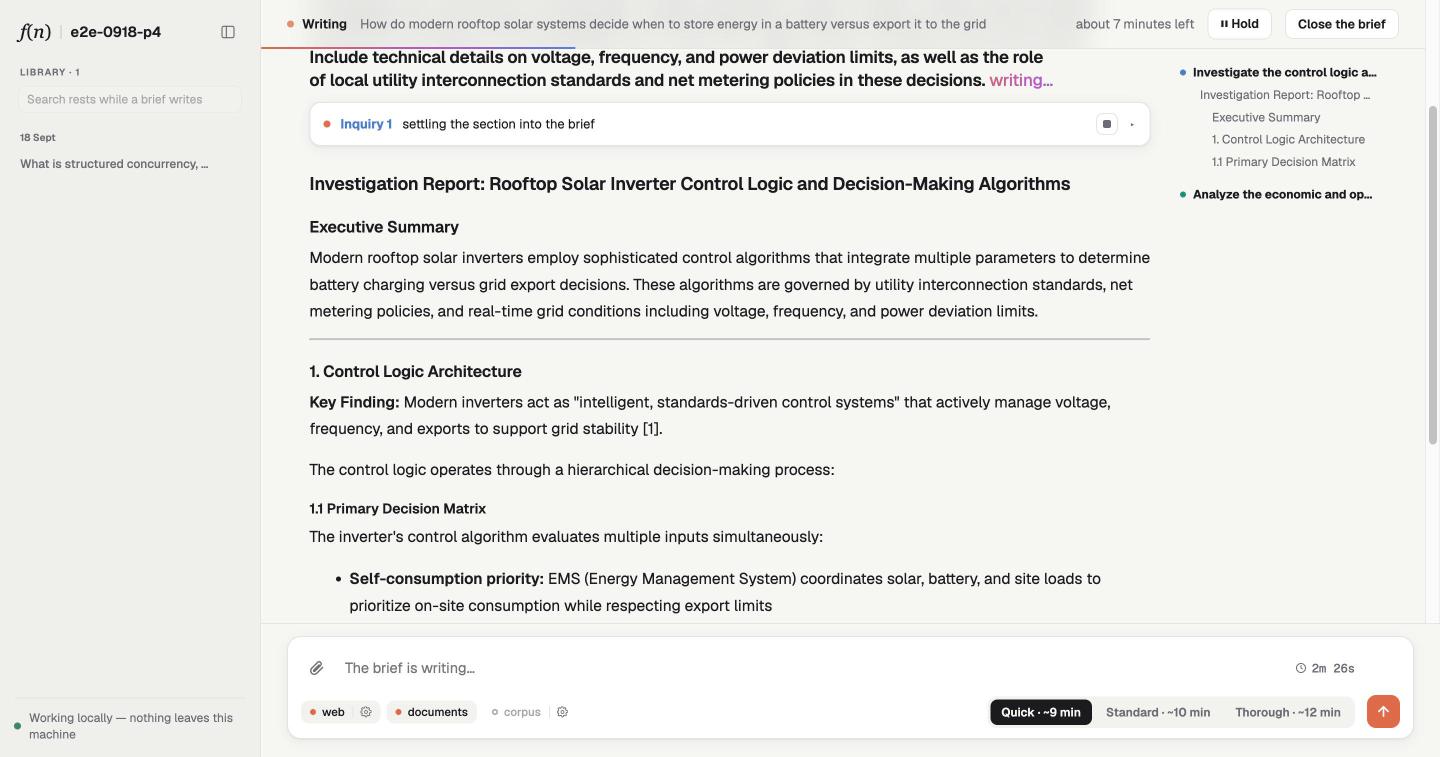
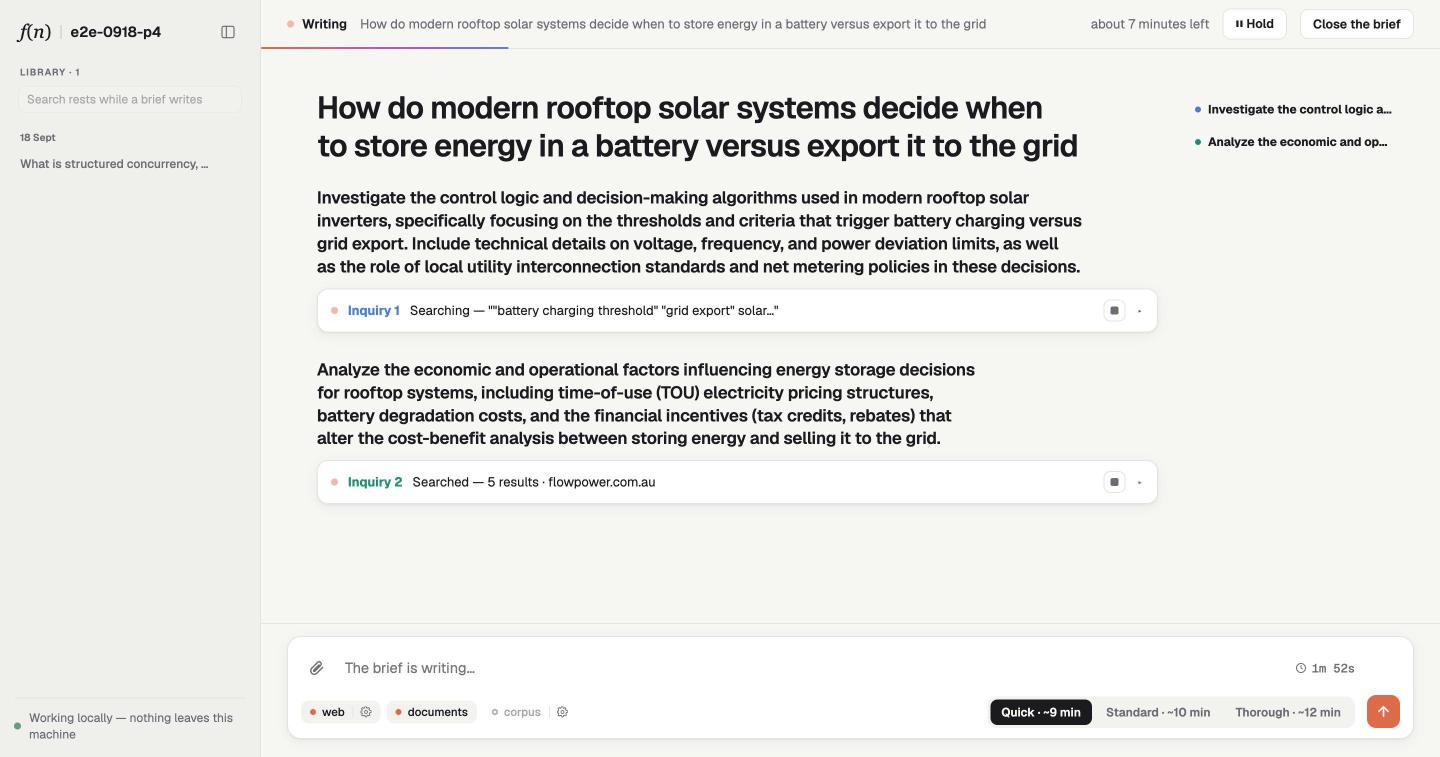
A brief writing itself. Each line of the outline is a section filled in place by its own line of inquiry, and the outline grows as the headings arrive.
Two different "multi", and this project has both. They are worth keeping apart, because they solve different problems:
- Multi-modal — the question can carry pixels and pages, not just text. Attach a photo or a PDF and the model looks at it. A vision projector sits beside the reasoning model; an attached image goes into context as pixels; a document is searched and read as text, and any page of it can be put in front of the model's eyes on demand, one page at a time, when the text is not enough.
- Multi-surface — the same
harness(ctx, events, commands)runs unmodified in a terminal, a native window and a browser. One fold, three bindings, no view holding truth.
Its name.
src/ui/presentation.tssays what this app is called, once: the sidebar, the browser tab, the desktop window, the terminal and the served host all read it. Rename it there. Thestoragekey beside it prefixes what a browser remembers for a reader (their open panel, this machine's pace); leave it alone when you rename, or those are forgotten.Lineage. Evolved from reasoning.run 0.8.0's RACE/DRB-tuned pipeline — a real, editable starter, not a dependency. Its document model is its own; the design record is
docs/document-identity.md.
npm install
npm start
Three models are fetched and digest-verified on first run — no key: the
reasoning LLM into models/llm/, the reranker the sources score
retrievals with into models/reranker/, and a vision projector into
models/vision/ so the model can see. (Prefer your own weight? Drop a
.gguf in the role folder, or point a path: in harness.yml at one.)
The same harness(ctx, events, commands) runs on every surface this
project kept — one fold, a different binding each time:
- Terminal —
npm start - Desktop window —
npm run dev:desktop - Browser —
npm run dev:web— boots the host + browser
Set LLOYAL_DEV=1 to dock the dev pane under the web or desktop view: an
agent timeline with per-token epistemics, the retrieval funnel, compiled
prompts, and live context, cpu and memory charts.
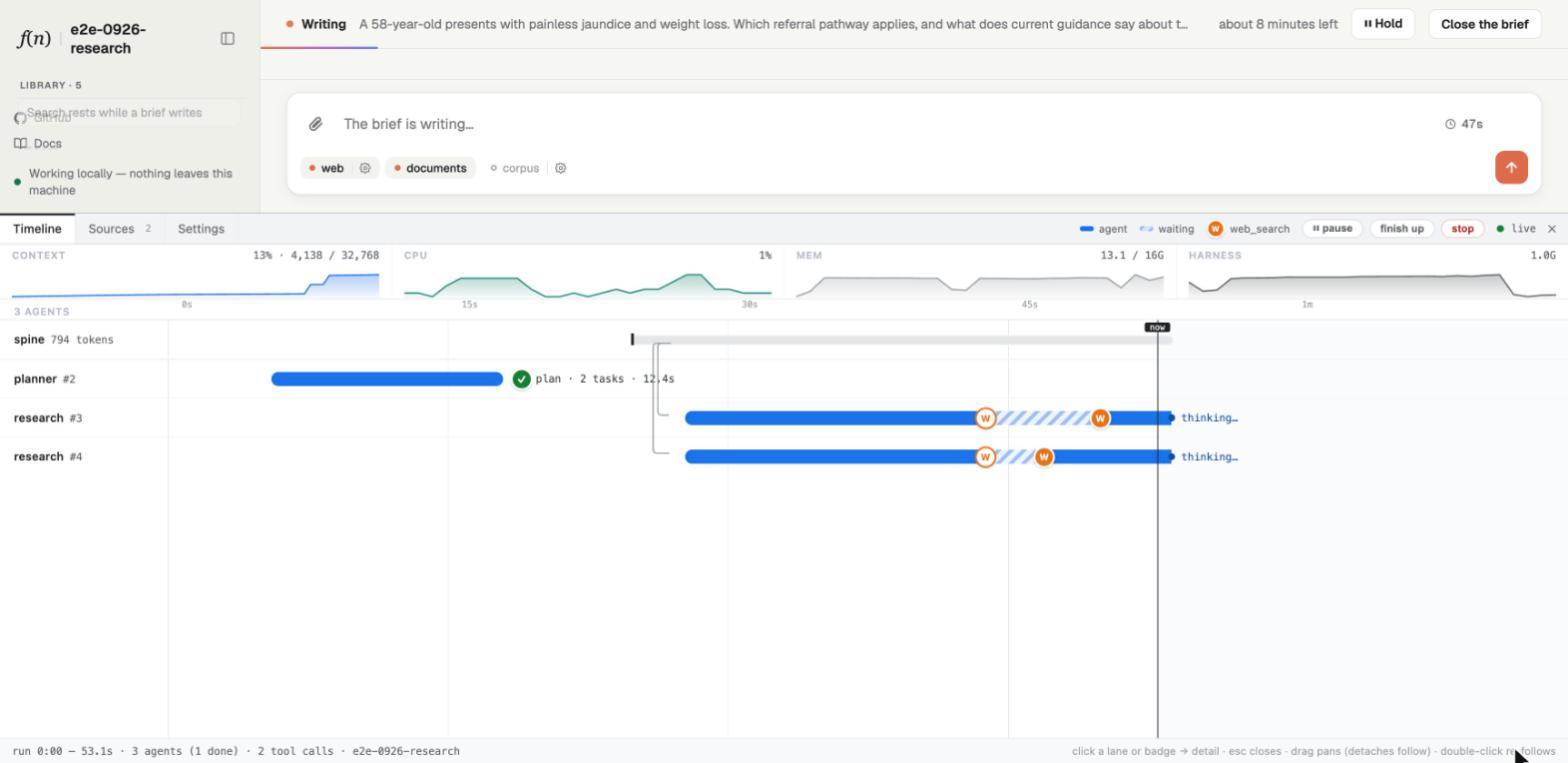
Three agents on one model. The planner forks a spine; two lines of inquiry inherit it and search at the same time; the room is 13% used. Every lane here is a branch of one resident model, not a request.
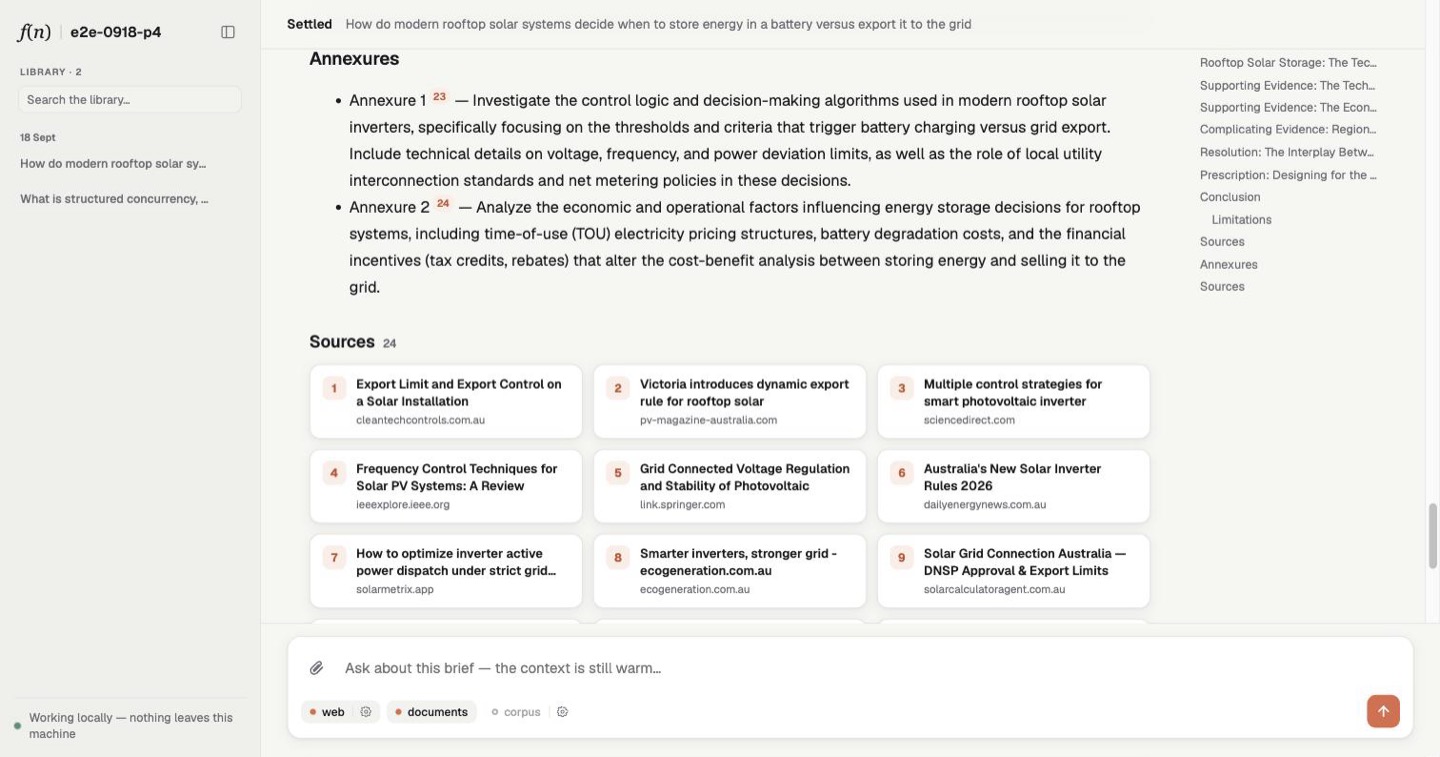
A brief is the one thing this app makes, and it lives through four moments. The same four words name them in the code.
| Ask | Frame | Write | Settle |
|---|---|---|---|
 |
 |
 |
 |
One question to a settled brief.
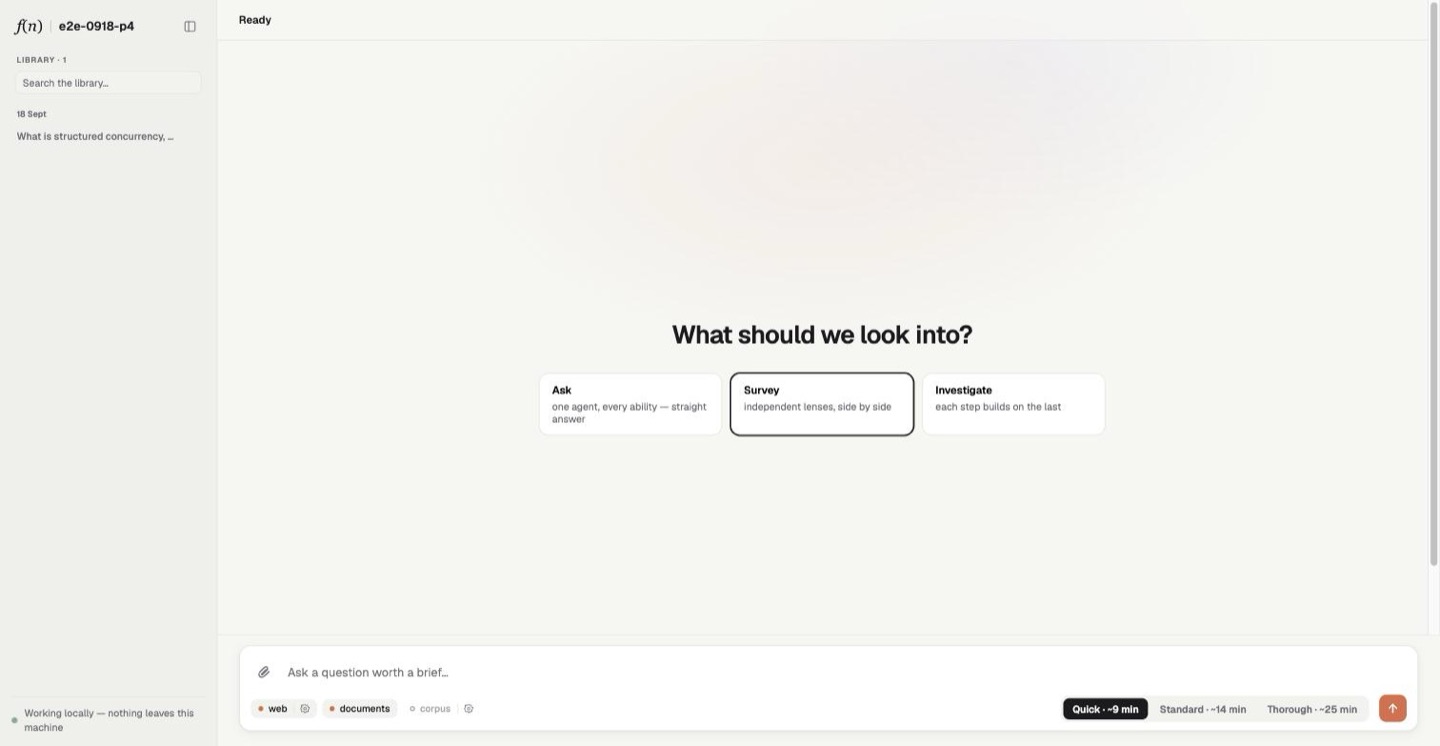
Ask. One question, and two choices beside it. The shape: Ask
puts one agent over every source for a straight answer; Survey plans
independent lenses and runs them side by side; Investigate runs them
one after another, each reading what the last one found. The depth:
Quick, Standard or Thorough — two, four or six lines of
inquiry, with the turns and time to match (every number is in
src/harness/budgets.ts). The chips under the composer switch a source
off for this question; attach a photo or a PDF by dropping it on.
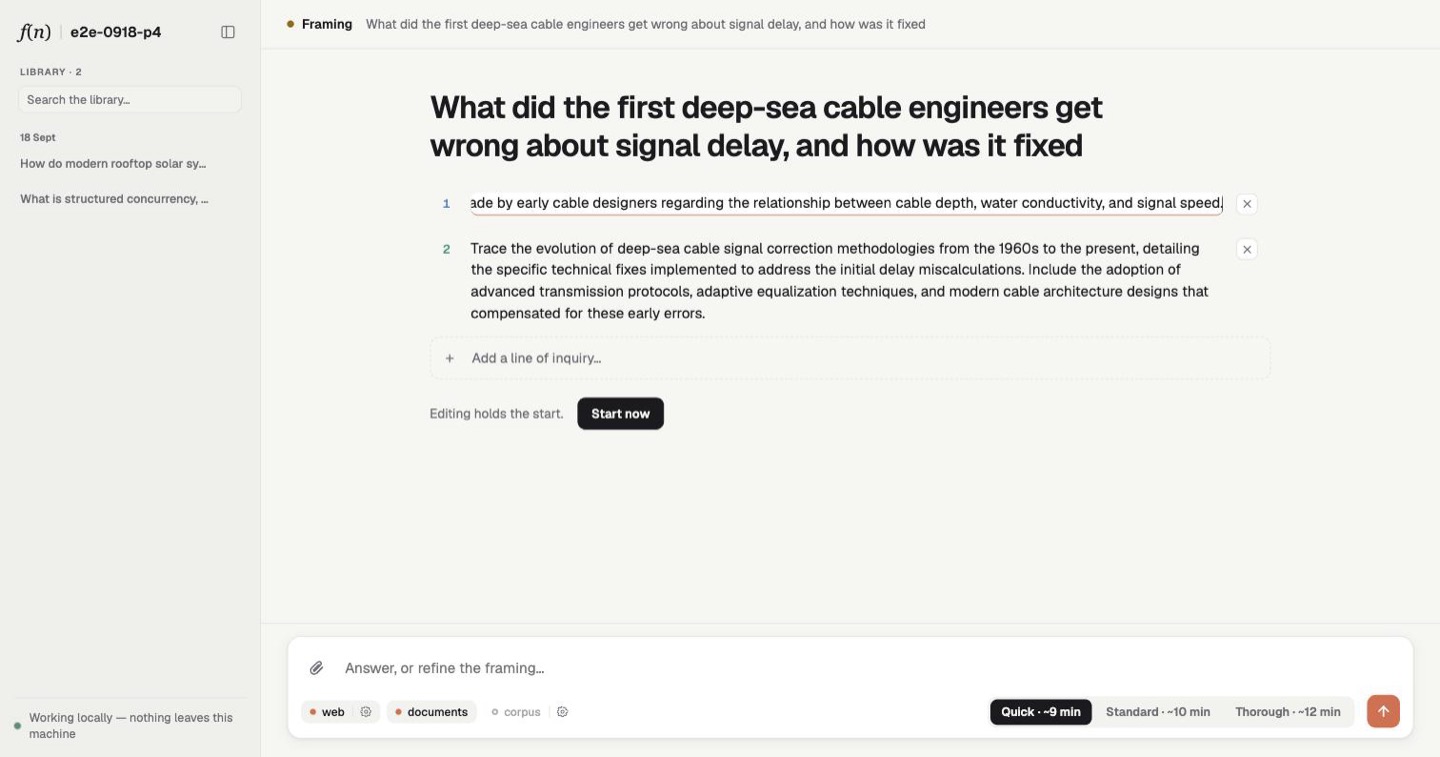
Frame. When more than one source takes part, each is first asked what it holds on the question; then the outline drafts itself line by line from the planner's own stream. The outline IS the plan: rewrite a line, strike one, add one, reorder them, switch the shape — and only then say yes. If the question is genuinely ambiguous, the planner asks first, and your answer joins the conversation it plans from.
Write. Each line of the outline becomes a section, filled in place by its own agent: searching, reading, waiting honestly through a rate limit, writing its findings with their citations inline. Open any section's inquiry to watch it think, step by step. Hold pauses the run with everything in place; Close the brief settles with what it has; a single line can be dropped from its row. A line that runs out of time or room is asked for what it found rather than abandoned. Then one agent reads every section and writes the brief in one voice (a plan of one line is its own answer).
Settle. The document takes the room: the brief, a chip on every citation, a sources grid the chips resolve into, margin marks for the facts of the run (closed early, rests on one source, a line that did not settle), and How it got here for the deliberation behind it. Ask a follow-up and it is answered beneath the brief, from a context that already holds the brief and everything asked of it so far. When the sources turn up nothing, the brief says so where the answer would be, and nothing is kept or invented.
Every settled brief joins the library in the sidebar — see "Memory".
Everything you attach lives in media/ at the project root: a
content-addressed store in the OCI Image Layout, the format a
container registry uses. Every blob is named by the sha256: digest of
its bytes, so an asset's identity IS its content — the same bytes are
stored once, and a citation that names a digest can only ever mean them. The store is the project's, not a brief's: it outlives every
session, a reopened brief finds its pictures and documents there again,
and because it is a published layout, anything that reads OCI can read it.
It sits beside models/ and apart from reports/, because it is what the
app was given, not what it wrote.
Drop a photo or a PDF on the composer and ask about it. What happens next is the part worth understanding, because a picture and a document are not treated the same way, and neither one rides the event wire.
Bytes go to the store, not to the model. An attachment is posted to
the content plane, which sniffs its type, normalises an image or reads a
PDF into pages, and commits the bytes to media/. Nothing after that
moment moves bytes: commands, events and the library all carry the
digest.
Three things can enter the model's attention, and each is paid for differently.
An attached image is projected once, up front, onto the trunk by
prefillUserMultimodal. Every agent forked from that trunk attends the
same cells, so N agents cost one projection rather than N. The
per-image detail floor and ceiling are yours — imageMinTokens and
imageMaxTokens in harness.yml. Grounding tasks want detail; wide
fan-outs want room.
A document's text is staged: listed on the shared spine so every agent knows it is there, costing nothing until one reaches for it. Then two tools, and both are more careful than they look.
search_documentsnarrows lexically with BM25 first, because a cross-encoder's cost is linear in candidates, then reranks and keeps the best few within a token budget. It always scores in explore stance, deliberately: the run's exploit stance exists to keep off-topic web pages out, but an attached document is the on-topic universe, and scoring against the original question would veto the passage that answers a sub-question of it.read_documentreturns the exact text, and only the part this agent has not already read — subtracting what it and its ancestors attend over. Ask for a page and you get the whole sections that touch it, so a table split across a page break stays whole.
A document's pages are projected selectively, by the agent, when text
is not enough. view_page hands the model that page as an image — or one
figure on it, by number. It returns a descriptor rather than bytes: the
pool resolves it through the store and admits it on the media rail. A
rule decides which pages are worth the cells at all — page one always, a
page with no extractable text, one carrying images, drawings, tagged
tables or tagged figures — and a text-only page refuses and points back
at read_document.
That last economy is the one to notice. The model does not get a PDF rendered into its context. It reads, decides a figure matters, and spends the cells on that one page.
Citations reach a page. All three tools hand the model a ready-made
attachment://<digest prefix>/page/<n>, so it copies a citation rather
than inventing one. The view resolves the prefix against digests it
already holds, and exactly one digest may answer — a truncated prefix is
either unambiguous or it is not a citation at all. Click it and the page
opens.
Four laws in test/invariants/documents.scenario.test.ts pin the
behaviour, and they are the clearest statement of it:
a document on the question: listed on the spine, recorded on the meta
  line, never projected
an image beside a document is projected exactly once, on the trunk —
  a warm ask adds nothing
a model with no projector still takes a document — sight is asked only
  of pixels
reopen restores the document; a warm ask stages it again; a cold submit
  does not
The platform contract is one generator:
harness(ctx, events, commands)
ctx is the resident model. events streams WorkflowEvents to
whatever surface is mounted; commands delivers that surface's
Commands back. Everything the reader sees is a fold of the event stream
— src/ui/reduce.ts turns events into ONE AppState that the Ink view,
the desktop main process and the browser page all share — and everything
the reader does is a command: submit_query, accept_plan, pause,
wrap_up, cancel_agent, open_doc. No view holds truth; no view calls
the model.
Inside, the algorithm runs: a pre-flight recon probe of each source →
the planner (its plan held for review; your edits mutate it through
plan commands) → a research pool of agents, parallel for a Survey or
chained over a shared KV spine for an Investigation, each retrieval
scored by the reranker before it enters context → synthesis into one
voice, citations woven inline. Every number it obeys is in one file,
src/harness/budgets.ts; the minutes the pickers quote are learned from
what YOUR machine actually does.
Every limit the writing obeys is one table, src/harness/budgets.ts, and the depth picker is its
first column. What a reader is not shown is the currency: a search is one turn, a page read is one
turn, a page viewed as an image is one turn and a projection, and every line of inquiry has its
own clock. Twenty-four pages with four figures, asked as a Quick Ask, is one agent with a minute
and a half, so it views one figure and the clock ends it — the picker's "~8 min" was the brief's
estimate, not that agent's ceiling. That question wants Thorough, or Investigate so each line
inherits what the last one saw.
| depth | lines of inquiry | turns each | time each (soft · hard) | retrieval stance |
|---|---|---|---|---|
Quick (low) |
2 | 10 | 1.5 min · 2.5 min | on-topic from the first turn |
Standard (medium) |
4 | 10 | 2.5 min · 4 min | explores until 40% of the room is used |
Thorough (high) |
6 | 10 | 4 min · 6 min | explores until 60% |
ultra |
10 | 10 | 10 min · 15 min | explores until 75%; sized for a million-token context |
The fixed rows: a source probe gets four turns and two minutes; the settling pass has a turn cap and no clock, so it writes for as long as the answer needs; a direct Ask keeps whatever it found; and a report is accepted only after two tool calls, refused once before that. The soft limit is where an agent is told to wind up; the hard limit is where it is stopped and asked for what it has.
Where the numbers come from. There is one context, and every agent in a run is a branch of it —
a line of attention that leases cells from the same shared room (continuous
context). So the context limits in a row are not
per-agent windows: they are reserves of free cells in that one room, absolute, held back so a reaped
agent can still report and a sibling can still read. The stance column is the same room read as a
fraction: an agent explores, scoring what it fetches against its own question, until that much of the
room is in use, then exploits, scoring against the brief's question so only what governs the answer
enters. When a line finishes or drifts, its whole branch is pruned and its cells return to the
siblings mid-run; that is why six lines can run where a request-shaped system would run out
(agent policy and context pressure).
Time and turns are the per-line knobs; the room is the shared one, and the pool watches it for every
agent at once.
The soft limit does a second job before a run starts: a question's attachments must leave at least
that much of the room free, or the question is refused before anything is read. attachments.context
caps what attachments may take, as a fraction of the whole context.
To change them: defaults.effort in harness.yml picks the default row; the rows themselves are
yours in budgets.ts, and the pickers learn their minutes from what your machine actually does.
Every settled brief is a folder under reports/, named by its id:
reports/<docId>/
  report.json     the record: the question, the shape and depth that wrote it,
                  the media it carried, the answer, what every inquiry found
  report.md       the brief as a reader opens it, with its annexure index
  annexure-N.md   one per line of inquiry that found something, sources included
  exchange-N.json each follow-up's own record, and its exchange-N.md beside it
The record is what the app reads back — the sidebar, a reopen, library search — and it is written last, so a folder without one never settled. The markdown is for you, and for the corpus.
Semantic recall. Point the corpus ability at that same directory and
the app reads what it has written. The corpus ships installed but off,
because it needs a path before it can run: uncomment
abilities.corpus.corpusPath: reports in harness.yml, or set it from
the corpus chip's settings in the composer. Then:
- A brief settles → its folder lands in
reports/→ the corpus re-indexes. - The next question's recon probes the corpus and finds it; the planner routes tasks at past briefs by name; agents search and read them like any source; the new brief cites the old one.
- Searching the sidebar ranks the library against your words with the same reranker the agents use.
- Clicking a report in the sidebar RESTORES it as the session document — asking over it prefills the report into the model's context, so follow-ups are warm, and the images it carried are staged again. The trash deletes a brief's whole folder and re-indexes: the system unlearns it.
This is the same learning loop that made Hermes Agent the local agent to beat — an agent's own files on disk feeding its future sessions — with one deliberate difference. Hermes distills trajectories into skills and curated memories the agent loads; this harness keeps the whole evidential product and re-enters it at retrieval time through the reranker. Memory as evidence, not technique: nothing is summarized away, relevance is judged per question, and forgetting is a reader's gesture.
Follow one question through the app. The same four words — Ask · Frame · Write · Settle — name the same four moments of a brief's life in every file below: the brief's sections, the selectors' modules, the view's components.
src/app.ts— the whole app in one generator: what is installed, the three parts, the command loop. Start here.src/protocol.ts— everything a reader can do (Command) and everything a view is told (WorkflowEvent). The table of contents.src/harness/brief.ts— what happens when the reader does each thing. Its handlers come first, grouped by moment; how each is done is below them. This is where you see why a Stop is always heard, and why an attached image costs one projection however many agents look at it.src/harness/research.ts— what the model does:plan,write,answer.inquireis the whole strategy — side by side or one after another — in one expression, and every stage can be replaced alone.src/ui/reduce.ts, thensrc/ui/select.ts, thensrc/ui/moments/— events become one state, state becomes the brief's language, language becomes four components. No view holds truth, which is why the terminal, the window and the browser cannot disagree.src/harness/library.ts— what is kept, and how every settled brief becomes ground the next one can search.targets/— the payoff: three surfaces, each a boot entry of a few lines over the sameharness.
The engine is written with Effection. You can read it without knowing Effection, with five things in hand:
function*andyield*read asasync functionandawait. A function that returnsOperation<T>is one youyield*.- Whatever an operation starts, it owns. When it ends — returns, fails, or is stopped — everything it started is stopped and cleaned up first. That is why there is almost no teardown code here, and why Stop works in the middle of anything.
- Some things are ambient.
initializeHarnesssets the session up once; code further in asks for what it needs (useWire(),Ctx.expect()) instead of having it passed down. Outside a session, those throw. - A call into the model is wrapped in
waitUntilSettled. A stop cannot abandon native work half way, so it waits for the call to finish before releasing what the call touched. - Accepted is not finished.
run.replace(...)returns the moment a run is accepted, handing back the run. A command handler stops there, so the loop stays free; only the one-shot path waits for the run too.
Each of these is explained once in the code, at the place it first matters. The model's memory has its own two words: the trunk is the running conversation of one brief, and a spine is a shared prefix that a run's agents all fork from, so what is on it is paid for once.
Folders are roles; the files inside them are your domain.
src/
  app.ts               the app: what is installed, the parts, the loop
  config.ts            what can be configured, declared once as data
  protocol.ts          everything it says (↓) and hears (↑)
  harness/             ← your program
    research.ts        what the MODEL does: plan · write · answer, and the stages of write
    brief.ts           a brief's life; the only place the trunk is written
    library.ts         settled briefs on disk
    instructions.ts    what this app is for, in the model's hearing
    budgets.ts         every number it obeys, effort as the one knob
    prompts.ts         renders the prompt files; ~30 lines
    prompts/           every prompt, one Eta file per text — see "The prompts are files"
  ui/                  ← your view
    presentation.ts    what it is called
    reduce.ts          reduce(state, event): the ONE fold every surface shares
    state.ts           the shape of that state
    select.ts          the seam: state → the brief's language
    select/            …one module per moment
    moments/           one component per moment: Ask · Frame · Write · Settle
    parts/             the pieces they are built from
    App.tsx            puts the current moment in the shell
    cli.tsx            the terminal view
    theme.ts           the visual register as data: palette, type, motion
targets/               boot entries only — the platform owns what is below
test/invariants/       the laws, as scenarios over the real harness
media/                 the content-addressed store (OCI Image Layout)
models/                resident weights (fetched on first run; gitignored)
vendor/                signed Abilities — Ed25519-verified tarballs, committed
reports/               your settled briefs — the library AND the memory
harness.yml            models, output dir, ability config, gate scope
Seeing an edit take effect. Three kinds of file reload differently.
The view (src/ui/) hot-reloads under npm run dev:web and
npm run dev:desktop. The prompts (src/harness/prompts/) are read
when a prompt is rendered, so an edit is live at the next question. The
engine — src/app.ts and src/harness/, the instructions
included — is bundled once when the dev command starts, so
after editing it, stop the dev command, start it again, and ask a fresh
question.
Ordered by ambition — each step is one file:
- What it is for —
src/harness/instructions.tsholds two sentences of yours: who the app works for, and what every answer must do. They are said on every path an answer can take — a direct question, a follow-up, a planned investigation — so this is the one edit that makes it your app. - What it is called —
src/ui/presentation.ts, read by every surface. - A prompt — the files in
src/harness/prompts/are yours to edit, and an edit is live at the next question. Their worked examples (immunotherapy trials, voice-agent latency) come from the domains this pipeline was tuned on: replace them with examples from yours first. What each file is, and what it is handed, is the next section. - A number —
src/harness/budgets.tsholds every limit the writing obeys, with effort as the single knob each row fans out from. - The register —
src/ui/theme.tsis the whole look as data. - A derivation —
src/ui/select.tsis where machinery becomes language ("Searched — 8 results · en.wikipedia.org"). Add a selector, render it in a moment. - A moment —
moments/andparts/are plain React over the fold. The terminal view folds the same state. - The algorithm —
src/harness/research.tsowns what the intelligence does, written in the framework's grammar: a spine to fork from, a pool that runs agents together, a terminal that ends a turn, a settling pass. Handapp.tsa different one and everything else stands. - A source —
npx lloyal-ai install <publisher>/<name>, then add its factory toabilitiesinsrc/app.ts. Which ones ship, and what installing does, is under "The sources are installed".
Each one fits on a screen, and each one runs on the models you already have — no key, no hosted service, nothing on the network. They are the shape of the framework, shown rather than described.
Start a brief on the keyless web provider. While it runs, open the web chip's settings under the composer and save a Tavily key. The next search of every inquiry already running goes through Tavily; remove the key and the next one is keyless again. The brief is never interrupted and nothing restarts. Change the corpus path the same way: the running brief keeps the index it started with, the next brief opens the new one, and the old index is torn down when the last run holding it ends.
Two rules make that true, and they are the framework's, not this app's: a value a tool reads is read AT THE CALL, from the ability's stored config, so a save reaches the tool objects agents already hold; a resource a setup builds — an index, a paced provider — is rebuilt by the save and follows it at the next take, while the runs holding the old one keep it. The settings never ask whether a run is live.
The same holds outside Abilities. Declare a key of your own in src/config.ts:
"answer.words": { yml: "answer.words", integer: true, default: 400, describe: "How long a follow-up may run." },It exists everywhere a setting does — harness.yml can commit it, the settings pane lists and saves it — and
you read it where you use it, not at boot: config().answer.words (brief.ts takes config as a function
for exactly this). A save applies at the next read. A key's applies says when: the default, at the next
read; reload, at the next launch; boot, never while running.
A tool is a class with a name, a description, a JSON schema and an execute. An Ability ships tools, and so
can src/harness/. This one answers a term of art, and carries a gate of its own:
import { Tool } from "@lloyal-labs/lloyal-agents";
import type { JsonSchema, ToolGuard, ToolLifecycleHooks } from "@lloyal-labs/lloyal-agents";
import type { Operation } from "effection";

/** Its own gate: the same term is not looked up twice by one agent. */
const onePerTerm: ToolGuard = {
  name: "glossary_once",
  reject: ({ args, attended }) => attended().some((a) => a.term === args.term),
  message: "You already looked that term up. Use what it said.",
};

export class GlossaryTool extends Tool<{ term: string }> {
  readonly name = "glossary";
  readonly description = "What this organisation means by a term of art.";
  readonly parameters: JsonSchema = {
    type: "object",
    properties: { term: { type: "string", description: "The term, as written" } },
    required: ["term"],
  };
  readonly hooks: ToolLifecycleHooks = { beforeDispatch: [onePerTerm] };
  constructor(private readonly glossary: Record<string, string>) { super(); }
  *execute(args: { term: string }): Operation<unknown> {
    return this.glossary[args.term.toLowerCase()] ?? { error: `no entry for "${args.term}"` };
  }
}
Add it to the tools array in src/harness/research.ts and it is on the spine every inquiry forks from —
advertised once, callable by every agent, whichever source the planner routed the task to:
const tools = [...sources.flatMap((x) => [...x.tools]), new GlossaryTool(GLOSSARY), s.output.tool];Every tool call passes through one lifecycle — may it run (beforeDispatch), did it count as an
attempt (afterExecute), does its result fit (beforeAdmit), it is in (afterAdmit), the turn is over
(onReturn) — and a hook is a plain object with an opinion at any of those positions. The tool's own gates
run first, then the harness's hooks in order, then the framework's defaults; the first concrete decision
wins, and undefined abstains.
research.ts already carries one, and harness.yml already overrides a gate:
const EVIDENCE_FIRST: ToolLifecycleHooks = {
  onReturn: ({ agent }) =>
    agent.toolCallCount < BUDGETS.evidence ? { type: "reject", message: EVIDENCE_REJECTION } : undefined,
};
// … agentPool({ …, hooks: [EVIDENCE_FIRST] })defaults:
guards:
url_dedup:
scope: cohort # a page one inquiry read, no sibling reads againAn inquiry that reports before the evidence floor is refused once and told why; its second report stands. A
gate an Ability declares — url_dedup, query_dedup — is overridden by name, never rewritten.
The pool's larger decisions — when an agent must stop, whether a tool result is scored against the original
question or only the agent's own, what becomes of an agent reaped without a result — are an AgentPolicy.
agentPool derives one from budget; hand it your own instead, overriding the one decision you care about:
import { DefaultAgentPolicy } from "@lloyal-labs/lloyal-agents";
import type { Agent, ContextPressure } from "@lloyal-labs/lloyal-agents";

class Patient extends DefaultAgentPolicy {
  shouldExit(agent: Agent, pressure: ContextPressure): boolean {
    // Only ever for room, never for time — and under pressure still the default's one agent a tick, so a
    // cohort is never reaped together.
    return pressure.critical && super.shouldExit(agent, pressure);
  }
}
// … agentPool({ …, policy: new Patient() })   — in place of `budget`
Every hook the pool calls, with its default, is agent policy and context pressure.
The reranker admits by answering a question, and the question is one line of harness.yml. Nothing enters
the model's context by distance: a superseded rule is a neighbour of the current one in any embedding, and only
a judge that is asked about the date tells them apart.
# harness.yml — one sentence, and every ability that reads pages or a corpus admits by it
model:
  reranker:
    id: qwen3-reranker-0.6b-q8
    instruction:
      text: "Given a question about the rule in force on a date, judge whether the Document states the rule in force on that date."
      smokeTest:
        query: "What notice period applies to a rent increase in 2026?"
        matching: "From 1 January 2026 a landlord must give 90 days' notice of a rent increase."
        nonMatching: "Until 2020 a landlord was required to give 30 days' notice of a rent increase."
        minGap: 2
Every fetch_page and every corpus search now returns the sections that answer that question, verbatim, the
best few within the query, and the canary pair refuses the boot if the sentence stops discriminating. Measured
on the shipped 0.6B judge, 2026-09-26: the rule in force scores 7.2 against 2.1 for the one it superseded, a
gap of five where the default retrieval question gives three. A lens that turns on negation, a breach or a
refutation, is beyond a 0.6B, which scored a complying clause as high as a breaching one; that is a bigger
judge, one id to swap. The key is boot-tier: it takes effect at the next launch, and minGap is a canary,
not a calibration.
The focus then narrows on its own. An agent reading a page scores its sections against what it just asked; as the room fills, the policy flips to exploit and a section must also answer the brief's question, which the dev pane's Sources tab shows as "re-ranked against the query". The default flips at 40% of the room; make the flip yours by handing the pool a policy:
class Focused extends DefaultAgentPolicy {
  shouldExplore(agent: Agent, pressure: ContextPressure) {
    return agent.toolCallCount < 2;   // two reads on its own terms, then only what answers the brief
  }
}
Most of what looks like a new lens is a new reference string in the query, which costs nothing. A genuinely different question is one instruction for the whole reranker, since the sentence is prefilled into its warm trunk. The focal lens is the whole account.
A decision over a known list is a grammar, not a prompt: the agents answer a NUMBER, and cannot answer anything else. Jev sells this shape as a hosted service; here it is a pool over one spine:
const pick = defineOutput("topic", z.number().int().min(0).max(topics.length));
const pool = yield* agentPool({
  systemPrompt: `Topics, by number:\n${topics.map((t, i) => `${i + 1}. ${t}`).join("\n")}\n0 = none of these.`,
  schema: pick.schema,          // the grammar: the answer IS a number in range
  enableThinking: false,        // nothing reasons before it
  acceptFreeText: true,
  orchestrate: parallel(items.map((item) => ({ systemPrompt: "", content: item }))),
});
return pool.outcomes.map((outcome) => pick.read(outcome));
The ranking beside the pick is the reranker's, and this app already reads it that way — the
sidebar's library search in src/harness/library.ts is service("reranker") and scoreBatch:
import { service } from "@lloyal-labs/rig";
import { call } from "effection";

export function* rankAgainst(question: string, candidates: string[]) {
  const reranker = yield* service("reranker");
  const logOdds = yield* call(() => reranker.scoreBatch(question, candidates));
  return logOdds.map((s) => 1 / (1 + Math.exp(-s)));   // the model's P(yes) per candidate: an order within this question
}
scoreBatch answers the reranker's own yes/no log-odds, and the sigmoid is the model's own P(yes) under the
instruction: an order within one question, not a probability comparable across questions. The platform uses
it as top-K within a query; a floor for it is a discrimination signal you measure for your instruction and
your model, never a global cutoff. Naming a model in harness.yml is the whole of composing it; a new KIND of
service is one row in the platform's table — services.
A stage is a pair of prompt files and one prompt("my-stage", { … }) where it runs; "Add one" under
"The prompts are files" below walks it.
Everything the model is told in this app's own words is in
src/harness/prompts/, one Eta file per text. A stage is a pair —
plan.system.eta beside plan.user.eta — and the app renders both with
the same input. A single file is a single turn (clarify.eta). Two files
are partials every prompt shares: framed.eta, the frame, and
cite.eta, the citation rule.
The frame. Every system file opens with one line:
<% layout("./framed", { writesTheAnswer: true }) %>
That line is what carries your src/harness/instructions.ts into every
stage: the frame says your purpose first, then the file's own text,
and — only where writesTheAnswer is true — your answers last. The
planner never hears answers (its output is a plan); a lone inquiry, the
settling pass and a direct answer do. A test holds that no system file
ships without the frame.
What a template is handed. it is the input, and each value has one
owner — the app, the framework, or the tool whose grammar it belongs to:
| stage | it.* |
who supplies it |
|---|---|---|
| every system file | purpose, answers |
instructions.ts — yours |
plan, plan-flat |
query, count, routingKey, context |
the planner (rig): the question, how many tasks its grammar allows, the key a task's source is written under, and any clarification text (the shipped templates leave it unused — the round is on the trunk) |
date, sources[{name, useWhen, toc}], coverage |
this app, in research.ts: the day, each source the plan may route to, what the probes found each covers |
|
preflight |
query, ability |
the coverage probe (rig), one per source |
inquiry |
preamble, tool, takesSources, writesTheAnswer |
this app: the source's own preamble, the report tool's name, whether it takes sources, whether this inquiry is the answer |
recovery, preflight-recover |
budget |
the framework, when it cuts an agent short: the words it may still write |
synthesize, synthesize-flat |
query, findings[{task, body}] |
this app: the question, and the findings the spine does not already hold |
clarify |
questions |
the planner's questions, said as the assistant's turn |
Eta here is three things: <%= it.query %> prints a value, <% … %>
runs plain JavaScript (an if, a forEach), and <%~ include("./cite") %>
inlines a partial. One rule of thumb: a line break right after a tag is
eaten, so a blank line after a tag is the newline that stands.
Edit one. Change any .eta and ask the next question — the folder is
read when the prompt is rendered.
Add one. A new stage is three steps. Write the pair of files, the
system one opening with the frame. Render them where the stage runs:
prompt("my-stage", { query, … }) in src/harness/research.ts returns
{ systemPrompt, content }, ready to hand to an agent. Whatever the stage
knows goes in that object — a template sees exactly what you pass and
nothing else. npm test runs test/invariants/prompts.test.ts, which
refuses a system file that forgot the frame.
An Ability is a signed package: tools, the instructions to use them,
its configuration, and any model it needs. Three ship with this app, and
src/app.ts is the list:
export const abilities = [createCorpusAbility, createWebAbility, createDocumentsAbility];web searches and reads pages (keyed with TAVILY_API_KEY in the
environment; keyless without). documents searches, reads and looks at
the PDFs you attach. corpus searches a folder of markdown, and ships
off until you give it a path — abilities.corpus.corpusPath: reports in
harness.yml turns the library into memory. The composer's chips switch
a source off for one question; a source's tools join every inquiry's
spine, and the planner routes tasks to it by name.
Install one: npx lloyal-ai install <publisher>/<name> verifies the
package against the catalogue, vendors its tarball into vendor/, and
you add its factory to the list above. Write one:
npx lloyal-ai ability:new my-ability starts one of your own.
Abilities never come from npm. They are distributed through the signed
channel, so install fetches the tarball, checks its Ed25519 signature
against the trust roots shipped with the framework, writes it to
vendor/<publisher>__<name>-<version>.tgz beside the signed manifest it
was checked against, and only then points
package.json at those exact bytes:
"@lloyal-labs/web-ability": "file:vendor/lloyal__web-2.0.3.tgz"That file: line is the whole reason an Ability appears in package.json
at all — it is how npm is told to materialise bytes the CLI has already
verified, never an instruction to fetch anything. Commit vendor/ and
npm ci reproduces those exact bytes from the repo — the Ability is the
one dependency that never reaches the network, whatever else the install
resolves from the registry.
Two consequences worth knowing. The version is pinned to a file, so
upgrading is another install, not a range that drifts. And lloyal new
records what it installed under harnessdev.abilities in package.json
— that list is what the launcher reads back to name the exact
install commands when a clone is missing an Ability its code imports.
Every brief is ONE identity — a docId minted when you submit — and that
same string names it everywhere: the app's state, the folder on disk
(reports/<docId>/), the KV cache's ownership, and on web the address bar
as /brief/<docId>. Back and forward navigate documents; a deep link
restores a brief from disk. docs/document-identity.md is the design
record — read it before changing how documents are born, switch, or die.
npm test runs the behavioural suite in test/invariants/: real harness,
scripted model (the sdk's published mock), no weights needed. The
scenarios are the laws, written to be read — what a query births, what an
abort keeps, what may never ride the wire. When you change the harness
they tell you what you broke; when you extend it, add the law you are
promising.
harness.yml is committed with the project — models, sources.outputDir
(default reports/), the scope of each ability's gates, per-ability
config. Settings the app saves at runtime layer into harness.json,
gitignored. Secrets go in the environment or the settings pane, never in
yml — set TAVILY_API_KEY for keyed web search; without it the web
ability runs on a keyless fallback.
This project is yours. Add the licence your organisation needs — a
LICENSE file at the root is what a reader looks for, and this project's
own source is covered by whatever it says. The scaffolding that produced
this project is MIT and imposes nothing on your code; the signed Ability
bundles under vendor/ come through the channel under their own licences,
which a licence of yours does not change.
Your use of the HDK runtime (@lloyal-labs/*) is covered by the
Functional Source License plus the
Lloyal Harness Builder Grant,
under which building, distributing, selling and hosting a harness or an
ability is always permitted and is never a Competing Use — including in
direct competition with Lloyal's own products.