

Glim is a free, open-source file viewer for macOS. Open a project folder and read its Markdown, PDFs, images, JSON, CSV and source code in the same window. Switch between previews and source, inspect local data, and make small text edits without leaving your files.
Free and open source · macOS · Apple Silicon & Intel · English / 简体中文
Website / 官网 · Download Glim →
Latest release · Release notes & checksums · Installation help
Mac downloads are not yet notarized by Apple. You may need to approve the first launch in System Settings. See instructions


A Markdown report, its chart images, the scripts that produced them and the underlying database can stay together. The screenshot shows a Markdown report with an embedded chart, with related PNG and SVG files open in adjacent tabs.
| Your task | In Glim |
|---|---|
| Read a report or project documentation | Render Markdown tables, diagrams and formulas; follow local links and view related images |
| Inspect an export or API response | Expand JSON objects, read CSV/TSV tables and inspect complete cell values |
| Check a local database | Browse SQLite tables, filter and sort records, and inspect schema in a read-only snapshot |
| Review documents and reference material | Keep PDFs, supported Office files, images and ebooks in workspace tabs |
| Fix a typo or configuration value | Edit UTF-8 text with undo/redo, automatic saving and explicit ⌘S |

SQLite opens in a private read-only snapshot. Choose a table or view, search across every column in all records, sort, or double-click a value to read it in full. Glim leaves the source database unchanged.
- Open a file with ⌘O, or open a folder with ⌘⇧O. The sidebar lets you browse related files; title-bar search finds files by name or path in workspace folders.
- Choose the view that fits the content. Markdown, HTML and supported data readers provide preview/source controls. Documents and images use their format-specific reading controls.
- Make a small edit when needed. Existing UTF-8 files save automatically. ⌘N starts an untitled note; its first ⌘S asks where to save it.
User guide · Formats and compatibility · Download Glim

† Partial preview. See the format guide for each reader’s actual behavior.
| Content | Representative formats |
|---|---|
| Documents and text | Markdown, HTML, UTF-8 text and logs; diagrams and formulas in Markdown |
| Data and code | JSON/JSONC/JSON5, CSV/TSV, YAML, TOML, XML, SQLite and highlighted source code |
| Images and documents | PNG, JPEG, WebP, GIF, SVG, TIFF, PDF, Word, Excel, PowerPoint and iWork |
| Books and mind maps | EPUB, FB2, CBZ and XMind |
| Media and specialist files | System-supported audio/video, fonts, safetensors metadata, archive listings and selected text previews |
- Editing: UTF-8 text supports basic editing and saving. Tables, data trees, database snapshots, images and document previews are read-only; editable formats retain source access. Large or long-line text uses editable pages.
- Compatibility: Office previews can differ from the original layout; spreadsheet formulas use saved values without recalculation. Media playback depends on macOS codecs. Some formats provide a partial preview or source fallback.
- Local files and network content: Files open locally. Markdown can fetch remote images, and HTML previews support CSS, JavaScript and network resources. Optional anonymous usage telemetry is controlled in Settings; see telemetry.
- Platform: macOS on Apple Silicon and Intel. Current downloads are ad-hoc signed and have not been notarized by Apple; installation steps are below.
Full format guide · Documentation · Remaining work
Open the latest Release page and choose the matching installer under Assets. That page contains the current version, release notes and checksums.
| Your device | Installer filename suffix |
|---|---|
| Mac · Apple Silicon (M series) | -macos-arm64.dmg |
| Mac · Intel | -macos-x86_64.dmg |
Not sure which Mac download to choose? Open Apple menu → About This Mac. An Apple M-series chip means Apple Silicon; an Intel processor means Intel.
Open the DMG and drag Glim into Applications. The app is ad-hoc signed, without Developer ID signing or notarization. If macOS blocks it, try opening it once, then go to System Settings → Privacy & Security → Open Anyway. Confirm the download came from this project's releases; there is no need to disable system security. Apple's instructions.
Release notes & SHA-256 checksums · All releases · Build from source
Found a file Glim should open better? Report a bug, request a format, or start a discussion. English and Chinese are welcome.
Contributing · Build from source · Roadmap · Security · MIT License
Thanks to everyone helping make Glim better.
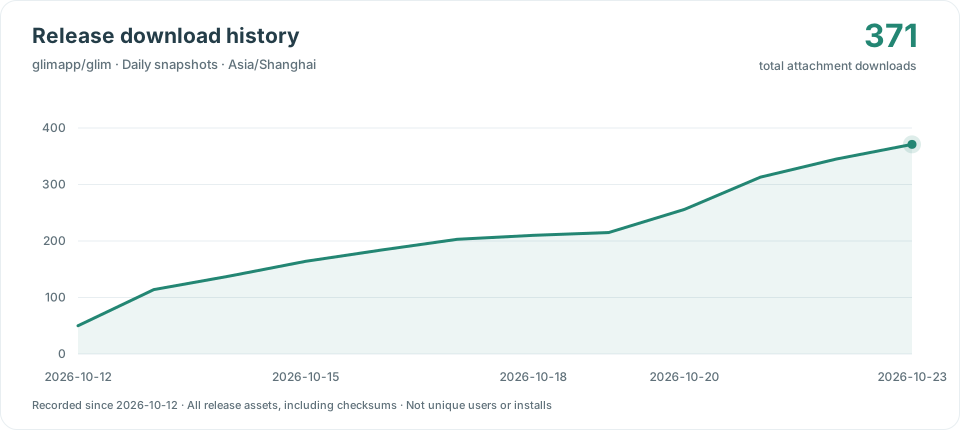
Daily snapshots of cumulative public GitHub release-asset downloads, including installers, update feeds, checksums and release-verification requests. Tracking starts on 2026-10-12; earlier history is unavailable. These counts are downloads, not unique users or installs.