
A buff given is a favour owed. Manners, a World of Warcraft addon, repays it in one press.
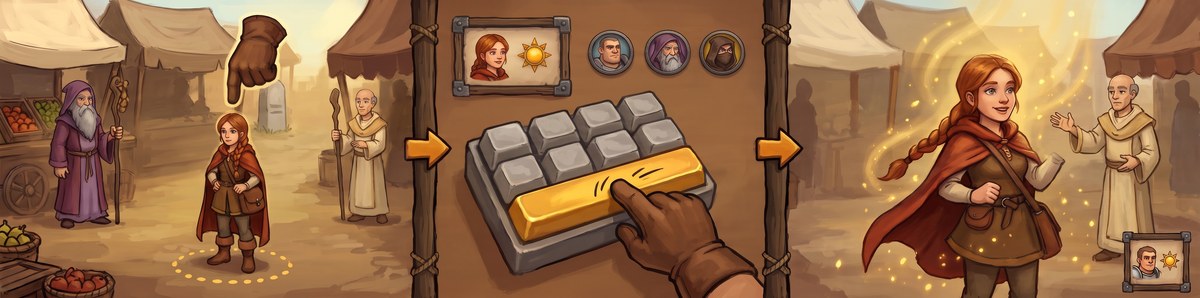


A priest buffs you in passing. By the time you find them among a dozen nameplates, they are gone. Manners saw who it was and put them on one button, the prompt. Press your key: they have your buff, and your own target comes straight back.
Runs on WoW Forever, Classic Era, Burning Crusade Classic, Mists of Pandaria Classic and retail, in nine languages.
- Returns a favour with one press. Whoever buffed you, a stranger included, comes up on the prompt with the buff you owe them. The favour is remembered through a reload or a disconnect.
- Your group and passers-by. Anybody in your party or raid missing your buff is offered it, then the players near you who are. One group cast for the whole party when you carry the reagent, your group first at a ready check, and a top-up at the moment that suits each buff's length.
- Your own buffs and consumables. Your armor, aura, aspect, shield or form, the poison, stone or oil for each weapon, food, flasks, elixirs and scrolls come up as "You" when they are missing.
- Resurrection, cures and courtesies. Your resurrection for the group's dead, a cure for a poison or a curse, a mage's water and portals and a warlock's healthstones and summons for whoever asks in chat.
- Asking. When somebody near you could give you a buff you are missing, a press whispers them one polite line.
- Sharing a group. Two Manners users of one class in a group split it between them, so nobody is buffed twice.
- Battlegrounds and arenas. Rules of their own: your own buffs first after a death, your team freely before the gates open.
- A blessing for each class. A paladin picks the blessing each class is offered first: Wisdom for mages, say, where the order would give them Kings.
- The favour ledger, milestones and a hall of fame. Who buffed you, what you gave back, the title your manners have earned and thirteen milestones; earn them all and you join the Gentlefolk of Good Manners.
- Profiles that switch by themselves. One for the open world, one for dungeons, raids or battlegrounds, chosen as you arrive, and a profile manager that can use, duplicate, rename or delete any of them, with Undo.
- Twenty-nine looks. From a pane of dark glass to a death knight's runeblade, picked from a gallery of cards on four shelves.
- Options that start short. A simple view of each page, a long page in parts you pick from a bar, and a painted icon for each page.
- In character, if you like. A line when you buff somebody, fitted to your race, class and the moment: the Forsaken alone have about a hundred.

- Wago, and through it WowUp: search Manners and install.
- CurseForge, and the CurseForge app.
- By hand: take a zip from
Releases and unzip it into
Interface/AddOns.
All three carry the same build from the same tag.
Do not install from a clone of this repository.
Libs/is deliberately not committed (the libraries are fetched at build time), so a zip made from a checkout has none of them and will not load. Use a release.
1. See the prompt. The first login on each character says in chat what
Manners does and shows the prompt where it sits (/manners welcome says it
again). On a brand-new character whose buff is still at the trainer it says
only that it starts once you learn it, and greets you properly the moment
you do. /manners, or a click on the minimap button, opens the options on
Start here. On a new profile two questions lead the page, Who do you want
to buff? and Should your character talk?: Use these sets them, Not now
keeps the defaults, and they are not asked again. Show me the prompt at the
top of the window (or /manners test) previews it; Move the prompt beside it
(or /manners move) lets you drag it, and it locks itself when you let go.
2. Put it on a key. Step 2 of Start here, Put it on a key, sets a key
right there (it is the game's own binding, Options > Keybindings > Manners,
"Buff the prompted player"). Or press Put Manners on an action bar (or type
/manners macro) and drop the macro on any slot of any bar: the slot shows the
spell a press would cast, with its cooldown and range. A controller button
bound to the same command works too. Without a key you can still click the
prompt.

3. Stay in the Simple view. A new profile opens the options in the Simple view: each page draws only the ten or so settings a player of your class changes, every buff's own switch among them. Show everything under the list brings the rest, and the search box finds any setting in either view.

A new profile offers your buff to everyone near you, says nothing aloud and reminds you of your own buffs. That suits most players; the rest of this page is reference.
Everybody who could use your buff is queued, in this order:
- Your target, when the game can confirm they are missing it. A guess does not get to jump the queue.
- Your party or raid at a ready check, or just back from the dead, when they are read as missing your buff or running low on it.
- Somebody who buffed you. Spotted by watching your own buffs appear and reading who cast them, which works on strangers too, as long as the game can still name them for you. Somebody you buffed first who buffs you back is not owed anything: the ledger lists it as Buffed back, and nothing chimes.
- Somebody who asked for it in chat, if you switch that on.
- You, when you are missing your own buff or one of your class's own.
- Your party or raid, anyone missing your buff, and their pets once you tick My group's pets too.
- Passers-by missing your buff, seen through nameplates, your target, your focus and your mouseover. With the game's friendly nameplates off Manners sees almost nobody outside your group, and cannot tell who a stranger who buffs you is. It says so where you look: a red line under the first greeting, Who to buff and Start here in red (Start here while Quick setup is still asking, too), the minimap tooltip in amber, and the options window's strip, each with Show friendly nameplates or the way to it. When a stranger's buff lands with nobody to name, one line in chat says why there is nobody to buff back, once a session on your first three. If you thank with an emote and Thank them even when I can't see who it was (under What I say) is off, the line names it: it thanks them with your emote, nobody targeted, all the same. With it on, the line says your emote thanks them where it may.
Ahead of all of them comes your resurrection for a dead member of your group, and a cure comes before any buff for the same person; a courtesy somebody asked for is offered with the requests, and an ask for a buff you are missing comes last of everything. Each is described under More than buffs below.
Everybody is offered the first buff they are missing before anybody is offered a second, so a party gets its Fortitude all round before the first Divine Spirit. Among people offered for the same reason, somebody read as missing a buff comes before somebody whose buffs the game would not show, and both before a top-up of a buff still running; then friends and guildmates, then by name.
It skips the dead, the out-of-range, anyone you just tried, anyone the buff does nothing for (Arcane Intellect is wasted on a rogue), and, while you are not flagged yourself, anyone flagged for PvP, since buffing them would flag you.
A passer-by who walks off is kept on offer by name for ten seconds, in case they are still within reach; somebody in reach right now comes first, and takes the prompt from them at once unless your cursor is on it. When the game refuses a buff on somebody, they are left off for a while, longer each time in a row: for where they stand (out of sight, out of range) a few seconds, half a minute at most; for anything else up to five minutes, and chat says so. Targeting them tries again at once.
On the prompt. Left-click (or your key) casts. Right-click skips that person for now without marking their favour repaid; on one of your own buffs it skips just that buff (a food skips every food in your bags), and Ctrl-right-click skips all of yours, for as long as A right-click on my own buffs skips for (minutes) says. Shift-right-click puts them on the never-offer list.
The list. With List the next few below on (Look, under Waiting list, off by default), the names under the prompt are buttons of their own, each with the icon of the buff that person would get: left-click buffs them and hands your target back, right-click skips them, shift-right-click never offers them again. Click a name in the list to buff them turns the buttons off. While the cursor is on a name it stays on that line: the others may move round it, and if that person drops off the list the line goes blank rather than taking the next name, so a click never lands on somebody you did not point at.

The tooltip. Hover the prompt, or a name in its list, and it says who and what, and why they are offered, in one short line; hold Shift for everything (who comes first and why, how long the buff lasts, what the clicks do). Nothing shows in a fight.

- A key. Bound on Start here or under Options > Keybindings > Manners. It is saved with your game key bindings, so it follows every profile. A press does what a click on the prompt does.
- An action bar. Put Manners on an action bar makes the Manners macro
(or puts it right, if it is there) and puts it on your cursor. A press of
the slot, by mouse or by key, casts what a press of the prompt would, at
whoever the prompt shows, and hands your target back the same way. The
game does not let one macro press a button that runs another, so the
macro carries the cast itself: its first line is
/click MannersBar, which tells Manners about the press, and under it Manners writes what the prompt would cast, out of combat, each time that changes. With nobody to buff, in the last moments of a global cooldown, or while the macro window is open, only the first line is there, and a press says why. The macro is Manners' to write: a#showtooltipline you put on top stays; any other change by hand makes it yours, left as you wrote it and no longer followed (Manners says so once, and pressing the button again hands it back). A macro of your own that clicks the prompt casts nothing. The slot draws the icon, cooldown and range of the spell (or scroll, or enhancement) a press would use, and with nobody to buff it goes back to the macro's own icon, a note. - A controller. A controller button bound to the same command presses the prompt as a key does, and the prompt shows the button as the game draws it. The macro works with the controller's own action bar navigation like any other. With a gamepad switched on Manners opens none of the game's own menus: the minimap button's right click is the on/off switch, and an options drop-down opens a list Manners draws itself.
The game locks the prompt for as long as a fight lasts: an addon may not change what a button casts then. So as a fight begins Manners hands the prompt everybody who still needed a buff at that moment (a passer-by who walked off in the seconds before is left out, though the prompt would still have offered them out of a fight), and each press of the prompt or its key casts at the next of them in turn, once each. The second line says which of how many ("in a fight -- 2 of 4, a press moves on"); once everybody has had a press it says so, and a press casts nothing until the fight ends, rather than buffing again somebody it has just buffed. The game lets no addon see in a fight whether a press landed, so a press the global cooldown turned away still moves on: whoever it passed over is offered again when the fight ends. Nobody is added to that list or taken off it before the fight ends, a skip cannot take somebody off it (chat says so), and names in the list cannot be clicked. In a fight, each press moves on to the next person (Look, under In a fight, on) switches the round off, and every press then casts at the one person the prompt was on. The Manners macro on an action bar keeps to that one person either way: the game does not let an addon rewrite a macro in a fight, nor a macro press a button that runs one, so in a fight the bar macro cannot move on. Put Manners on an action bar (Start here) says so.
A Forsaken gets a small button of its own just right of the prompt, with a key of its own, armed for every fight: even when the prompt is off the screen, hidden by Hide the prompt in combat or snoozed. It casts Will of the Forsaken and nothing else, from its key. A left click casts it only while it is dim for the whole fight (All fight, dim until needed) or while no key is set; otherwise it takes no click, so a click beside the prompt reaches the game behind it. It stays out of sight until you are feared, charmed or asleep, then fades in, and fades out again after. While the spell is ready it lights up, glowing, with the spell's name over it and "press to break free" under it; the prompt, when it is up, says the same. While the spell cools down it shows dim. The key casts even while the button is out of sight. The prompt's own key keeps to buffs, unless In a fight, my key casts names a spell. Offer Will of the Forsaken when I am feared, charmed or asleep (Look, under In a fight, on) switches it, and Key for Will of the Forsaken under it sets the key. When the fight buttons show (Look, under In a fight, Only when needed by default) can instead keep it dim beside the prompt for the whole fight (All fight, dim until needed); it holds for Mend Pet's button too. Only a Forsaken who has the spell sees the first two; When the fight buttons show is there for a hunter with Mend Pet too.
A class with a cure can tick Offer my cure in a fight when somebody needs it (Look, under In a fight, off; also under Who to buff, Cures). It gives a small button right of the prompt (or of the Will of the Forsaken button), with Key for my cure in a fight under the switch. It is never on screen for nothing: it appears only when Manners sees you, your target or somebody in your group, in reach and alive, carrying a poison, disease, curse or harmful spell your cure removes, with the spell's name, who it is and what they carry, and it fades again once nobody does. A press cures the player under your mouse, else your target, else you; on WoW Forever your target when it is a friend, else you. A class with two cures (a druid, a priest or a shaman on the older clients) casts the second with Shift held, and the button says which. A debuff Manners never removes keeps the cure that would lift it away from that person. Where the game hides debuffs in a fight the button stays out of sight, and its key still casts. The prompt's own key keeps to buffs, unless In a fight, my key casts names a spell.
In a fight, my key casts (Look, under In a fight; Nothing by default) lists the shields and quick heals your class knows: Power Word: Shield, Renew and Flash Heal for a priest, Ice Barrier for a mage, Flash of Light and Divine Protection for a paladin, and so on, only those you have learned. Pick one and the prompt's own key casts it for the length of every fight, then buffs again when the fight ends. Manners lends the key to a button that is never shown, at the pull, and takes it back at the end, so nothing new appears on the screen. A spell you can cast on others lands on the player under your mouse, else your target, else you; Who it lands on can make it you alone (on WoW Forever it lands on your target when that is a friend, else on you). A spell only for yourself always lands on you. Clicking the prompt still buffs and moves on to the next person, and the Manners macro on an action bar keeps to buffs. It needs a key for the prompt, and a change made in a fight counts from the next one. After a reload in the middle of a fight the key keeps to buffs until it ends.
Other players' buffs are hidden by the game in a fight, and sometimes for a moment after: somebody whose buffs cannot be read is offered marked unverified, and everybody is read again the moment the fight ends.

When you are missing the buff you give others, "You" comes up on the prompt with "your own Arcane Intellect" under it, and a press casts it on you and hands your target back: nothing is said, and nothing goes in the ledger. With it come the buffs your class casts only on itself and what you carry in your bags. They sit on Who to buff in five sections: Myself, Weapons, Food, flasks and scrolls, Add a spell of my own and When my own buffs come up.
The rules for all of them:
- One at a time, your buff for others first: a mage missing both is offered Arcane Intellect, then the armor.
- Only when none of a kind is up, so the armor, aura or aspect you chose is never swapped for another. Only yours count: another paladin's aura on you does not stop the reminder. But two of the same aura do not stack, so Automatic passes over one that already reaches you from another paladin (or an Aspect of the Wild or a Trueshot Aura from another hunter) for the next you know.
- Where your class has several of one kind, you pick one, or leave it on Automatic, which reminds you of the one you had up last. Until you have had one up, a mage gets Mage Armor in a dungeon or raid and Frost or Ice Armor elsewhere, a paladin Devotion Aura and a hunter Aspect of the Hawk. Automatic never picks the Cheetah or the Pack, but with either up you are not reminded. Righteous Fury on Automatic waits until your group role is tank.
- Never in a fight, and not in cities and inns unless you tick Also in cities and inns; that goes for your buff for others on yourself too. The first time a buff of yours waits for that reason, chat says so, once a character, and names the switch. Nothing is offered while the game says the spell cannot be cast (a druid in cat form, a priest in Shadowform, a mage out of mana).
- Top up my own buffs before they run out (When to offer, under My own buffs, on) offers a buff with a timer again shortly before it ends; an aura or an aspect never is. So is Lightning Shield or Shadowguard down to its last charge, and Inner Fire down to its last five, after a fight.
- Right-click "You" to skip that buff for now; Ctrl-right-click skips all of your own. Shift-right-click switches Myself off, since the never-offer list is for other people, and chat says where to switch it back on.
/manners debug, and the lines at the foot of When my own buffs come up, say which of your own buffs is up, which is due, and why one is not being offered.
Myself. Myself, when I'm missing my own buff (on) switches everything on yourself on or off. Under it, one control for each of your class's own buffs you have learned: a drop-down where there is a choice (a mage's Armor, a paladin's Aura, a hunter's Aspect, a shaman's Shield) with Automatic, each spell you know and Don't remind me, and a checkbox for a buff on its own. The full list for each class is under Which buffs each class offers.
- Forms. Shadowform, Moonkin Form and Tree of Life are reminded of like any other buff of yours, and a druid's form never while you are in another one (cat, bear, travel). On Classic Era and Burning Crusade Moonkin Form waits while your group still needs your Mark of the Wild.
- Tracking. Find Herbs, Find Minerals, a hunter's Track Beasts and the other tracking skills are one kind, Tracking, reminded of when none is on (after you die, say). On WoW Forever a dwarf can keep Find Treasure on beside a gathering tracking, so there it has a switch of its own, Find Treasure, reminded of once you have had it on. In a battleground or an arena a gathering tracking is not reminded of at all; one to fight with (Track Humanoids, Track Hidden), picked or the last you had on, still is.
- Detect Invisibility (warlocks; Classic Era, WoW Forever, Burning Crusade): off until you switch it on. To hand it to your group as well, tick Detect Invisibility (your group only) among the buffs you offer. Ticked, Offer Detect Invisibility to passers-by too appears under it, off by default: with it on, passers-by missing it are offered it as well, and so is one who asks for it in chat.
- Unending Breath while swimming (warlocks, every client): on by default. Only while you swim with no water breathing on you; a fight in the water holds it until the fight ends.
- Dampen Magic or Amplify Magic (mages): off until you pick one, each only while you are in no group unless you untick Dampen Magic only when I'm alone or Amplify Magic only when I'm alone.
- Mana Shield, Fire Ward and Frost Ward (mages; Classic Era, WoW Forever, Burning Crusade): Mana Shield, and Fire Ward or Frost Ward (Automatic takes the one you had up last), each off until you switch it on. They are reminded outside a fight only: from the pull until the fight ends Manners offers none of them, so in a fight you recast them yourself. A ward or an added spell still on its own cooldown is not offered until it is ready.
Weapons. One hand at a time.
- From your bags. On WoW Forever, Classic Era, Burning Crusade Classic and Mists of Pandaria Classic, when a weapon has nothing on it and a poison, sharpening stone, weightstone, wizard or mana oil or fishing lure that fits it is in your bags, "You" comes up with that item's icon, and one press puts it on: your target is not touched. The main hand and the off hand are reminded of separately, a lure only for a fishing pole, and each kind has its own switch. Poisons are a rogue's alone, and a rogue's poisons are reminded on Mists and retail too (spells there, not items). On WoW Forever a weapon wears an imbue and an oil, stone or lure at the same time, so each is reminded of on its own, and a warlock is reminded of a Firestone or Spellstone for the main hand. With Make a Firestone or Spellstone turned on (off by default), a warlock with no stone in his bags or on his weapon and a Soul Shard to hand is offered Create Firestone or Create Spellstone first. Automatic takes the best you can use now: an oil for your group role, else your talents (wizard oil for a caster, mana oil for a healer, the strongest your level allows), the strongest lure your Fishing allows, a warlock's Firestone or Spellstone by his talents, and the stone he makes the same way; a rogue's poison is the kind last on that hand, at its best rank. Pick one by name to keep to it. Alone, a stone, oil or poison is offered again only once it has worn off; in a group, with top-ups on, it is renewed ahead of the next pull. Manners never answers the game's question about replacing an enchant: that is left to you. Nothing is put on while you move: the item waits until you stand still.
- A shaman's weapon imbue. Rockbiter, Flametongue, Frostbrand and Windfury Weapon are one family, Weapon imbue (Classic Era, Burning Crusade, WoW Forever and Mists, with each client's own imbues). With none on the weapon in your main hand, "You" comes up with the first one you know, Windfury ahead of the rest; pick one in the drop-down to be reminded of that alone. On retail the main hand and the off hand (Flametongue once a weapon is in it, or Thunderstrike Ward once a shield is) each have a switch of their own. Weapon imbues before the shield (off) brings them up ahead of the shield, for a shaman short of mana.
- A Lightsmith paladin's rites on retail.
Food, flasks and scrolls. Each is off until you switch it on, and shown once you carry one.
- Well Fed (every class; Classic Era, Burning Crusade, Mists, WoW Forever): with a food in your bags that gives Well Fed and none on you, "You" comes up with that food's icon and one press eats it. Which food chooses the order: The best one I can eat (the default), The weakest first, or one of the foods in your bags by name. Never remind me about, under it, lists the foods in your bags to leave out (a fishing food, say). Nothing is offered while you are eating, moving, mounted or in a fight, and a meal cut short brings the reminder back at once.
- Well-Rested (Classic Era and WoW Forever), for the Cozy Sleeping Bag: one press lays it down. Not at the level cap, nor during the hour its use cools down, nor while you move. Remind me before Well-Rested runs out, under it, brings the bag back when five minutes are left, so you can renew it in time.
- Companion pet (every client). On WoW Forever, Mists and retail Manners brings a pet out of your pet journal itself, with no press: Which pet picks the one you had out last, a random favourite, any pet, or one of your pets by name. A pet you use from your bags each time (every pet on Classic Era and Burning Crusade, a handful on Forever) comes up on the prompt as "You". Never in a fight, a dungeon, a raid, a battleground, an arena or a pet battle, nor while you are mounted, stealthed, dead, flying or casting. A pet you use from your bags waits until you stand still. A pet you put away stays away until you bring one out yourself.
- Flask, Elixir and one switch per scroll (Agility, Strength, Protection, Intellect, Stamina, Spirit): with none of that kind on you, "You" comes up with the best one you can use. A flask that works only in some places comes last. On Burning Crusade and Mists Elixir is two switches, Battle Elixir and Guardian Elixir, one for each elixir slot, each by the slot the elixir's own tooltip names; a flask fills both, and on Mists a scroll fills the slot its tooltip says, so a Scroll of Stamina stands in for a guardian elixir and a Scroll of Agility for a battle one. Your Elixir switch carries over to both. On Classic Era and WoW Forever, where elixirs have no slots, Elixirs to keep up under Elixir lists the elixirs in your bags: tick the ones you want on at once, and "You" comes up for each ticked one that is in your bags and not on you, one at a time. With none ticked, any one elixir on you will do. Two ticked elixirs the game does not let stack (one drunk takes the other off) are noticed, said once in chat, and kept as one from then on; untick and tick either again to have both reminded of once more. A Scroll of Intellect, Stamina or Spirit waits while the class buff of the same stat is on you, unless that is a weaker rank than the scroll; the other way round, somebody wearing such a scroll worth at least what your rank would give them is not offered your Fortitude, Intellect or Divine Spirit, since the game refuses the weaker of the two. Classic Era (Season of Discovery's too), WoW Forever, Burning Crusade and Mists; on retail Flask alone, for every class.
- Scrolls (on) covers every scroll at once: switch it off and no scroll is offered and their switches leave the page; switch it back on and each is as you left it.
- A mage's scrolls on WoW Forever. Familiar reminds you when no familiar is with you and a Rat, Frog or Cat Familiar scroll is in your bags; Weapon imbue when no imbue is on the weapon in your main hand and you carry an imbue scroll that fits it. One press uses it from your bags. Automatic takes the best you can use now: a scroll of the school your talents favour, then your level and weapon; pick one by name to keep to it.
Add a spell of my own. A buff of yours that Manners does not know: type its name as your spellbook shows it, or its spell id, and press Enter. Manners checks that this character knows it, that it is not passive or cast on an enemy, and that Manners does not cover it already (then it says where that switch is). It shows the icon and name, with a Remove for each. Up to ten, kept for each character. Each is reminded like your other own buffs: when it is not on you (another rank of it counts), outside a fight, under Myself and Also in cities and inns, and one press casts it on you. The first time you cast one on yourself out of a fight, Manners looks two seconds later; a spell that left no aura on you (Blink, say) is taken off the list with a line in chat saying why, and leaves the prompt at once. A spell that cannot go on you at all and went to your pet (Mend Pet) is judged the same way. A cast that may have gone to a friend you had targeted is not judged, so a spell that can only land on another player stays on the list. /manners spell lists them, /manners spell add <name or id> and /manners spell remove <name or id> change the list. It is for buffs on yourself: buffs for other people come from Manners' own list under What to cast, and in a fight the prompt keeps what it had at the pull.
When my own buffs come up.
- Also in cities and inns (off).
- Consumables only in dungeons and raids (off) keeps the oils, stones, food, flasks, elixirs and scrolls out of the open world; poisons and lures are not held back.
- My food, stones and oils after everybody else (off): those same items wait behind your group and passers-by, so in a busy place you buff other people first and keep your own for later.
- Put consumables on a button of their own (off): food, flasks, elixirs, scrolls and your weapon's oils, stones and poisons leave the prompt for a small button of their own, which you drag where you want it while the prompt is unlocked. It has its own key under Key Bindings and its size on Look; a left-click uses the item, a right-click skips it for your skip time, and it never shows in a fight. It wears the frame of the look you picked for the prompt, and changes with it.
- Remind me of my shout when I'm alone (warriors, off): with nobody in your group, or nobody of it near enough, Battle Shout is offered to you when it is missing or running low, in a fight as well.
- Never remind me about: a box for each spell of your families you know. A ticked spell is skipped by Automatic and never offered at all.
Your pet (hunters). Under Myself, in a section of its own, each on:
- Call my pet when none is out: Call Pet when no pet is with you. On Mists and retail it is the Call Pet you used last. Never after you dismissed the pet yourself, abandoned it or have none (until a pet is out again), never with Lone Wolf, never on a character that has never had a pet out.
- Revive my pet when it is dead: Revive Pet, and Call is not offered while it is dead.
- Feed my pet when it is not happy (Classic Era, WoW Forever and Burning Crusade): Feed Pet with a food it eats from your bags, the lowest level that suits the pet, never a food that makes you Well Fed while anything else will do, and nothing once the pet is happy. A food the pet refuses is remembered and not offered again; one the game calls too low for the pet is left out until the pet's next level.
- Mend my pet when it is hurt after a fight: Mend Pet below half health, once the pet is out of the fight too, and not while Mend Pet still heals it.
- Tell me at a vendor when my pet is low on food (Classic Era, WoW Forever and Burning Crusade): at a vendor that sells a food your pet eats, a line in chat naming your pet and the food when your bags hold fewer than five meals for it. Once a vendor each session; Manners never buys anything.
- Remind me about Growl in groups and alone (off): a line in chat when Growl is on autocast in a dungeon or raid with a tank in your group, once a zone, or off while you are alone in the open world, once a session. Manners never changes it for you.
- Tell me when my pet has training points to spend (Classic Era, WoW Forever and Burning Crusade): once a session for each pet, and again when there are more, at most once in fifteen minutes.
Everything for my pet is the master over all of these and over the Mend Pet button below: off, Manners leaves your pet to you, and every switch keeps its own setting for when it is on again.
Mend Pet in a fight (its switch is under Your pet, below the Mend Pet reminder, and under Look, In a fight, with a key of its own; the reminder's switch does not turn it off): a button of its own to the right of the prompt, or of the Will of the Forsaken button where a Forsaken hunter has both, armed for every fight and out of sight until it is wanted. It fades in and lights up while your pet is below half health, in reach and alive, and Mend Pet is not still at work, and fades out again after. Where the game hides your pet's health in a fight (WoW Forever and retail) Manners cannot tell, so the button stays out of sight and its key still casts; When the fight buttons show (Look, under In a fight) set to All fight, dim until needed keeps it there for the whole fight, half lit with its two lines shown. Out of sight the button takes no click, only its key casts, unless it is dim for the whole fight or no key is set. The prompt's own key keeps to buffs, unless In a fight, my key casts names a spell.
Care waits while you eat: a food or drink stands you up, so nothing for the pet is offered until the meal is over.
None of these comes in a fight, in the few seconds after one, while you are mounted, on a taxi, feigning death or casting, without the mana to cast it, or in a city or an inn unless Also in cities and inns is on; Myself off turns them all off. A right-click on one is "not now": Revive and Feed come back later, Mend after your next fight, Call once a pet has been out. Nobody is skipped and nothing goes on your never-offer list.
Bond with my pet (on) offers a moment with your pet now and then: after a long fight or a boss, after a fight it barely lived through, after a revive (or, when it fell in a fight, an apology, taking turns with the welcome back), at login (good morning after you logged out at an inn), after a quiet stretch on the road (a pat, then a game of fetch, in turns), when you sit down to eat and your pet is not happy with food it eats in your bags (Share your meal, once your own meal is over, so a press never stands you up; Classic Era, WoW Forever and Burning Crusade), when you tame a new pet (welcome to the family, and a nudge to name it while it still has its kind's name), when it comes back after three days or more, when it was with you as you ended a fight alive under a fifth of your health, when it gains a level or, where pets have loyalty, more of it, and on the 7th, 30th, 100th and 365th day together. How often moments come sets the least time between two: Rarely an hour, Sometimes twenty minutes, Often ten; before one on a quiet road, half an hour, a quarter of an hour or ten minutes. Never in a fight, a battleground or an arena; it stays on the prompt for 45 seconds with no sound, and letting it pass costs nothing. Every moment, the pet's answer, the line you say and the memory below have a switch of their own in a fold, Bond with my pet, piece by piece, under Who to buff, and are held by Bond with my pet and Everything for my pet. A press does the fitting emote at your pet (/pet, /praise, /soothe, /welcome or /greet: the button targets your pet, does the emote at it and puts your own target back) and an /emote everybody near you sees, such as "Mort scratches Humar behind the ears. Humar wags happily." The answer goes by the pet's family. With In character chosen and your lines going in /say, you also say a line to your pet in your people's voice. Manners remembers each pet by name on this character: when it first saw it, fights shared, pats and meals, shown under the switch, with a small line in chat at a milestone ("500 fights shared with Humar"; the days together are the anniversary moment's while that is on). A pet you rename keeps its memory under the new name. Remember fights, pats and meals turns the counting and its lines off.
Group buffs. Once you know the group version of your buff (Arcane Brilliance, Prayer of Fortitude, Prayer of Spirit, Prayer of Shadow Protection, Gift of the Wild) and carry its reagent, a party with enough people missing it gets one cast instead of one each. Three is the default, and When this many need it sets 2 to 5. In a raid on WoW Forever the whole raid is counted together, because there the spell reaches everybody in your party and raid within 100 yards. Somebody more than ten levels under the group spell is not counted and keeps the single buff. A paladin's Greater Blessings go by class across the group instead, and are held back while anybody of that class carries another of your blessings, which the Greater one would replace. The prompt names who it is for ("Your party", "Your raid", "Every Warrior") and why ("Arcane Brilliance -- 4 missing"), and the tooltip counts your reagents. A right-click skips the cast for the whole group. Short of mana for the group spell, you are offered the single one; chat says when you are down to 5 reagents and when you run out. With WoW Forever's Legacy perk Reagent Economy you need no reagent at all.
Dungeons and raids.
- My group first at a ready check (on): from the check until the pull (or a minute after everybody has answered), your party or raid goes to the front, behind only your own target.
- Group members just revived first (on): for two minutes after somebody in your group is brought back, they go to the front. A hunter getting up from Feign Death does not count.
- Raid groups I buff: untick the groups you were not assigned. Their members are offered only if they buffed you, asked, or you target or focus them. A shout cannot be aimed at a group: a warrior's ticks only choose whose missing shout brings the prompt up, and the page says how far the shout reaches on your client (your own party on Classic Era and Burning Crusade, the raid around you on WoW Forever, Mists and retail).
- Save mana: stop below (% mana) (0, off): below it, your group, your target and passers-by wait until your mana is 5 points above it. Below it, still offer says what still comes up meanwhile: People who buffed me or asked (the default), Only my own buff, or Nothing. A favour held back stays owed.
- In a raid group, a battleground or an arena the "buffed you" chat line is not printed, and in a dungeon it waits out the fight. The favour is still noticed and offered.
My group's pets too (off): a hunter's beast or a warlock's demon missing your buff is offered it as its owner is. Only what does something for a pet (no Arcane Intellect for one without mana), and in a raid by the groups you buff. A pet is targeted by its name like everybody else, so one named as somebody in your group is left out.
Sharing a group with other Manners users. Share the group with other
Manners users (on). When somebody else of your class in your party or raid
uses Manners too, the group is split between you (a raid by its groups, a
party by its members), and each of you is offered only your own part. A favour
owed, a request, your target and your focus are never held back, and anybody
still missing the buff after 45 seconds is offered anyway. A group cast is
left to one of you. /manners debug says who you share with.
Topping up. With If they already have it on Offer a top-up when it runs low, Manners knows how long each buff lasts on your client and tops it up about a tenth of that before it ends (a minute before a ten-minute buff, five before an hour's), earlier in a raid or dungeon and for your own buffs, and only in the last half minute for somebody outside your group.
Resurrection. My group's dead (on), for a class with a resurrection: out of a fight, somebody of your party or raid who is dead and within reach comes up first of everything, and a press targets them, casts and hands your target back. Never somebody who has released their spirit, never a hunter feigning death, and not while another resurrection is already on its way to them. Nothing is said aloud. Dead passers-by too (off) adds a dead player outside your group whom you target, focus or hover.
Cures. Cure my party and raid, Cure passers-by and Cure myself too, all off, for a class with a cure. Somebody carrying a poison, a disease, a curse or a harmful spell your class can remove is offered the cure, out of combat: before any buff for that person, after a favour you owe. On yourself the cure comes before your own buffs; a right-click skips it for a while, and Shift-right-click turns Cure myself too off. Only with more than this many seconds left (10) leaves alone what is about to run out by itself, and a debuff with no timer is never offered. A handful that punish whoever removes them (Unstable Affliction, Vampiric Touch) are never offered either. In a fight, see Curing in a fight.
People who ask me in chat. Off by default, because reading chat is
guesswork. Somebody who asks for your buff in /say, /yell, group chat or a
whisper ("int pls", "fort?", "can I get motw", or the spell's name in your
language) is offered it for the next minute. Nothing is ever said back. What
counts: eight words at most, naming the buff as a whole word, with a please,
a question mark or an opener like can I, and nothing like no or not;
words English uses for other things (might, mark, spirit) need a
please or to stand alone, and never count in group chat; nobody of your own
class counts as asking; and nothing said in a fight counts unless it was
whispered.
Courtesies on request. Four switches under People who ask me in chat, each off and shown to the class that has it, read from chat by the same rules. Never in a fight.
- Water and food, when they ask (mages): "water pls" puts them on the prompt. With none in your bags that suits their level, the first press conjures it; the next targets them and opens a trade with it already in the window. Accepting the trade stays yours.
- Portals, when my group asks (mages): a member of your party or raid who names a city ("port to Orgrimmar pls") is offered that portal.
- Healthstones, when they ask (warlocks): as water, with a trade. On Mists and retail it is a Soulwell for a member of your group.
- Summons, when my group asks (warlocks): the press targets them and casts Ritual of Summoning.
Asking for a buff. Ask people for a buff I'm missing (off). When
somebody in your group, or right beside you, could cast a buff you would want
and do not have, they come up last of everything on the prompt, and a press
whispers them one short polite line. It casts nothing and leaves your target
alone. One ask a person for each buff in ten minutes, and one ask in all in
two; never in a fight, a battleground or an arena; nobody on your never-offer
or /ignore list, nobody dead, fighting, away or busy. Ask in chooses a
whisper (the default) or /say, What the ask says one of three lines or
My own words, a line you write in the box under it ({name} their name,
{buff} the spell, either left out; said even with In character on), and
Ask in cities and inns too is off. The Manners macro on an action bar does
not carry an ask.
After a death your own buffs come ahead of your team's, what you fight with before food, flasks and the rest. While the gates are still shut your team is offered freely, group casts first, and Save mana holds nothing back; once they open, only while you are out of combat, and only somebody within reach. Four switches on When to offer, under Battlegrounds and arenas:
- Buff my team there (on): off, nobody else is offered anything there but somebody you target or focus.
- Say my line there (off).
- Thank people there (on): somebody of your own team, never in a fight.
- Consumables there too (off): what Consumables only in dungeons and raids holds back comes up there as it does in a dungeon.
Never offer. People on the list are never offered anything, as passers-by
or as group members. Somebody on it who buffs you is still offered the favour
back, because returning a favour is the point; shift-right-click them again
to let that favour go. Your /ignore list goes further: nobody on it is
thanked, offered a favour back or offered as a passer-by, though a group
member on it still is. /manners never and /manners allow <name> work from
chat.
Guilds. Leave out these guilds takes guild names, one a line, as the game shows a guild under a player. Nobody in those guilds is offered anything; people who buffed you or asked, and your target and focus, still are. Show their guild under the name (Look, under Text) writes the guild on the prompt's second line, which is a quick way to see which name to type.
Classes. Classes I buff as passers-by is a grid of the classes, all ticked. Untick one and its passers-by are not offered your buff. Your group, people who buffed you or asked, and your target and focus are offered whatever their class.
Friends and guildmates first. A friend (Battle.net friends included) or guildmate goes ahead of the other passers-by, or of the rest of your group. It only changes the order.
Snooze, and hiding while mounted. /manners snooze hides the prompt for
15 minutes; snooze 5, snooze 1h (up to four hours) or snooze off for
your own. The minimap menu and the Snooze button at the top of the options
window offer 5, 15 and 30 minutes, an hour, two hours and four. Favours are
still noticed while snoozed. Hide the prompt
while I'm mounted (When to offer, under Mounted and mana, off) keeps the
prompt away while you ride.

Who buffed you, with what and when, whether you returned it, and who you buffed without being asked, newest first. Today's count ("Returned 12 of 14 favours today") and the all-time totals sit at the top, then tabs for everything, favours, buffs you gave, and Milestones. A favour you did not return says why: the time ran out, nothing you cast helps them, they already had your buff, or you put them on the never-offer list. A group buff counts as one buff given and says how many who needed it got it.
Open it with /manners ledger, a shift-click on the minimap button, or Open
the ledger on Start here. It keeps the last 200 entries per character;
Clear empties the list and today's count but keeps favours still owed, the
all-time totals and your title.
Titles. Favours you return earn you a title: Well Brought Up at 10, then Well Mannered, Courteous, Gracious at 100, Magnanimous, Paragon of Etiquette and, at 1,000, The Very Soul of Courtesy. The one you hold sits at the top of the ledger with how far you are from the next ("37 of 50 to Courteous"), and in the minimap tooltip. A new title gets one line in chat.
Milestones. Thirteen marks of good manners, read from what the ledger records: Much Obliged for the first favour you return, You Only Had to Ask for answering a request in chat, All Walks of Life for favours returned to five different classes, Thank You, Everyone for ten different people in one day, Old Acquaintance for thanking the same person on ten different days, The Kindness of Strangers for a hundred strangers buffed unasked, A Hundred Thank-Yous, Back on Your Feet for a resurrection through the prompt, A Clean Bill of Health for a cure, At Your Service for a courtesy on request, and three hidden ones that say what they were once earned. The Milestones tab lists them with how far along each is; an earned one has a small speech-bubble button, Link in chat, which puts a line about it in your chat box and sends nothing until you press Enter. A new milestone gets a small toast for a few seconds and one line in your chat window: never in a fight, never over the prompt, at most one a minute, and a click sends it away. Nothing counts presses: the same stranger counts again only once the buff you gave would have run out, and the same person once a day. Milestones on Start here, under Favour ledger, switches all of it off (what was earned is kept); Show a toast and Play the sound sit under it. They are kept per character, and neither Clear nor a profile reset touches them.

Twenty-nine looks, each a card under Look > Panel style. Tabs over the cards sort them: For my class (the looks made for your class, three for a mage; it opens first), All, and one tab for each shelf, Minimal, Classic, Themed and Class. Point at a card and the prompt wears that look at once; move off and yours comes back; click to keep it (not in a fight, where a look waits for the fight to end). A small New marks the looks new in this release.
Use my class's look on each character, over the cards, has each character on the profile wear the look made for its class: a druid the Druid look, a paladin the Paladin look. A mage wears the mage look you last clicked on a mage, else Frost Mage; any other look you click becomes the profile's own, which every character wears with the switch off. A line under the tabs says which look is in use and why.
Under the cards, headed with the chosen look's name, are its own settings. Every look's frame is a painting; Earlier art keeps the frames they had before the repaint, and the cards then show those. Round the icon off is greyed where the look always rounds it. Show my key on the prompt puts the key you press on the prompt's keycap: as the look has it (the choice says which), always, or never; nothing is shown while no key is bound. With them, Gryphons at the ends on Glass and the reason's colours.
Minimal and Classic:
- Glass (the default): the game's own action bar. A dark pane of glass in beaded gilt rails, the spell icon in a metal bezel. Light drifts inside the glass; while you owe somebody the border of a spell that is ready runs round the icon. Gryphons at the ends (off, with Glass's settings) sits a gilt gryphon at each end.
- Framed: a flat dark panel in a thin rim, like the game's tooltips.
- Minimal: a thin gold rim round the icon and a soft pane you can barely see under the words, over one hairline of light: it fills behind a spark when somebody buffs you, flashes with a ready check's tick when your buff lands, and runs back out red with a cross when it is refused.
- Luxe: a slim dark card with a spine in the reason colour.
- Ghost: a pane of smoked glass in a thin rim; Pill, a rounded pane with a pale rim; Slate, a dark pane in a steel edge. A little of the world shows through the three panes, never enough to lose the words.
- Hairline: a framed icon and one fine line, the words on a soft shadow.
- Toast: a warm banner and a gilded medallion, the icon's ring a twist of rope.
- Arcane: smoked glass with a rim lit by the reason.
Themed and Class (Ribbon, Letter, Warchief and Gearworks are the themed ones; a class look is named for its class):
- Ribbon: a tournament pennant of crimson damask on a twisted gold cord, its forked end fluttering. A buff that lands pins a laurelled medallion on.
- Letter: a torn and folded sheet of parchment under a red wax seal. A quill writes each new name in and signs a landed buff; a refusal cracks the seal.
- Hunter (once Leather): tooled, stitched hide with brass studs and a buckle, two feathers stirring, and a paw-print brand that smoulders while you owe somebody.
- Warrior (once Forge): forged iron and a riveted band, the reason glowing in a slot like a bar of heated steel, embers rising off a molten seam.
- Arcane Mage (once Archmage): a violet crystal, your spell in a hexagon of six arcane charges that light one by one, travel round while you owe somebody and discharge in lightning when your buff lands.
- Paladin (once Lightbringer): a paladin's plate of silver and royal-blue enamel, your spell in a golden sun. A pillar of light comes down when somebody buffs you, and wings of light spread when your buff lands.
- Warlock (once Fel): a warlock's slab of black felsteel lit from within by fel fire, your spell in a summoning circle of eight runes under a demon's horns, and a soul shard held in a claw.
- Druid (once Wild): a druid's bough of living wood, your spell in a wreath under a stag's antlers and ringed with moonwell water. A vine grows along the bough when somebody buffs you and stands in blossom while you owe them.
- Frost Mage (once Frost): a frost mage's slab of glacial ice hung with icicles, your spell in an ice crystal, in a painted frame. An Ice Block shuts over your spell and shatters when your buff lands.
- Shaman (once Stormcaller): a shaman's. A carved totem holds your spell beside a slab of weathered stone, the reason wakes the sigil of air, fire, water or earth, and chain lightning arcs along it when your buff lands.
- Warchief: the Horde's, in Orgrimmar's black iron and red hide. A spiked slab between two ivory tusks, the crest glowing like iron out of the forge, a war banner stirring, and a drum beat when your buff lands.
- Gearworks: an engineer's, in Gnomeregan's brass and Kezan's copper. Your spell under the glass of a pressure gauge, three cogs turning in mesh, steam let off when a buff lands and a spark when one is refused.
- Death Knight (once Ebon): a death knight's runeblade of dark saronite. Your spell in an eight-sided socket under a skull with soulfire behind it, and three runes that kindle one after another when somebody buffs you.
- Fire Mage, Priest, Rogue, Monk, Demon Hunter and Evoker: painted frames of their own (bronze and embers; ivory and gold; black leather and a poisoned blade; red lacquer and jade; fel steel and a warglaive's ring; scaled bronze and a dragon), the socket's rim breathing softly while you owe somebody.
On Glass, Framed and Minimal the prompt has a way of arriving and of answering: rules of light draw out from the icon as it comes up, a ring pops out of the icon and a wave of light crosses the panel when a buff lands, and when the game refuses it the edge flashes red, a crack runs under the words and the text shakes. The other looks answer in ways of their own. Animations on Calm stills all of it. The icon shows the global cooldown sweep, like an action bar, and the prompt fades out after your last buff.

Pick your own colours and fonts too; LibSharedMedia is supported. Leave the text colour at white and it turns dark by itself on a light panel colour.
A colour-blind palette. Colour set, with the look's own settings under Look > Panel style, swaps the reason colours for pale yellow, orange, sky blue and violet, which stay apart under protanopia and deuteranopia.

A click opens the options, a shift-click the ledger, and a middle click switches Manners on or off. Right-click for a menu: on or off, snooze, who is next (skip one, or never offer them anything), the ledger, a preview, the prompt's lock, position, sound and effects, the chat lines, and your profiles when you have more than one. The icon dims while snoozed and goes darker still while off. A broker display shows how many people who buffed you are still waiting. The same launcher is in the addon compartment under the minimap, so hiding the button loses nothing.
/manners opens it on the page you used last. Drag it by its title bar; Esc
closes it. Drag the grip in its bottom-right corner to make it bigger;
dragged wide enough, a page flows into two columns, and into three when there
is room. The game's own Options > AddOns > Manners has a button that opens
it too.
On every page.
- Along the top: Show me the prompt, Move the prompt (it reads Lock it while the prompt is unlocked), Snooze (5 minutes up to four hours) and Manners is on.
- Under them, a line appears only while something keeps the prompt from doing what you would expect: Manners is off, the prompt is unlocked, a snooze is running, nothing can be offered, or the prompt is kept away while you are mounted.
- On the left, the pages, each with a painted icon of its own: Start here; Who to buff, Who to skip, When to offer, What I say, Look; Profiles and Diagnostics. A page with nothing for your character is left out. A red dot beside a page means something there wants looking at; a key binding is optional, so no red dot asks for one.
- Over a page of many sections (Start here, Who to buff, When to offer, Look), a bar of its parts: All draws the whole page, and a part draws only its sections, its folded ones open. The red dot is on the part that wants looking at too, and the window remembers the part you last opened on each page until you log out.
- The search box above the pages finds a setting by its name, its tooltip, one of its choices or the section it is in, in every language Manners is translated into, and "quiet", "mute" or "spam" finds the chat switches. Pick a result and the window goes there, opens the part and the section and flashes the setting; one hidden behind a switch says which to turn on first.
- Simple view, a switch under the search box. On, each page draws only its short list, and says under it how many settings it leaves out, with Show everything. Start here, Profiles and Diagnostics are always drawn whole. A new profile starts in the simple view; one made before it existed keeps everything on screen and is offered it once.
- A setting that belongs to a switch sits a step in under it, and is not drawn while that switch is off. A greyed-out setting says under itself which switch greys it.
- Who to buff, Who to skip and When to offer open on a grey line saying who the prompt is on right now and why, and how many more are waiting.
- Under a thin line, "The defaults suit most players; change these only if something bothers you.", come folded sections for fine-tuning. A gold dot on a folded section means something in it is not at its default.
- Reset this page, bottom left, resets the page you are on, after asking. It keeps where the prompt sits and its lock, the lines you wrote, the never-offer list, your key and Manners is on. The version number sits at the bottom too, for bug reports.
What follows is every page, section by section, with what the tooltips have no room for. Defaults are in brackets.
- 1. Quick setup, only on a profile that has never been set up: the two questions, with Use these and Not now. A class with nothing to give is not asked.
- 1. Who to buff: Offer my buff to is a quick choice. Only people who buff me; People who buff me, and my group; Everyone near me (a new profile's); or My group, kept topped up (dungeons and raids). Each sets a few switches on Who to buff and When to offer, and the grey line under it says what they add up to; when the switches match none of the four it reads Custom (changed by hand). A hunter or a shaman, with nothing to give anybody else, gets a line naming the buffs of their own instead, and Ask people for a buff I'm missing at the top of the page.
- 2. Put it on a key: where the key stands (No key yet, or the key), the box that sets it, Put Manners on an action bar and Open key bindings. Remind me in chat while Manners has no key (on): one line in your chat window says where to set it, about twenty seconds after you log in, never in a fight, on three logins at most for a character, and not at all once a key is set or the Manners macro is made.
- Favour ledger: today's count, Open the ledger, and Milestones (on) with Show a toast and Play the sound under it.
- Minimap and chat window: Show minimap button; Show what Manners is
doing in my chat window (on), a line in your own chat when somebody buffs
you, when a favour is repaid, and when a click fails, never said to anybody
else; Hide all Manners messages in my chat window (off), which silences
even the few lines the first leaves (what you type after
/mannersis still answered); and Show the welcome again. - What's new in the version you run, folded at the foot of the page: that release's date and what it changed, in short, the highlights first and the fixes last, then the three releases before it in brief. In English, as the changelog is.
- Offer my buff to: People who buff me (on); My party and raid (on)
with My group's pets too (off) under it; Passers-by (players near me,
not in my group) (on) with Passers-by within and Only in cities and
inns (off) under it; People who ask me in chat (off) with your class's
courtesies under it.
- Passers-by within: Anywhere I can cast (about thirty yards), Nearby (about ten, the default) or Right beside me (about five). Only passers-by are measured. The game gives no exact distance, so this lands on the nearest step the client can measure; where nothing can measure, everybody in casting range is offered.
- What to cast: Buff to offer, automatic or one spell pinned (a pinned
spell is the only one considered). Under it each buff on a row of its own
with its switch, and that buff's own switches a step in under it; untick a
buff to never offer it. A class with a single buff reads "You offer Arcane
Intellect." instead.
- Shadow Protection (Classic Era, WoW Forever, Burning Crusade) and a warlock's Detect Invisibility (your group only) start unticked.
- A buff the game would refuse for somebody's level (more than ten levels under its lowest rank) is passed over for the next one that reaches them.
- A druid's Thorns has Offer to: Everyone; Tanks only (the players in your group with the tank role or a raid's main tank mark, and nobody outside it); Tanks and me (the same, and your own Thorns whatever your role); Tanks, and anyone outside my group; or Only me. Anybody who asks you for Thorns in chat is still offered it. In a group, Tanks only and Tanks, and anyone outside my group leave your own Thorns alone too unless you are the tank; on your own you are reminded as ever. Not on me in a dungeon or raid, under it (off), stops your own Thorns being reminded of inside a dungeon or a raid, whatever Offer to says; your group is still offered it.
- On WoW Forever, a campsite's Boosted Stamina, Intellect or Spirit is left alone when it gives as much as your Fortitude, Arcane Intellect or Divine Spirit would. Don't cast over a campsite's Boosted Stamina, Intellect or Spirit (off) leaves it alone always, a stronger buff of yours included.
- A warlock's Unending Breath goes to everybody, your group and passers-by, with Offer Unending Breath to everybody near me (on) on Classic Era, WoW Forever and Burning Crusade. Unticked, it goes to return a favour and to whoever asks for it by name.
- Paladins. Blessings overwrite one another, so anybody already carrying one of yours is left alone rather than handed a different one. A blessing for each class, under Buff order: pick a class, then the blessing its players are offered first (Wisdom for mages, say). Somebody who already wears it from another paladin, or who cannot be given it, gets what the order would have chosen. Automatic picks Wisdom for anyone with a mana bar and Might for everyone else. Don't offer Might to mages, warlocks and priests (on); Skip players another paladin has blessed (off); Don't put Kings over a Fish Bowl's Boosted Stats (WoW Forever, off), which also keeps the Greater Blessing of Kings off a class with somebody sitting by one, and under it Never put Kings over Boosted Stats (off): no Kings at all for them while it lasts, unless they ask for it by name.
- Buff order, for a class with more than one buff to give: the buffs as a list in the order they are tried, each with an arrow up and an arrow down, and Back to Automatic. A paladin's Blessing of Kings first (on) heads it until you move one. Anybody wearing one of your buffs is left alone whatever the order, and Greater Blessings follow it.
- My group and raid: Use group buffs (on) and When this many need it (3), with how many reagents are in your bags; Raid groups I buff; Share the group with other Manners users (on).
- More than buffs: My group's dead (on) with Dead passers-by too (off); Cure my party and raid, Cure passers-by and Cure myself too (all off) with Only with more than this many seconds left (10).
- Myself, Weapons, Food, flasks and scrolls and When my own buffs come up: see Your own buffs above.
- Asking for a buff: Ask people for a buff I'm missing (off), then Ask in, What the ask says (three lines, or My own words with a box for them) and Ask in cities and inns too.
- Who comes first (folded): My target first, Friends and guildmates first, My group first at a ready check and Group members just revived first, all on. With My target first off your target is ranked by why they are on the list like anybody else.
- Players to skip:
- Skip players flagged for PvP (on): buffing somebody flagged flags you too, so while you are not flagged, nobody flagged is offered, not even a favour back, which waits for their flag to drop. It steps aside while you are flagged yourself. A group spell or a shout that would land on somebody flagged is held back too. Under it, who it is holding back right now.
- Skip players in a fight (off): buffing somebody in a fight pulls you into it, so nobody the game says is fighting is offered until the fight is over. Your target and focus still are.
- Skip my own class when they can cast it too (off): another mage can give themselves Arcane Intellect, so they are left out, unless they are too low a level for the rank you cast. Somebody who buffed you, asked, or you targeted is always offered.
- Leave out these guilds and Classes I buff as passers-by: see Leaving people out above.
- Skip players out of range (on): where the spell's own range check has nothing to say, the game's follow distance (about 28 yards) is asked instead. Where nothing can tell, they are still offered.
- Skip players below level (1, nobody): read off the unit, so somebody known only by name cannot be checked and is offered anyway.
- Never offer: one row per name, with an X to take it off, a box to add
a name and Clear the list.
- Offer held-back buffs again: a buff the game refused on somebody ("A more powerful spell is already active", too low a level, or refused twice running with nothing about them changed) is not offered to them for ten minutes; this offers every such buff again now. A buff added to or taken off them does the same for the ones refused twice.
- Other people already buffed: If they already have it: Skip them (the default), Offer a top-up when it runs low (then Top up at most this many minutes early and In a raid or dungeon, top up this many times earlier), or Always offer, which reads nobody's buffs. Don't offer when the game hides their buffs (fights) (off): with it on, nobody is offered unverified; somebody who buffed you or asked still is.
- My own buffs: Top up my own buffs before they run out (on), whichever of the three above you pick for other people. Remind me this many minutes early sets the moment itself (0 works it out from the buff's length); it is never more than half the buff's length ahead.
- Hold back:
- Offer nothing in cities and inns (off): while the game calls you resting, nothing is offered to anybody, not passers-by, not your group, not a favour you owe. Somebody you target or focus still is. Where, under it: Cities and inns, Cities only or Inns only.
- Hold back short buffs in cities and inns (off): the buffs that last only a few minutes (Thorns, say) are not offered while you rest, and longer ones still are. Short means this many minutes or less (15).
- Offer nothing in dungeons, raids and battlegrounds (off): the same rule inside a dungeon or a raid. Your own buffs are not held back. A battleground or an arena goes by Buff my team there, which ticking this one unticks; tick that one again and this switch reads Offer nothing in dungeons and raids, which is then all it does.
- Hold back my target and focus too (off).
- Mounted and mana: Hide the prompt while I'm mounted (off; dead, on a flight path or in a vehicle the prompt already stays away); Save mana: stop below (% mana) and Below it, still offer. Classes without mana do not see the last two.
- Battlegrounds and arenas: the four switches above.
- Buffing back: how long somebody who buffed you is offered one back.
- Offer a buff back for (seconds) (120).
- Count only class buffs as favours (on): only class buffs such as
Fortitude, a Fear Ward or a Soulstone count as a favour to return, or to
/thank. A paladin's aura or a hunter's aspect reaching you never counts. - Refresh a buff they already have, to return a favour (off): somebody who buffs you and already wears everything you could give them, with time to spare, is offered nothing; the favour is let go at once, and the ledger says why. On, the buff they already have is offered again.
- Stop sooner if they are probably gone (on) and Let them go after (seconds) (45): somebody who buffed you is rarely your target or on a nameplate, so all that is known is that they were in range when they buffed you.
- Keep favours through a /reload (on). The clock keeps running while you are away.
- Timing (folded): Don't repeat a spell on someone for (seconds) (12), per spell; A right-click skips for (seconds) (12, up to half an hour); A right-click on my own buffs skips for (minutes) (0, which follows the seconds above; up to four hours), the same for the consumables button and Not now in the minimap menu, and a skipped food skips every food in your bags, since any of them gives Well Fed; Check for people every (seconds) (0.4).
- Targeting (folded): Hand my target back afterwards (on). With it on,
the macro ends with
/targetlasttarget, or with/cleartargetwhen you had nothing targeted. A warrior, whose shout never takes the target, has a line saying so instead.
Everything here is off until you turn it on.
- When I buff someone, at the top, is a quick choice: Stay silent, Just /thank them, A polite line, In character (fits your race and class) or Whisper them a thank-you. It sets the switches under it.
- Thanks and speech:
- /thank people who buff me: when somebody buffs you, you
/thankthem, whether or not you could buff them back. Never in a fight, or inside a dungeon or a raid (in a battleground or an arena only somebody of your own team, with Thank people there on), nor while you are stealthed or feigning death, at most once per person every five minutes and once every ten seconds in all, so a raid buffing you on the pull is one thank. Emote to use picks which of twenty-four friendly emotes (/thank,/cheer,/bow,/saluteand the rest), Or one of these, at random ticks others, and Wait a moment before thanking sends it one to three seconds after the buff lands (not with Ask me before thanking). - Ask me before thanking (off, under the /thank): nothing goes out by itself. When somebody buffs you, the prompt offers "Thank ", and the thanks you have set up (your emote and the whispered thank-you) go only when you press it, with a click or the prompt's key; a right-click lets it go. Left alone, the offer goes away after twenty seconds on the prompt (a minute after the buff, shown or not), and a fight drops it; nothing is sent then. While you are stealthed or chat is held back, it waits off the prompt. Every rule above still decides whether a thank is due, and is read again at the press. A favour you owe or a buff your group needs comes first, then the thank, then passers-by. Several people buffing you are one press each; with Thank them even when I can't see who it was on, a buff from somebody nobody could name is offered as "Thank whoever buffed you", and the prompt asks you to clear your target first. A pasted settings line can turn it on, never off.
- Don't thank anybody while I'm in a party or a raid (off, under the /thank): while you are in a party or a raid, no /thank and no whispered thank-you go out, to a group member or anybody else, and no thank is offered on the prompt. In a battleground or an arena, Thank people there decides instead.
- Whisper a thank-you to people I can't buff back: when somebody buffs you and nothing of yours goes back to them now (a warrior, a rogue, a buff you have nothing to answer, a return that waits for them to join your group or for a one-target buff to come free), you whisper them a line from the In character set, naming what they gave you. Under the /thank's rules. Stay silent turns it off, and a pasted settings line never turns it on.
- Thank them even when I can't see who it was (off, under the two above): with the game's friendly nameplates off the game often names nobody as the caster of a stranger's buff, and nothing could thank them. With this on, your thank emote goes out with nobody targeted, so everybody near sees you thank the air rather than nobody being thanked; on Classic Era, TBC and Mists, where the combat log names them, the whispered thank-you goes to them by name. Never while you have somebody targeted (the emote would go at them), never for a buff that may be a group member's (somebody in your group of the buff's class), a shout, a buff the game will not say the caster of, one the game says no player cast (a friendly NPC's), or one of your own; under the /thank's other rules, once per buff every five minutes, and one landing is one thank. A pasted settings line never turns it on.
- Say a line when I buff someone, with Where to say it (say, yell, party, raid, emote, or Whisper them), Only when I buff someone back, Say nothing in a party and Say nothing in a raid (all off) under it. While you are in a party, or in a raid, with its switch on, no line goes out when you buff, to a member or a passer-by; the buff is still offered and cast, and the /thank, the whispered thank-you and asking for a buff keep their own switches. In a battleground or an arena, Say my line there decides instead.
- First name only (off):
{name}says only the first word of a name, so "Petra Stonewell" is called "Petra", in the line said with a cast, the whispered thank-you and the line that asks for a buff alike. A one-word name is said whole; a name cut at a dash before (a realm, or a name like "Anne-Marie") is cut there still, and an apostrophe stays in the word. A whisper still goes to the whole name, and the prompt, your target and the ledger keep it too.
- /thank people who buff me: when somebody buffs you, you
- Lines: Line set has four sets you can edit (Azeroth (general),
Polite, Cheeky, Just their name) and a fifth, In character (fits your race
and class): over three thousand lines, picked when you click to fit your
people, your class, your faction and the moment. My own lines, mixed in,
while In character is the set, takes lines of your own (
{name}and{buff}as elsewhere), and How often my own lines are said under it says how many presses say one of them: about one in three (as before), half, two in three, or every press, when In character speaks only if none of yours fits the macro. Never say my last line again, under the In character note, leaves the last In character line said this session out for good (a reload forgets which line was last, not the lines left out; after a press that said one of your own lines it waits for the next In character one); Lines left out lists them, one a row: delete a row to hear its line again. A line typed there that is no In character line leaves nothing out, and a pasted settings line never carries the list. Try a few lines shows some, and keeps to all of this.
The line rides in the macro the button runs, because the game refuses
addon-sent /say and /yell outside instances, which is exactly where
somebody buffs you in passing. A macro says its line even when the cast
fails, so the line goes in only with a buff that can land: somebody your
target, focus, cursor, group or a nameplate still shows you, alive and in
range, with the spell ready and the mana for it. When Manners cannot tell,
the buff goes out without it. A passer-by is shown to Manners mostly by a
nameplate, so with the game's friendly nameplates off a stranger seldom gets a
line, and a grey note under the switches says so, with Show friendly
nameplates. One line per person a minute. Line of sight cannot be checked.
On WoW Forever a whisper goes only to a two-word name, where the chat box
cannot send it to somebody else by mistake.
- Use my class's look on each character (off): each character on the profile wears the look made for its class, a mage the mage look last clicked on a mage, else Frost Mage. Another look clicked is the profile's own, worn with it off.
- Panel style: the twenty-nine cards under tabs (For my class, All, Minimal, Classic, Themed, Class), a look tried on the prompt as you point at it. Under them, headed with the chosen look's name: Earlier art (off, for a repainted look), Round the icon off, Gryphons at the ends (Glass), Show my key on the prompt (As the look has it, Always, Never), Panel colour, Colour by why they are offered, Colour set, Where the colour shows and Colour when not by reason. Folded with them, This window: Fade this window while I change the look (off).
- Position: Move the prompt, Where it sits (three ready-made places) and Move it in Edit Mode (on): while the game's Edit Mode is open the prompt is unlocked to be dragged with the game's own frames, casts nothing meanwhile, and locks again when Edit Mode closes.
- Size: Scale, Opacity.
- Getting my attention: Flash when someone buffs me, Animations (Full or Calm), Play a sound (off) with Sound and Only for people who buff me under it.
- In a fight:
- Hide the prompt in combat (off): the prompt and its list are off the screen for the whole fight, and its key, a name in the list and the Manners macro on your bar cast nothing until it ends. If the Manners macro still held a cast as the fight began, the prompt stays up for that fight and a line in chat says so.
- In a fight, each press moves on to the next person (on).
- In a fight, my key casts (Nothing), with Who it lands on under it: see A spell on your key in a fight above.
- Offer Will of the Forsaken when I am feared, charmed or asleep (on, a Forsaken only), with Key for Will of the Forsaken under it: see Will of the Forsaken above.
- Offer my cure in a fight when somebody needs it (off, a class with a cure), with Key for my cure in a fight under it: see Curing in a fight above.
- No flashes in combat: the prompt stays on screen, its key still casting, with no flashes and no cooldown sweep.
- Dim the prompt in combat (off): Glass, Framed and Minimal are drawn at about half strength in a fight.
- Waiting list: Show how many are waiting (on), List the next few below (off) with How many to list (3) and Click a name in the list to buff them (on).
- Folded:
- Exact position: the prompt's place in numbers, with the Width and Height of its pane.
- Text: Font, Font size, Text colour, Colour names by class, Shadow and outline on the text, Show a second line and Show their guild under the name.
- Prompt wording: what its two lines say, one box per reason.
- Icon: Show spell icon, Icon size, Size of the consumables button, Frame round the icon and Show the global cooldown on the icon.
- Tooltip: Tooltip on the prompt is Short (the default), Full, Only while holding Shift or Off; Tooltip position is Beside the prompt (above or below it, on the side with more room) or Where the game shows tooltips.
A profile holds every setting on the other pages: who is offered, when, what is said, how the prompt looks and where it sits. Every character starts on Default; the favour ledger, the milestones and what you are owed stay with the character whatever profile it is on.
The page opens with every profile, one line each, the one in use first and marked: which characters are on it ("this character", "3 characters: Ann, Bo, Cy", or "nobody") and, with Switch automatically on, where it is chosen for this character ("Switched to in dungeons, raids"). When another character shares this one's profile, Give this character its own settings copies it into a profile named after this character and switches to it.
Pick a profile. Pick one in Profile (the one in use until you pick another), then act on it with the buttons under it:
- Use switches this character to it. That is also how a profile is edited: every page shows and changes the profile in use.
- Duplicate makes a copy of it under the name typed in Name; nobody is moved onto the copy. Rename gives it that name, any profile, not only the one in use: every character on it stays on it, and automatic switching and New characters start on follow the new name. A name already taken, empty or over 50 letters is said under the buttons.
- Delete removes it, after asking, and names the characters that go to Default. The profile in use cannot be deleted, and the page says so.
- Copy into the profile in use replaces every setting of the one in use with its settings, after asking.
Undo. After Delete, Reset this profile, Copy into the profile in use, Rename or a paste, a line under the list says what was done ("Deleted Raid healer.") with Undo beside it, which puts it back exactly: the profile's settings, the characters that were on it and every rule of automatic switching that named it. One step, this session only: the next action, or a profile picked anywhere else, takes its place. Never in a fight.
Fresh starts. New profile: type a name and press Enter, for a profile with every setting at its default, which this character switches to. New characters start on (Default) is the profile a character takes the first time it logs in with Manners, for the whole account; characters that have logged in before keep theirs, and a profile since deleted means Default. Reset this profile puts every setting back to its default, after asking.
Nothing on the page changes a profile in a fight.
Switch automatically. Switch profile automatically (off) picks the profile by where you are, with a dropdown for each place: In the open world, In a dungeon, In a raid, In a battleground or arena. Each lists your profiles and Do not switch, which is where they start. On arriving somewhere, the character switches to the profile picked for it, a moment after the loading screen and never in a fight (it waits for the end of it). A place left on Do not switch keeps the profile you are on: nothing is put back when you leave. A profile you pick yourself holds until you next arrive somewhere else. A raid group out in the world is the open world: the switch is at the instance's door. Say so in chat (on) prints one line a switch, "profile Raid (in a raid)", and the page's first line then says "Chosen automatically: in a raid". These choices are the character's own, so an alt can do otherwise, and deleting a profile puts the places that named it back on Do not switch.
An example: pick Default, type Raid in Name and press Duplicate, Use it, untick Passers-by and Say a line when I buff someone on it, then go back to Default and pick Raid for In a raid and Default for In the open world. Out in the world Manners offers everybody and speaks; inside a raid it keeps to your group and says nothing.
Share as text.
/manners export, or Show my settings as text, puts your settings in a box
as one line of text to keep or hand to somebody. Paste one into Paste
settings here, then press Accept, or after /manners import, to use it.
Paste into says where it goes: over The profile in use, or into A new
profile named in the box under it, which this character then switches to.
Only what differs from the defaults is written, a damaged line is refused
before anything changes, and the page's Undo (or /manners import undo)
takes it back. A pasted line never carries whether Manners is on, the lock,
where the prompt sits or the minimap button, and it never switches speaking
on, nor Ask people for a buff I'm missing, since both talk to other
players. Nor does it carry Switch automatically's choices, which name
profiles of your own.
- What Manners can see: what your class has and whether the game lets addons read each buff, when a top-up is due for each of your buffs, and how near a passer-by is measured. The full check-up also lists your spells of my own and the last cast judged.
- Errors this session: what has broken; past five, Show every error lists them all in chat.
- Reporting a bug: Run a full check-up, Show a short summary, Check how Manners draws in this game and Log every click (noisy). See Troubleshooting below.
/manners                    the options (also /manners options)

Everyday
/manners on | off           switch it on or off
/manners snooze [min|off]   hide the prompt for 15 minutes, or as long as you say
/manners test               preview the prompt, for styling
/manners ledger             the favour ledger
/manners spell [add|remove <name or id>]  list your own added spells, add one or remove one
/manners never [name]       who is never offered anything, or put somebody on it
/manners allow <name>       take somebody off that list

Setting it up
/manners welcome            what it does, and the one thing it needs from you
/manners macro              put the macro for your action bar on your cursor
/manners move               unlock the prompt and drag it; it locks itself when you let go
/manners unlock             the same as move
/manners lock               lock it again (an unlocked prompt never casts)
/manners restore            switch handing your target back on or off
/manners verbose            switch the chat lines about who buffed you on or off
/manners quiet              hide all Manners messages in your chat window, or show them again

Sharing settings
/manners export             your settings as one line of text
/manners import <text>      use a line somebody exported
/manners import undo        put your own settings back

When something is wrong
/manners debug              what your class and this build allow, your added spells and the last cast judged
/manners errors [all]       the last few things that broke, if any did (all: every one kept)
/manners selftest [launch]  check Manners against your game, with a report to paste (also /manners check)
/manners dev                tools for testing the addon on this client: the click log, try, look and forms
/manners help               this list, grouped the same way
/mnr works in place of /manners in all of them. A word it does not
recognise suggests the closest command, or lists them all.

English, German, Spanish (Spain and Mexico), French, Italian, Korean, Brazilian Portuguese, Simplified and Traditional Chinese, whichever your client runs in. Slash commands are English in all of them.
| Client | Version |
|---|---|
| WoW Forever | 1.60.1 |
| Classic Era, Season of Discovery included | 1.15.9 |
| Burning Crusade Classic (Anniversary) | 2.5.6 |
| Mists of Pandaria Classic | 5.5.4 |
| Retail (Midnight) | 12.1.5 |
One download holds all five, and each offers what its own game gives.
On WoW Forever and Classic Era:
| Class | Buffs offered |
|---|---|
| Mage | Arcane Intellect |
| Priest | Power Word: Fortitude, Divine Spirit; Shadow Protection, off until you tick it (Classic Era, WoW Forever, Burning Crusade) |
| Druid | Mark of the Wild, Thorns |
| Paladin | Wisdom, Might, Kings; Salvation (your party or raid only), Light and Sanctuary on Classic Era and Burning Crusade; Beacon of Light (Season of Discovery) or Oath of Light (WoW Forever), for your tank |
| Shaman | Earth Shield and Spirit of the Alpha (Season of Discovery), for your tank |
| Warlock | Unending Breath (or, with its switch unticked, only to return a favour and to whoever asks for it by name); Detect Invisibility for your party or raid, off until you tick it |
| Warrior | Battle Shout (your own party; your whole raid on WoW Forever); Commanding Shout too in Season of Discovery |
Mages, priests, druids and paladins also cast the group version of a buff once they have learned it and carry its reagent: Arcane Brilliance (Arcane Powder), the three Prayers (Sacred Candle, or a Holy Candle for Prayer of Fortitude's first rank), Gift of the Wild (Wild Berries or Wild Thornroot, by rank) and the Greater Blessings (Symbol of Kings).
One person at a time. Earth Shield, Spirit of the Alpha, Beacon of Light, Beacon of Faith, Oath of Light, Symbiotic Relationship and Blistering Scales can be on one player only. Each goes to the player your group gives the tank role (or the main tank mark in a raid), and only while none of yours is on anybody: put yours on somebody else and it stays there, and they are offered the top-up. Beacon of Faith never goes to the player wearing your Beacon of Light, so it finds a second tank. They are never offered to passers-by, anybody in your group who asks for one by name is offered it, and a tank who buffs you is owed one back.
Battle Shout reaches your own party (in a raid, your own subgroup on Classic Era and the whole raid on WoW Forever) and nobody else, so a warrior outside a group is offered nobody. That is deliberate rather than a fault.
On yourself, with Myself on, once you have learned them:
| Class | Your own buffs |
|---|---|
| Mage | Armor: Frost Armor (Ice Armor from level 30) or Mage Armor; Dampen Magic or Amplify Magic, off until you pick one; and on WoW Forever, from the scrolls in your bags, Familiar and Weapon imbue; Mana Shield and Fire Ward or Frost Ward, off until you switch them on (Classic Era, WoW Forever, Burning Crusade) |
| Priest | Inner Fire; Touch of Weakness and Shadowguard, if you have learned them; Shadowform |
| Warlock | Demon Skin (Demon Armor from level 20), and Molten Armor in Season of Discovery; Demonic Sacrifice, or Soul Link if you have it, while your demon is out (on WoW Forever, with the Demonic Pact talent, both, each with its own switch); Unending Breath while you swim |
| Paladin | Aura: Devotion, Retribution, Concentration, Shadow, Frost or Fire Resistance; and Righteous Fury |
| Hunter | Aspect: Hawk, Monkey, Wild or Beast, and in Season of Discovery Falcon and Viper; Trueshot Aura; Heart of the Lion in Season of Discovery; and for the pet, Call Pet, Revive Pet, Mend Pet and Feed Pet (see Your pet) |
| Shaman | Shield: Lightning Shield or Water Shield; Weapon imbue; Spirit of the Alpha in Season of Discovery while your group role is tank |
| Druid | Moonkin Form; Tree of Life in Season of Discovery; Omen of Clarity on Classic Era only (a passive on WoW Forever) |
A warrior has no buff of his own to be reminded of beyond his shout, and a rogue's own buffs are his poisons; every class is reminded of a stone, an oil or a lure in the bags for a weapon with nothing on it.
On the other clients each class offers what that client gives it:
- Burning Crusade Classic: the same buffs at every Burning Crusade rank, and Commanding Shout for warriors (your own party only). On yourself, Molten Armor, Fel Armor, Aspect of the Viper, Sanctity and Crusader Aura join their families, and Earth Shield counts as a shaman's shield; Tree of Life and Demonic Sacrifice or Soul Link are reminded of too. A shaman with the talent also offers Earth Shield for the tank.
- Mists of Pandaria Classic: Arcane Brilliance, Power Word: Fortitude, Mark of the Wild, Blessing of Kings or Might, Legacy of the Emperor (and of the White Tiger), Dark Intent, and Battle Shout, Commanding Shout or Horn of Winter for your own party; Earth Shield and Beacon of Light for the tank, and Symbiosis for one member of your group who is not a druid. On yourself: Molten, Frost or Mage Armor; Inner Fire or Inner Will; Shadowform; Moonkin Form; Righteous Fury; an aspect; Lightning, Water or Earth Shield; a weapon imbue; Grimoire of Sacrifice; and Unending Breath while you swim.
- Retail: Arcane Intellect (to those who use mana), Power Word: Fortitude, Mark of the Wild, Skyfury, Blessing of the Bronze, and Battle Shout for your own group; Earth Shield, Beacon of Light, Beacon of Faith, Symbiotic Relationship and Blistering Scales for the tank. Source of Magic is offered when you pin it or somebody asks for it. On yourself: a rogue's poisons, Shadowform, Grimoire of Sacrifice, Unending Breath while you swim, a shaman's imbues for each hand and a Lightsmith paladin's rites. Death knights, monks, demon hunters, hunters, rogues and warlocks have no buff for anybody else there, and Manners says so.
It cannot cast by itself. Blizzard does not let an addon cast a spell on its own: casting is protected and only runs from a key press or a click. This has been true since patch 2.0 and no addon gets around it. So Manners does everything except the keypress: it decides who deserves the buff and writes that decision onto a secure button, and the game casts when you press.
A fight freezes the button. An addon may not change a secure button in combat, so whoever the prompt held when a fight started stays on it until the fight ends (see In a fight), and the bar macro keeps what it held.
Targeting is by name. A press targets the person by name, casts, and hands
your target back: it is the only shape that reaches a passing stranger on any
client, since [@Name] resolves only for somebody already in your party or
raid. So somebody the game can no longer name for you cannot be reached, and
a pet named as somebody in your group is left out. In a fight your target is
handed back only when the press found the person: with them gone, your enemy
stays targeted.
It cannot see line of sight, so a buff can still fail round a corner, and it sees passers-by mostly through the game's friendly nameplates.
Nothing happens as you log out. The game shows no prompt then, so a night at an inn is told at your next login, with a good morning for your pet. And where the game keeps your pet's health hidden in a fight, Mend Pet waits until it can read it again.
This client differs from the others in ways each of which took a live test to find.
Conditional targeting does not work. [@unit], [@Name], [@focus],
[@mouseover] and the secure unit attribute all fail, silently or with "You
have no target". A bare /cast with no target works fine, so this is
specifically about naming another unit. The macro uses /target, which
matches a name prefix, so
offering Mort could find Mortimer standing next to him. Where the client names
who received the spell, the addon notices the cast landed on somebody else and
says so; this client usually doesn't, and then the favour is counted as repaid
on the strength of the /target line alone. /targetexact is
detected (/manners debug reports it) but not used: it finds nobody at all
if the name is one character out.
UnitName returns a surname, not a realm, in its second value, so here
the two are joined with a space, and a whisper needs the two-word name.
Other players' buffs are hidden in a fight, and may stay hidden for a moment after it. A buff read before with its timer still counts while it has time left, the reads are made again the moment the fight ends, and nobody is offered "unverified" in the five seconds after.
Unit power is a secret value for players outside your group, so "does this person have mana" is read from their class instead.
A hunter's pet keeps vanilla's happiness and food. Feed Pet is offered here as on Classic Era, and the client itself says which foods your pet eats. A pet's health may be hidden in a fight like anybody's, so Mend Pet and the comfort after a hard fight are read once the fight is over.
There is no combat log, as on retail. A favour is spotted by watching your own buffs appear and reading who cast them, which is a unit: somebody with no nameplate who is not your target cannot be identified at all. Turn on the game's friendly nameplates (Show friendly nameplates on Start here) and strangers can be. To keep them off and still thank whoever buffs you, Thank them even when I can't see who it was under What I say makes your thank emote with nobody targeted.
Secure buttons must register for mouse down: every secure button that
works here registers "AnyDown".
- Nothing comes up. Press your key on the empty prompt and chat says why it is empty. With no key, hover the minimap button or look at the first line of Diagnostics: both say what holds the prompt back, naming the switch and its tab (a rule for cities and inns, dungeons or battlegrounds, the mana floor, passers-by left alone out in the world). The strip under the options window's title says it too while a rule or the mana floor holds everybody back. The grey line at the top of Who to buff says who the prompt is on and why, and a red dot beside a page marks what wants looking at (most often the game's friendly nameplates being off).
/manners debugsays what your class and this build allow, which of your own buffs is up or due, the requests still standing, who you share a group with, the last thank, your spells of my own and the last cast of one judged ("spells of my own" and "last cast" lines), and why a resurrection, a cure or an ask is held back./manners errorslists the last few things that broke, if any did. When one keeps breaking, the minimap tooltip, the broker text and the options window say so in red, with Run a full check-up to send; with Say nothing at all in chat on, one line says it on screen as well.
Please send a log with it: it turns a guess into a fix. Open the options
(/manners), go to Diagnostics, press Run a full check-up, click in the
box, press Ctrl+A then Ctrl+C, and paste it into a comment on CurseForge or an
issue from the templates
(Something misbehaved for a bug, A class cast, or did not for how a class
went), with a few words on what went wrong. Run it right after the bug if you
can.
The check-up holds the build and what this client allows, the self-test
below, what /manners debug and /manners errors say, your own buffs'
reasons, the queue with each person's reason, where you are, the bar macro,
the other addons loaded, your settings, and a trail of the last 200 things
Manners saw and did, kept through a /reload. Other players are named
"Person 1", "Person 2" and so on throughout, so it is safe to paste in
public. Nothing is said to anybody and nothing is changed. Show a short
summary is the short version.
/manners selftest (or /manners check) holds Manners up against the game
you are playing, out of a fight, in a few seconds. It casts nothing, says
nothing, changes no setting and presses nothing on the prompt. Each check
reads PASS, WARN or FAIL with what it saw: the client and its build, every
game call Manners depends on, what Manners believes about your buffs and your
bags, the prompt's secure button and the macro armed on it, range, speech,
the options window, and the errors of this session. The report opens in a box
under Reporting a bug on Diagnostics, ready to copy. Target a friendly
player first, and the range checks have somebody to measure.
/manners selftest launch (Check how Manners draws in this game on
Diagnostics) adds the launch checks, for a new client or a new build. Out
of a fight it asks the game, in a blink, about what the looks, the action bar
slot and the controller keys lean on, and puts everything back: every look is
put on the real prompt in turn and your own comes back, the Manners macro's
slot is set, read back and given back what it showed (with no such macro, a
temporary one called MannersSelfTest is made for the test and deleted at the
end), and the tooltip is a scratch one. Each line reads PASS, CHECK or FAIL
with the game's own answer. It also says what your session did: any action
the game refused Manners since you logged in (its "blocked" message), the map
Manners reads for Offer nothing in cities and inns, and whether a debuff's
timer is given, which cures rest on. It is the report to paste when a look,
the bar slot or a controller does not draw right, or when the game blamed
Manners for something.
Start with CLAUDE.md: the five clients, the hard rules (Lua 5.1,
secret values, combat, the macro's shape) and the everyday commands, with the
file map, the checks and the rest in its topic files under
.claude/docs/.
tests/README.md explains the suites, the scenarios and the
mutations that hold each fix; tools/README.md the tools,
the renderers and the image generators (the pictures on this page are the
addon itself, drawn from its own code by tools/make-screenshots.py).
RELEASE-CHECK.md is the five minutes in the game before a
release, and RELEASING.md the full checklist.
python tools/lint.py                every file compiles, the tocs are current
python tools/check.py --release     everything a release is checked against, in one command
python tools/prove.py "<label>"     one mutation proven on its own scenario files, in seconds
Libs/ is deliberately not in the repository: .pkgmeta declares all 14
libraries as build-time externals, so the packager fetches current upstream
copies under their own licences, and a zip built from a clone will not load.
A release is python tools/release.py X.Y.Z (--dry-run prints every step):
it checks the tree, sets the version, commits, pushes master, waits for CI,
tags, pushes the tag and waits for the build, which uploads to GitHub,
CurseForge and Wago for all five clients. By hand it is the same steps, with
the tag pushed only once CI is green:
python tests/setversion.py X.Y.Z
git commit -am "Manners X.Y.Z"
git push origin master
git tag vX.Y.Z && git push origin vX.Y.Z
The hall of fame, for players who have earned every milestone of the favour ledger their character can earn. Start here has a fold of that name under the favour ledger: it says how far along you are, and when the last milestone is yours it shows a code and a button, Show my certificate. To be listed:
- Press Show my certificate. The favour ledger opens on its Milestones tab with your certificate beside it: your character's name, class and client, the day of the last milestone, the count, every milestone with its date, the code and the addon's version.
- Take a screenshot of it with the game's Print Screen key. It is saved in the game's Screenshots folder.
- Post the screenshot and the code with the Hall of fame form.
The screenshot is the proof, and your name is added here and to the list inside the addon with the next release. It is an invitation and nothing more: nothing of value is asked for it. The fold and the certificate go away while Milestones is switched off.
Nobody is listed yet. The first place is open.
MIT, see LICENSE. Bundled libraries keep their own terms, see
THIRD-PARTY-NOTICES.md. LibSharedMedia-3.0 is LGPL v2.1.