
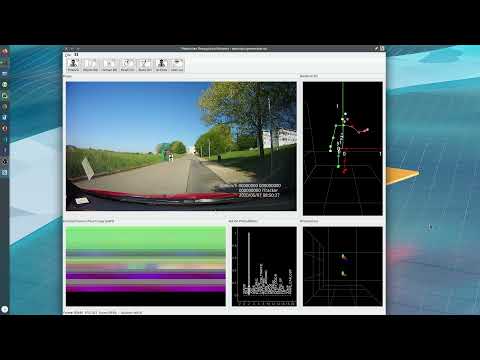
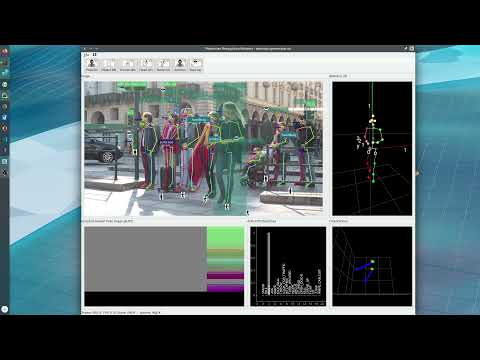
This repository contains the code for the PedRecNet (Paper: https://arxiv.org/pdf/2204.11548.pdf) as well as EHPI3D. It is the successor of our EHPI2D work (https://github.com/noboevbo/ehpi_action_recognition). The PedRecNet is a multi-purpose network that provides the following functions:
- Human BB Detection (via YoloV4).
- Human Tracking
- 2D Human Pose Estimation
- 3D Human Pose Estimation
- Human Body Orientation (currently only Phi) Estimation
- Human Head Orientation (currently only Phi) Estimation
- "Pedestrian recognizes the camera" estimation
- Human Action Recognition (via EHPI3D)
Note: This work is currently unpublished. It is part of my PhD dissertation and we are currently in the process to prepare (a? maybe more) paper. Note also, that, for now, I am no longer active in research, thus this code is provided as is.
Please cite the following paper if this code is helpful in your research.
D. Burgermeister and C. Curio, “PedRecNet: Multi-task deep neural network for full 3D human pose and orientation estimation,” in 2022 IEEE Intelligent
Vehicles Symposium (IV), 2022.The repository uses mise as task runner and environment manager. All entry points (demo, training,
evaluation, tools) are available as mise tasks (mise tasks lists them) and as plain Python scripts with --help.
mise install                 # pinned Python 3.14 + uv
mise run setup               # .venv with PyTorch 2.14 (CUDA 13.0), PyQt6, ...; see below for other CUDA versions
mise run gpu:info            # check that PyTorch sees the GPU
mise run download:models     # YoloV4, PedRecNet, EHPI3D and pose-resnet weights -> data/models
mise run data:check          # datasets / models: what is there, what is missing, next steps (run before training)
mise run demo --video my_video.mp4
mise run test # unit tests (no data / GPU needed)The code runs on current consumer GPUs incl. the RTX 50xx (Blackwell, e.g. RTX 5070 / 5080, compute capability 12.0):
| Task | PyTorch wheels | NVIDIA driver |
|---|---|---|
mise run setup |
PyPI (Linux): CUDA 13.0, sm_75 - sm_120 | >= 580 |
mise run setup:cu128 |
CUDA 12.8 (also the GPU build for Windows) | >= 570 |
mise run setup:cpu |
CPU only | - |
Training uses bf16 mixed precision by default (--amp), the default batch size of 48 fits into 12 GB; with less memory
use e.g. --batch-size 24 --accumulate 2 (same effective batch size).
Data (datasets, models, demo videos) live below the data root, ./data by default. Change it via the
PEDREC_DATA_DIR environment variable, e.g. in a git-ignored mise.local.toml:
[env]
PEDREC_DATA_DIR = "/mnt/storage/pedrec_data"- Python 3.12 or newer (3.14 tested), venv suggested
pip install -r requirements.txt(plusrequirements-onnx.txtfor the ONNX / TensorRT backend,requirements-dev.txtfor the tests)- Run the scripts from the repository root, e.g.
python pedrec/demo.py --help
All published weights (YoloV4, PedRecNet, EHPI3D, training checkpoints, pose-resnet) and datasets / dataframes work
unchanged. The dataframes were pickled with pandas 1.3 / numpy 1.21; they are read through
pedrec.utils.pandas_helper.read_pedrec_df, which converts numeric categorical columns that current pandas can not
sum (tested with fixtures written by the original versions, tests/data). Optionally rewrite them once with the
current versions: mise run tools:convert-dfs data/datasets/ROMb/rt_rom_01b.pkl ... (keeps a .bak copy).
mise run download:models fetches all of them, the manual locations are:
- YoloV4 weights (adapted from https://github.com/Tianxiaomo/pytorch-YOLOv4). Place it in data/models/yolo_v4/yolov4.pth.
- PedRecNet weights - place it in data/models/pedrec/experiment_pedrec_p2d3d_c_o_h36m_sim_mebow_0_net.pth.
- EHPI3D weights - Place it in data/models/ehpi3d/ehpi_3d_sim_c01_actionrec_gt_pred_64frames.pth.
Not required to run the network but for some experiments / trainings:
- Simple Baselines for Human Pose Estimation Weights - adapted from https://github.com/microsoft/human-pose-estimation.pytorch - place it in data/models/human_pose_baseline/pose_resnet_50_256x192.pth.tar.
- Intermediate training checkpoints of the stage chain (see Training):
mise run download:checkpoints <stage>or https://dennisnotes.com/files/pedrec/single_results/experiment_pedrec__0.pth, placed in data/models/pedrec/single_results/.
All datasets are expected below $PEDREC_DATA_DIR/datasets (default data/datasets). Run mise run data:check
before training: it shows what is downloaded and missing (incl. sampled images at exactly the dataframe rows the
training reads), whether train:pedrec / train:ehpi3d can run and the commands for the next steps. The downloads
are resumable and skip existing files; all datasets are restricted to non-commercial research.
| Dataset | Used for | Get it |
|---|---|---|
| COCO 2017 | PedRecNet 2D / confidence | mise run download:datasets:coco |
| MEBOW (COCO body orientations) | *_mebow stages |
by e-mail, mise run download:datasets:info mebow (train_hoe.json / val_hoe.json into COCO/annotations) |
| Human3.6m | PedRecNet 3D | registration, only the "Videos" are needed (mise run download:datasets:info h36m); dataframes: mise run download:datasets:pedrec --parts h36m; images: mise run data:h36m:images |
| SIM-ROM (ROMb), SIM-Circle (RT3DValidate) | PedRecNet 3D / orientation | mise run download:datasets:pedrec --parts rom circle |
| SIM-C01 | EHPI3D action recognition (skeleton dataframes; the images are not published) | mise run download:datasets:pedrec --parts c01 |
| SIM-C01 PedRecNet results | input of the gt_pred EHPI3D variants (regenerating them with train:ehpi3d:data needs the SIM-C01 images) |
mise run download:datasets:pedrec --parts c01-results |
| TUD multiview pedestrians | *_tud stages, orientation evaluation |
mise run download:datasets:info tud |
mise run download:datasets:pedrec without --parts downloads all PedRec parts. data:h36m:images extracts every
10th training and every 64th validation frame (what the training uses, ~20 GB); --val-step 1 extracts all
validation frames (needed by results:h36m, eval:h36m --subsample 1). Additional 3D datasets (MPI-INF-3DHP,
Fit3D, AIST++, AMASS) are supported on the v2 branch; the data layout is the same, so the datasets can be shared.
The expected layout below the data root (see pedrec/training/experiments/experiment_path_helper.py, every path can be
overridden there or via the script options):
data/
  datasets/COCO, Human3.6m/{train,val}, ROMb, RT3DValidate, cvpr10_multiview_pedestrians, Conti01
  models/yolo_v4, models/pedrec, models/pedrec/single_results (training checkpoints), models/ehpi3d, models/human_pose_baseline
  demo/
- Some C01 real examples -
mise run download:demoor place it in data/demo/. - Pedestrians crossing a street - place it as data/demo/multi_person_crossing_street.mp4 (the default demo input).
Currently I would recommend to use a PIP environment instead of Anaconda. I tried the (recommended) Anaconda environment for PyTorch various times, but the performance is hugely inferior to the PIP environment on my system(s). Using Anaconda I get about 9FPS on videos with a single human compared to 25FPS on my PIP environment. One thing I noticed is that the performance difference shrinks the more people are in a video, thus with 7+ people the performance of the Anaconda and the PIP environment are almost equal. If someone has an idea what the problem could be, please notify me. Things tested:
- CUDA / CUDNN are working enabled and recognized by PyTorch on both environments
- Pillow-SIMD installed
- Usage of opencv-contrib-python-headless instead of the Conda version.
pedrec/demo.py runs the full pipeline (YoloV4 -> PedRecNet -> tracking -> EHPI3D) on videos, image directories, single
images or a webcam, with the Qt GUI or headless. Every component can be switched off individually, so the parts of the
network can be run on their own.
| Task | What it does |
|---|---|
mise run demo |
Qt GUI on the default demo video (--video, --images, --image, --webcam select the input) |
mise run demo:video <file> / demo:images <dir> / demo:image <file> / demo:webcam [id] |
Qt GUI on the given input |
mise run demo:fast |
GUI with fp16 autocast + channels_last (Tensor Cores) |
mise run demo:onnx |
GUI with the ONNX models on onnxruntime (TensorRT / CUDA), after mise run export:onnx |
mise run demo:headless --video in.mp4 --output out.mp4 --json out.json |
Full pipeline without GUI, writes an annotated video / images and all results as JSON |
mise run demo:detector --video in.mp4 --output out.mp4 |
YoloV4 detector only |
mise run demo:pose --image person.jpg --output out.jpg --json out.json |
PedRecNet only: 2D / 3D pose + orientation on the full frame (no detector, tracking, actions) |
mise run demo:detector-pose --video in.mp4 --output out.mp4 |
Detector + PedRecNet without tracking / actions |
mise run demo:no-action |
GUI without action recognition |
mise run bench |
Per stage timings and comparison with the original implementation (--fast, --video, --random-weights) |
GUI player controls (below the video): play / pause (Space), previous / next frame while paused (Left /
Right, while playing they skip 5 s), replay (Home), skip back / forward and a seek bar. Processed frames are cached,
so stepping back, replaying and seeking into the processed part show the same tracked results instantly; after a jump
into an unprocessed part the tracking starts anew. Left of the video a magnifier shows the plain camera image of the
selected person (no overlays) to see what the person is doing; the button in its corner pops it out into an own,
resizable window (closing the window docks it again).
Useful options (see python pedrec/demo.py --help):
- components:
--no-detector,--no-pose,--no-tracking,--no-action,--action-list c01|c01_real - tracking:
--tracker bytetrack(default: Kalman filter + two stage IoU association, keeps ids through short occlusions) or--tracker legacy(original optical flow + pose similarity merging);--smoothing one_euro(default) /mean(original 2 frame mean) /nonefor the 3D pose and orientations - speed:
--fast(=--half --channels-last),--compile,--backend onnx,--prefetch N,--cpu --size WxH,--max-frames N,--*-weightsto use other checkpoints
The pipeline (pedrec/inference/pipeline.py, PedRecPipeline) can be embedded in your own code. It uploads every
frame once and runs the person crops, normalization, NMS and coordinate transformations batched on the GPU; PedRecNet
runs exactly once per frame (the original code ran it a second time for tracked but undetected persons). The optimized
crops / pose / YOLO decoding are tested against the original implementation (tests/test_inference_equivalence.py).
The PedRecNet is trained as a chain of stages, each one initialized from its predecessor and adding datasets and / or
loss terms (2D pose -> 3D pose -> joint confidence -> orientation). All stages are described in
pedrec/training/experiments/pedrec_stages.py and trained with one script:
mise run train:list                                   # stage table incl. dependencies
mise run train:pedrec --stage p2d_coco_only           # one stage (needs the pose-resnet weights)
mise run train:pedrec:chain p2d3d_c_o_h36m_sim_mebow  # all stages up to the published model, skips existing checkpoints
mise run train:pedrec --stage p2d3d_c_o_h36m_sim_mebow --init-weights my_checkpoint.pth --lr 2e-3 --batch-size 32
Shortcuts for the main milestones: train:pedrec:2d, train:pedrec:3d, train:pedrec:conf, train:pedrec:orientation.
Each stage trains two rounds (frozen backbone, then full network with reduced learning rates), writes the checkpoints
experiment_pedrec_<stage>_0_01.pth / experiment_pedrec_<stage>_0.pth (EMA weights), the best epoch
experiment_pedrec_<stage>_0_best.pth and a markdown protocol into data/models/pedrec/single_results/. Stages without a fixed learning rate run the LR range test first (plot saved next
to the checkpoint); --lr skips it, --lr-finder forces it. The demo needs the plain network weights, extract them
with mise run tools:extract-net --stage <stage>.
Training stability options (PedRecNet and EHPI3D):
| Option | Default | Effect |
|---|---|---|
--amp auto/bf16/fp16/off |
auto (bf16 on RTX 30xx-50xx) | mixed precision; loss heads always in fp32, off = original fp32 training |
--grad-clip N |
10 | clip the global gradient norm |
--accumulate N |
1 | gradient accumulation for GPUs with less memory |
--ema-decay D |
0.9998 (EHPI3D 0.999) | exponential moving average of the weights, used for validation and the checkpoints |
--resume |
- | continue an interrupted stage from experiment_pedrec_<stage>_<cycle>_state.pth (written every epoch) |
Steps with a non-finite loss or gradient are skipped (the run stops after 50 in a row). The best epoch is selected by the mean relative improvement of all validation metrics (PCK, MPJPE, joint accuracy, orientation errors) compared to the first epoch.
mise run train:ehpi3d:list                     # variants (gt / pred / mixed skeletons x 30 fps / 15 fps / 64 frames)
mise run train:ehpi3d --variant gt_pred_64frames
The training needs the SIM-C01 skeleton dataframes and the PedRecNet results on them (*_allframes.pkl, see
"Generate own training data"). mise run train:ehpi3d:data regenerates the result dataframes with the published
PedRecNet.
| Task | What it does |
|---|---|
mise run eval:pedrec --weights <ckpt> |
2D / 3D pose, joint confidence and orientation metrics on COCO, SIM and Human3.6m (training validation code) |
mise run eval:h36m --weights <net.pth> |
Per-action MPJPE on Human3.6m |
mise run eval:coco-orientation --weights <net.pth> |
Body orientation accuracy on COCO (MEBOW) |
mise run eval:tud-orientation --weights <net.pth> |
Body orientation accuracy on TUD |
mise run eval:ehpi3d --variants gt_pred_64frames |
Action recognition metrics on SIM-C01 |
mise run results:coco / results:h36m / results:sim-c01 |
Write PedRecNet result dataframes (--experiments <stages>) |
mise run export:coco / export:h36m / export:sim-c01 |
Markdown / LaTeX result tables from the result dataframes (as used in doc/diss_eval) |
mise run export:onnx |
Export YoloV4 / PedRecNet / EHPI3D to ONNX and verify them against PyTorch |
pedrec/demo.py                  demo / inference CLI (GUI + headless)
pedrec/inference/pipeline.py    PedRecPipeline: detector -> pose -> tracking -> actions
pedrec/inference/gpu_ops.py     batched device side crops, resize, NMS, coordinate transforms
pedrec/tracking/                ByteTrack style tracker, One Euro filter, original optical flow tracker
pedrec/training/train_pedrec.py PedRecNet training (stages: pedrec/training/experiments/pedrec_stages.py)
pedrec/training/train_ehpi3d.py EHPI3D training (variants: pedrec/training/experiments/ehpi3d_variants.py)
pedrec/evaluations/             validation / evaluation scripts
pedrec/tools/                   dataset generators, result writers, weight tools
pedrec/networks/                PedRecNet, EHPI3D, YoloV4
pedrec/datasets/, pedrec/configs/, pedrec/utils/, pedrec/tracking/, pedrec/ui/, pedrec/visualizers/
doc/                            experiment protocols, evaluation results, architecture review
tests/                          unit tests (mise run test)
Check out the panda dataframes (e.g. the rt_conti_01_train_FIN.pkl from SIM-C01 dataset, or the pkls from the H36M dataset). If you provide a dataset of the same structure you can just use the pedrec dataset class.
You can find some scripts I used to generate the dataframes in pedrec/tools/datasets/, but I have not tested them in a while.
The same applies for EHPI3D action recognition data: Check out the dataframes from the rt_conti_01_train_FIN.pkl file! You might want to checkout the notebook dataset_rtsim_conti01_ehpi as well. The PedRecNet result dataframes for SIM-C01 are downloaded with mise run download:datasets:pedrec --parts c01-results (https://dennisnotes.com/files/pedrec/result_dfs/) and can be regenerated with mise run train:ehpi3d:data (needs the SIM-C01 images).
I've just pasted a few of my notebooks in the notebooks folder. They are not cleaned up and may contain absolute paths etc. but maybe they help the one or other to understand some concepts / validation results.
Note: probably outdated information! Need to recheck this part.
note: not really datatypes, those types are stored in numpy arrays due to performance considerations. There are helper methods providing more userfriendly access to those values (e.g. joint_helper(_3d), bb_helper). Those datatypes are the ones used internally in the PedRecNet application, there might be differences in types used in e.g. datasets etc.
| "Datatype" name | Shape |
|---|---|
| bb_2d | center_x, center_y, width, height, confidence, class_idx |
| joint_2d | x, y, confidence |
| joint_3d | x, y, z, confidence |
note: n = dataset length
| dataset name | Shape | DType | Description |
|---|---|---|---|
| img_paths | (n) | str | img path, relative to the dataset root |
| joints2d | (n,17,4) | float32 | 17 = joints, 4 = x, y, confidence, visibility (coordinates in pixels, starting from top left of the image) |
| skeleton_3d_hip_normalized | (n,17,5) | float32 | 17 = joints, 5 = x, y, z, confidence, visibility (coordinates in mm) |
| env_position | (n,3) | float32 | 3 = x, y, z (mm) |
| body_orientation | (n,4) | float32 | 4 = theta, phi, confidence, visibility |
| head_orientation | (n,4) | float32 | 4 = theta, phi, confidence, visibility |
| bbs | (n,6) | float32 | 5 = center_x, center_y, width, height, confidence, class_idx |
| scene_idx_range | (n,2) | uint32 | 2 = scene_idx_start, scene_idx_stop the index range in the hdf5 file containing data from the same scene |
| actions | (n) | uint32 | List = dynamic sized list of action ids, e.g. [[1, 2], [3, 4, 5]] |
| movements | (n) | uint32 | ids, see constants for ID <-> NAME mapping |
| movement_speeds | (n) | uint32 | ids, see constants for ID <-> NAME mapping |
| genders | (n) | uint32 | ids, see constants for ID <-> NAME mapping |
| skin_colors | (n) | uint32 | ids, see constants for ID <-> NAME mapping |
| sizes | (n) | uint32 | ids, see constants for ID <-> NAME mapping |
| weights | (n) | uint32 | ids, see constants for ID <-> NAME mapping |
| ages | (n) | uint32 | ids, see constants for ID <-> NAME mapping |
| frame_nr_locals | (n) | uint32 | frame number of the current scene |
| frame_nr_global | (n) | uint32 | frame number of the complete record |
Some notes to original datasets. Important: Those notes do NOT apply to internal PedRec usage, the original datasets are converted to PedRec Datasets before usage, thus those notes can usually be ignored.
They use a binary mask containing 1s in the bounding box area.
- 0 = 'Hips'
- 1 = 'RightUpLeg'
- 2 = 'RightLeg'
- 3 = 'RightFoot'
- 4 = 'RightToeBase'
- 5 = 'Site' - ????
- 6 = 'LeftUpLeg'
- 7 = 'LeftLeg'
- 8 = 'LeftFoot'
- 9 = 'LeftToeBase'
- 10 = 'Site' - ????
- 11 = 'Spine'
- 12 = 'Spine1'
- 13 = 'Neck'
- 14 = 'Head'
- 15 = 'Site'
- 16 = 'LShoulder'
- 17 = 'LeftArm'
- 18 = 'LeftForeArm'
- 19 = 'LeftHand'
- 20 = 'LeftHandThumb'
- 21 = 'Site'
- 22 = 'L_Wrist_End'
- 23 = 'Site'
- 24 = 'RightShoulder'
- 25 = 'RightArm'
- 26 = 'RightForeArm'
- 27 = 'RightHand'
- 28 = 'LeftHandThumb'
- 29 = 'Site'
- 30 = 'L_Wrist_End'
- 31 = 'Site'
- YoloV4 object detection: https://github.com/Tianxiaomo/pytorch-YOLOv4
- Pose-resnet as base network: https://github.com/microsoft/human-pose-estimation.pytorch
- Skeleton by Wolf Böse from the Noun Project
- Head by Naveen from the Noun Project
- body by Makarenko Andrey from the Noun Project
- Eye by Simon Sim from the Noun Project
- jogging by Adrien Coquet from the Noun Project
- Walk by Adrien Coquet from the Noun Project
- stand by Gan Khoon Lay from the Noun Project
- sit by Adrien Coquet from the Noun Project
- Dennis Burgermeister, Cognitive Systems Research Group, Reutlingen University (no longer active)
- Cristóbal Curio, Cognitive Systems Research Group, Reutlingen University
This project was funded by the Continental AG.