
agents-tree is a live terminal CLI and optional herdr plugin for viewing
coding-agent sessions and their nested subagents as a tree. It shows Antigravity
CLI (agy), Claude Code, Codex and Grok Build with each agent's model and effort,
context use, elapsed time and status.
In a terminal, agents-tree . (shown here with fictional demo data):
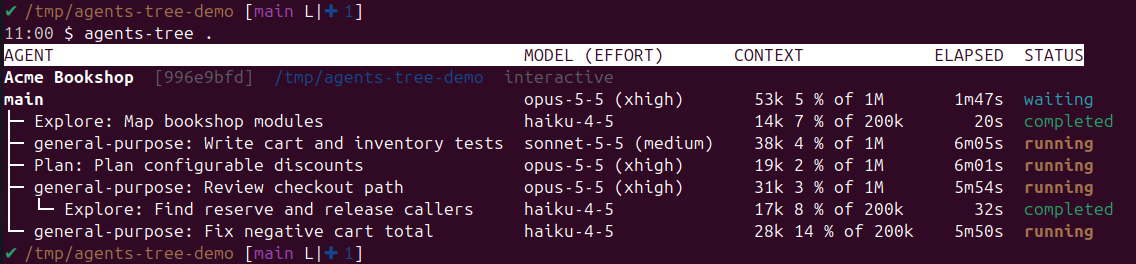
In herdr, open the same tree as a live overlay over the
active pane with prefix+a.

It reads the transcripts Antigravity CLI (agy), Claude Code, Codex and Grok Build keep on disk and never talks to a session, so nothing it prints ends up in an agent's context. It has no dependencies beyond Python 3.10.
Antigravity CLI (agy), Claude Code, Codex and Grok Build are supported.
uv tool install agents-tree # or: pipx install agents-treeFrom a checkout: uv tool install ., or run it in place with
PYTHONPATH=src python3 -m agents_tree.
Install the plugin to open the live tree over the focused agent pane with one key:
herdr integration install claude                 # herdr learns each pane's session id
herdr plugin install blavka/agents-tree
herdr plugin action invoke agents-tree.setup-keysagents-tree # every running session on this machine
agents-tree . # sessions running in this directory (or its newest session)
agents-tree ~/src/api # same, for another directory
agents-tree 1a2b3c4d # one session, by id or a unique prefix (an ambiguous one lists the matches)
agents-tree -r # only running subagents and their parents
agents-tree -s # only the sessions of this directory (or its project, from a subfolder)
agents-tree -i 3d # only sessions alive but idle for 3 days or more: candidates to close
agents-tree -ki 3d # close eligible idle sessions after confirmation (minimum: 30s)
agents-tree -w # live view like top, refreshed every 2 s (-n 5 for 5 s)
agents-tree --json . # one schema-versioned JSON document for scripts
agents-tree --provider agy # Antigravity CLI sessions
agents-tree --provider codex # Codex sessions under ~/.codex (or $CODEX_HOME)
agents-tree --provider grok # Grok Build sessions under ~/.grok (or $GROK_HOME)--json writes the provider-neutral session and agent tree, including each
agent's detail, to stdout. It is intended for scripts and other tools; errors
go to stderr and it cannot be combined with --watch.
In the live view:
| Key | Does |
|---|---|
↑ ↓ / j k / wheel / pointer |
select an agent (hovering a row highlights it) |
Enter / → / click |
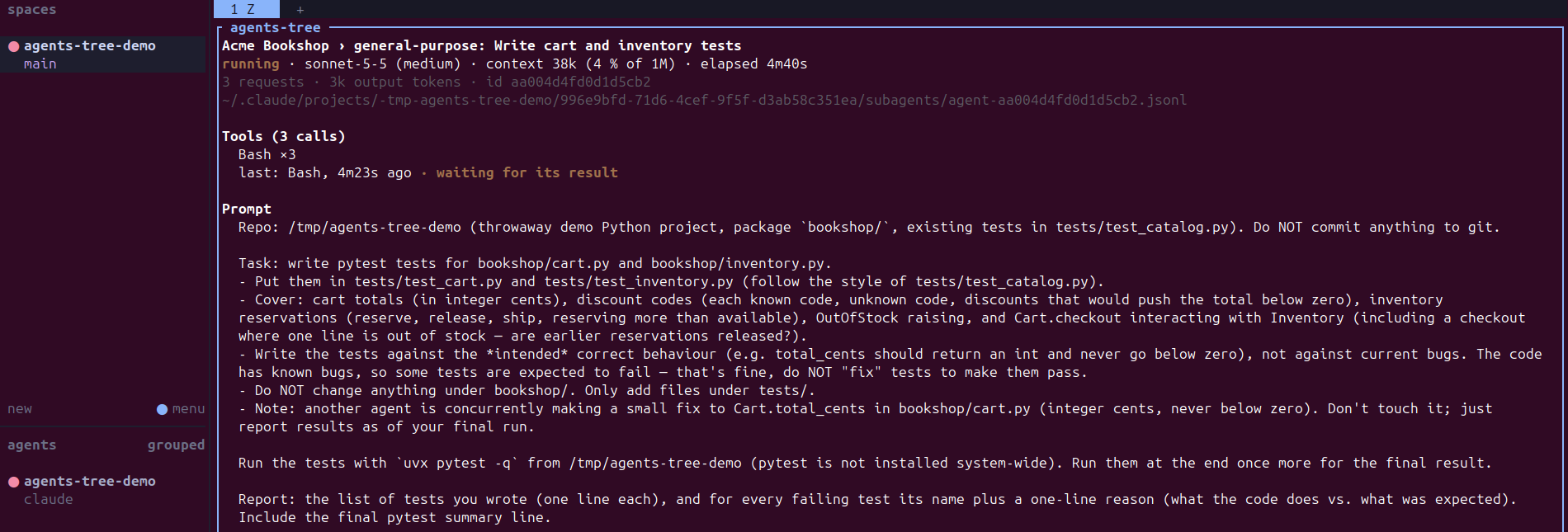
open its detail: the prompt it was given, its tool calls (and the one it is waiting on), its last message, request and token counts, transcript path |
| double-click | in the detail, copy the name, session id, agent id or path under the pointer |
Esc / ← / q |
back to the tree (in the tree: clear the selection, then quit) |
PgUp PgDn Home End |
scroll the detail, or jump through the tree |
r |
toggle running-only |
f |
show or fold older finished agents that were hidden to fit the screen |
Ctrl+C |
quit |
The live view takes the mouse for clicks, hovering and the wheel; most terminals still
select text with Shift held, or start it with --no-mouse. In the detail, double-click
the name, the session id, the agent id or a path to copy it. When the tree is
taller than the terminal, the oldest finished agents are folded into a
"… N older finished agents hidden" line; press f to expand them and scroll
through the full tree.
Enter on a row opens that agent's detail:
The summary counts sessions by state (▲ blocked, ● running, ○ waiting,
– inactive). Sessions
are grouped under their directory's name, the ones waiting on a person first, then
the working ones; each session is one row, its subagents below it.
| Column | Meaning |
|---|---|
| label | state icon, then the session's title, or agent-type: description as the spawning agent gave it (the agent-type: is left out when every subagent of the session shares it) |
| id | the session id's first 8 characters: pass it as the target (agents-tree -w 1a2b3c4d) to watch that session alone |
| model (effort) | model of the agent's latest request, and its effort level (models without effort show none); always shown, even when rows share a model |
| context | tokens in the latest request (input + cache + output) as a bar and a share of the context window; tokens alone when the window is unknown |
| time | subagents and working sessions: first to last transcript entry, up to now while running; other sessions: how long ago they last did anything (3h05m ago) |
| status | subagents: running (active in the last 2 minutes, or waiting on a tool call), completed / failed (as Claude Code reported), done (finished, no outcome recorded), idle (a teammate waiting for its next message), stale (no sign of life and no completion marker); sessions: their own state, or not running |
Enter on a session row shows its directory and full id.
- Context window. Claude Code does not record it, so it is taken from the
model family: 1M for Claude 5 models (Opus, Sonnet, Fable), 200k otherwise.
Grok Build stores it in
summary.jsonwhen set; otherwise 2M for grok-4 / grok-code, 128k for other models. Override with--window 200000orAGENTS_TREE_WINDOW. - Transcript formats are internal to each agent CLI and may change between
releases. Unknown lines are skipped, but a field that moves makes its column
show
-until agents-tree is updated. - Transcript cache. A folded snapshot of each parsed transcript is kept in
~/.cache/agents-tree($XDG_CACHE_HOME/agents-tree, or$AGENTS_TREE_CACHE) so the next run reads only the lines appended since. The snapshot holds prompt excerpts. A damaged snapshot is discarded and that transcript is read again. SetAGENTS_TREE_CACHE=offto disable it. - Elapsed spans wall-clock time, so a session resumed over several days, or a subagent woken up again by a message, shows that whole span.
- Running sessions (Claude) come from
claude agents --json; withoutclaudeonPATH, agents-tree falls back to~/.claude/sessions/(interactive sessions only). - Running sessions (Grok) are the ones in
~/.grok/active_sessions.json(or$GROK_HOME) whose process is still alive, including a session that is only waiting. A session also counts while itsupdates.jsonlwas written in the last two minutes, or while a subagent'smeta.jsonstill saysrunning. - Running sessions (Codex) are inferred from a transcript written in the last two minutes, including one of its subagent transcripts. Codex's on-disk files do not retain the process id for a quiet, waiting session, so such a session may drop out of the all-sessions view until it writes again; a directory or session-id target still shows its newest saved session. The idle filter cannot currently identify waiting Codex sessions.
- Running sessions (Antigravity CLI / agy) are inferred from transcripts written
in the last two minutes under
~/.gemini/antigravity-cli/brain/(or$ANTIGRAVITY_HOME). The older~/.gemini/antigravity/layout remains supported.
herdr shows your agents, not their subagents. The plugin in this repository opens the live tree for the focused agent pane over that pane; closing it gives the layout back.
| Key | Action |
|---|---|
prefix+a |
live tree of the focused agent's session; q or the same key closes it |
prefix+shift+a |
live tree of every running session |
On a pane without an agent, prefix+a shows every running session. The plugin
runs the copy of agents-tree bundled in the repository, so it needs only
python3 3.10+ (or AGENTS_TREE_PYTHON pointing at one). setup-keys writes
one marked block into your herdr config.toml (backed up first) and leaves keys
you already use alone; agents-tree.remove-keys takes it out again. The
open-split and open-tab actions show the same tree in a split or a tab.
For development, link a checkout instead: herdr plugin link /path/to/agents-tree.
uv sync
uv run pytest
uv run pylint src
uv run pylint tests --disable=redefined-outer-name,protected-access,unused-argument
uv run pyright
CI (.github/workflows/test.yaml) runs the same on every push and pull request:
lint and types on Python 3.12, then the tests, a test run and a package build on
3.10 to 3.14.
To release, bump version in pyproject.toml, src/agents_tree/__init__.py and
herdr-plugin.toml, then push a matching tag (git tag v0.2.0 && git push origin v0.2.0). .github/workflows/publish.yaml checks the tag against the version,
tests, builds and publishes to PyPI through trusted publishing.
AGENTS.md is the guide for working on the code, including adding a provider; docs/demo/ shows how to check agents-tree against a real agent run in a throwaway project.
Providers live in src/agents_tree/providers/: each turns one agent CLI's files
into the provider-neutral Session/Agent model in model.py, which
render.py draws.
MIT