
pico-bootLoader is a bootloader for RP2350 boards. Its primary purpose is to host a collection of retro-game emulators and native ports of Doom, Duke Nukem 3D and Quake II on a single board and to let the user choose which one to run from an on-screen menu, without reconnecting the board to a computer.
It runs on ten board configurations, each with its own ready-made binary — see Supported hardware for the file names:
- Raspberry Pi Pico 2 / Pico 2 W, or a Pimoroni Pico Plus 2, with an Adafruit DVI breakout and a microSD breakout — or the PicoNES PCB that replaces that wiring
- Raspberry Pi Pico 2 / Pico 2 W on a Pimoroni Pico DV Demo Base
- Adafruit Fruit Jam
- Adafruit Metro RP2350
- Adafruit Feather RP2350 with a TLV320DAC3100
- Waveshare RP2350-Zero with the PicoNES Mini PCB
- Waveshare RP2350-PiZero
- Waveshare RP2350-USB-A, optionally on the PicoNES Micro PCB
- Murmulator M2, or an RP2350 Plus on the PicoSNES PCB, which uses the same pin map
- Olimex RP2040-PICO-PC with a Raspberry Pi Pico 2
Every one of them outputs video over DVI/HDMI and reads its applications from an SD card. RP2040 boards are not supported: the flash layout and the UF2 checks are RP2350-specific. The Olimex board is named after the RP2040 Pico it was designed for, but takes a Pico 2 in the same socket. The four PCBs are optional console-style carriers for boards already in this list — see Custom PCBs.
It is not limited to emulation, though: any RP2350 application can be made bootable and added to the menu — see Creating a bootable build of your own application.
An RP2350 board normally holds a single program. Running a different one means
connecting it to a PC, holding BOOTSEL, and copying a new .uf2 over USB.
pico-bootLoader replaces that procedure: the applications are placed on the
board's SD card once, and from then on every power-on presents a menu. The menu
is navigated with a USB game controller or a USB keyboard, in either a graphical
mode with full-screen artwork per application or a plain text mode. Selecting an
entry flashes the corresponding application (if it is not already resident) and
starts it. A hardware reset or power cycle always returns to the menu.
Doom, Duke Nukem 3D and Quake II are included as native RP2350 ports — they are not emulated.
- Flash the bootloader. Download the loader
.uf2for your board from the Releases page; the table under Supported hardware, below, gives the file name for each board. Hold BOOTSEL, connect the board over USB, and copy the.uf2onto theRP2350drive. - Prepare the SD card. Download
pico-bootLoader_sdcard.zipfrom the same Releases page and unpack it onto a FAT32- or exFAT-formatted card. The archive contains the emulators, the native ports, the menu artwork, a sample configuration file and theupdateAllinstaller for ROM sets and game data. Alternatively, assemble the layout yourself as described in SD card layout. - Run
updateAll. With the card still in the computer, startupdateAll.exefrom the card'supdateAllfolder; the program selects that card itself. Windows may report that the program is not signed: select More info, then Run anyway. On Linux or macOS, runpython3 updateAll.py --sd <path of the card>from the same folder.updateAllinstalls the arcade ROM sets and the shareware or demo data of Doom, Duke Nukem 3D and Quake II, each in the folder its application reads, and downloads whatever is not at hand. Doom does not start without it. The ROM sets are not part of this project, and holding the rights to them is the user's responsibility; updateAll/README.md describes how to use only zips you already have. Running it again later installs the sets added since. - Add your games. The archive contains no games, ROMs or BIOS files. Each
emulator's file browser opens in its own folder:
/roms/NES,/roms/SNES,/roms/MD(Genesis / Mega Drive),/roms/PCE,/roms/GB,/roms/SMS(Master System and Game Gear),/roms/O2E(Videopac) or/roms/TI99, and at the root of the card when that folder does not exist. The BIOS files and the folders of ColecoVision, Doom, Duke Nukem 3D, Quake II and the arcade games are given under Bootable applications. - Run it. Insert the card and power on the board. The menu appears.
The Releases page provides two kinds of download: the per-board bootloader
.uf2 binaries and the pico-bootLoader_sdcard.zip SD-card archive.
Release tags say which of the two changed:
| Tag | What changed | What you need to do |
|---|---|---|
v0.N |
bootloader firmware | re-flash the board and refresh the SD card |
v0.N.M |
emulator binaries only | replace /emu on the SD card; no re-flash needed |
Every release lists the exact emulator versions its archive ships, and the same
table is in /emu/versions.txt on the card.
Only RP2350 boards are supported; the partition scheme and the UF2 family checks
are RP2350-specific. The board is selected at compile time through the
HW_CONFIG value (defined in
pico_shared/BoardConfigs.cmake). The same
number names the SD-card folder the loader reads applications from
(<BASEDIR>/<HW_CONFIG>/).
| HW_CONFIG | Board | Bootloader binary |
|---|---|---|
| 1 | Pimoroni Pico DV Demo Base (Pico 2 / Pico 2 W) | pico-bootLoader_PimoroniDVI_pico2_arm.uf2 |
| 2 | Adafruit DVI + microSD breakout, or the PicoNES PCB (Pico 2 / Pico 2 W / Pimoroni Pico Plus 2) | pico-bootLoader_AdafruitDVISD_pico2_arm.uf2 |
| 5 | Adafruit Metro RP2350 | pico-bootLoader_AdafruitMetroRP2350_arm.uf2 |
| 6 | Waveshare RP2350-Zero with the PicoNES Mini PCB | pico-bootLoader_WaveShareRP2350ZeroWithPCB_arm.uf2 |
| 7 | Waveshare RP2350-PiZero | pico-bootLoader_WaveShareRP2350PiZero_arm_piousb.uf2 |
| 8 | Adafruit Fruit Jam | pico-bootLoader_AdafruitFruitJam_arm_piousb.uf2 |
| 9 | Waveshare RP2350-USB-A (optionally on the PicoNES Micro PCB) | pico-bootLoader_WaveShare2350USBA_arm_piousb.uf2 |
| 13 | Murmulator M2, or an RP2350 Plus on the PicoSNES PCB | pico-bootLoader_MurmulatorM2_arm.uf2 |
| 14 | Adafruit Feather RP2350 (TLV320DAC3100 audio) | pico-bootLoader_AdafruitFeatherRP2350_TLV320DAC3100_arm_piousb.uf2 |
| 15 | Olimex RP2040-PICO-PC with a Raspberry Pi Pico 2 | pico-bootLoader_OlimexPicoPC_arm.uf2 |
Video output is DVI/HDMI on all boards. Boards whose video connector is wired to the RP2350 HSTX pins — HW_CONFIG 2, 5, 8, 13, 14 and 15 — drive it through the HSTX peripheral; the others use PicoDVI. A single SD card serves both kinds — artwork is cached in both pixel formats (see Artwork).
The Olimex RP2040-PICO-PC
is a carrier board for a Raspberry Pi Pico, with HDMI, a microSD slot, a USB-A
port, an audio jack and a UEXT connector. Despite its name, the loader runs on
it with a Raspberry Pi Pico 2 in the socket in place of the original Pico.
Flash pico-bootLoader_OlimexPicoPC_arm.uf2 and put the applications in
/emu/15/.
- Video and sound. HDMI is driven through HSTX. Sound plays on HDMI and on the audio jack at the same time.
- Controllers. A USB controller or keyboard goes in the USB-A port, and a NES or SNES controller can be wired to the UEXT connector. The USB-A port is connected to the Pico 2's own USB port, so a USB controller cannot be used while the card is shown to a computer in USB drive mode; leave that mode from the NES/SNES controller or by ejecting the drive.
- Flash. A standard Pico 2 has 4 MB of flash, which leaves 3.5 MB for the application partition.
- PSRAM. A standard Pico 2 has no PSRAM. A PSRAM chip can be added with its
chip-select pin on GPIO 8. Without it, the entries that require PSRAM — the
Super Nintendo emulator, PCEngine CD, OutRun, Duke Nukem 3D and
doom_tiny_full— still appear in the menu but do not run.
Support for this board was contributed by DnCraptor.
The Pico 2 W runs the ordinary pico2 binary for its hardware configuration;
there is no separate build for it. Up to v0.4 there was one, purely so that the
on-board LED would work: that LED hangs off the wireless chip and reaching it
means linking the CYW43 driver, which filled the 512 KB bootloader partition to
within a few kilobytes and left no room for USB drive mode.
Everything on the board therefore works as it does on a Pico 2, except the
on-board LED, which no longer blinks as a heartbeat or while an application is
being flashed. A build with the LED can still be produced locally with
./bld.sh -2 -c <HW_CONFIG> -w; it is not released and USB drive mode is off in
it by default.
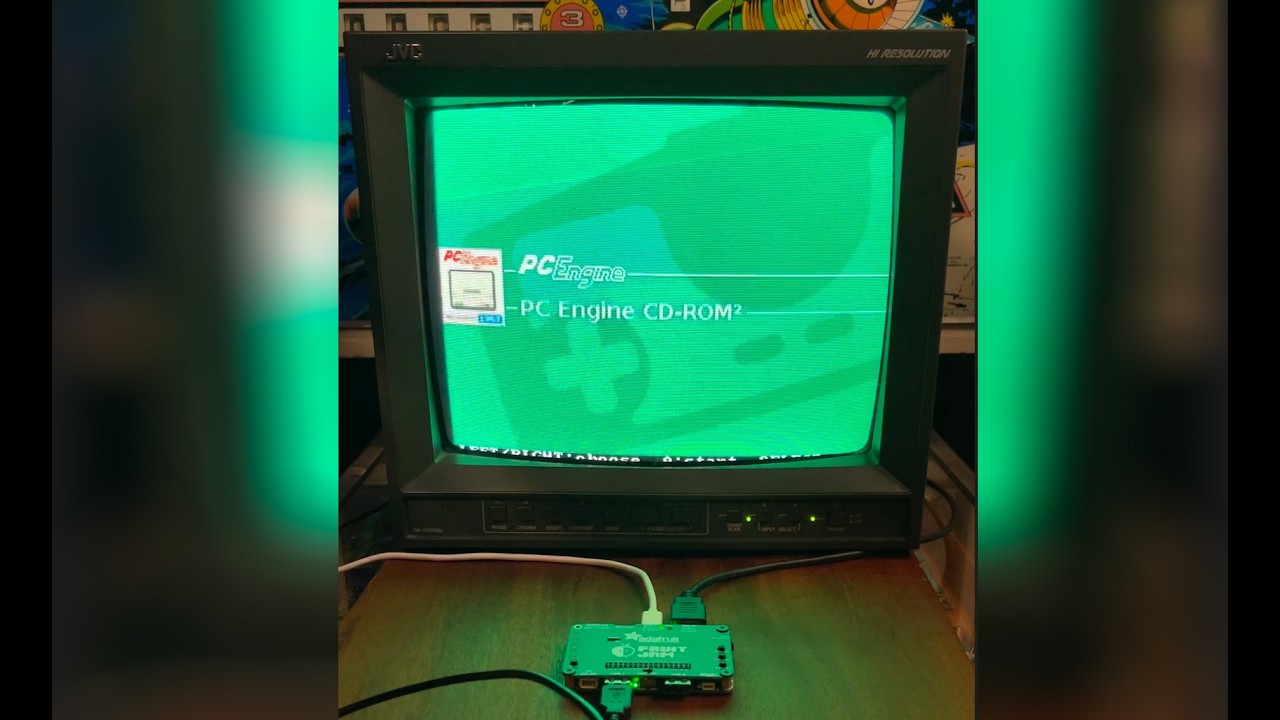
Click the image below to watch pico-bootLoader in action.
The following emulators and native ports are supported. Each is built from
its own repository and identified by the program name embedded in its .uf2.
| System | Program name | Source repository | Menu artwork |
|---|---|---|---|
| Nintendo Entertainment System | piconesPlus |
pico-infonesPlus |  |
| Super Nintendo Entertainment System | picosnesPlus |
pico-snesPlus |  |
| Sega Genesis / Mega Drive | picogenesisPlus |
pico-genesisPlus |  |
| NEC PC Engine / PCEngine CD | picopcePlus |
pico-pcePlus |  |
| Nintendo Game Boy / Game Boy Color | PicoPeanutGB |
pico-peanutGB |  |
| Sega Master System / Game Gear | picosmsPlus |
pico-smsplus |  |
| Philips Videopac / Magnavox Odyssey² | picoPacPlus |
pico-pacPlus |  |
| ColecoVision | colecojam |
Adafruit_ColecoJam |  |
| Texas Instruments TI-99/4A | pico994A |
pico-994A |  |
| Doom (native port, not emulated) | doom_tiny |
pico-doom |  |
| Duke Nukem 3D (native port, not emulated) | duke3d_game |
pico-duke3D |  |
| Quake II (native port, not emulated) | pico-quake2 |
pico-quake2 |  |
| OutRun (native port, not emulated) | picoOutRun |
pico-outrun |  |
| Phoenix (arcade) | picoPhoenix |
pico-phoenix |  |
| Moon Cresta (arcade) | picoMoonCresta |
pico-mooncresta |  |
| Galagino (arcade: 47 games, among them Pac-Man, Galaga, Donkey Kong and Xevious) | picoGalagino |
pico-galagino |  |
| Dragon's Lair (arcade, laserdisc) | picoDragonsLair |
pico-dragonslair |  |
| 1943 (arcade: 1943 and 1943 Kai) | pico1943 |
pico-1943 |  |
The following emulators need a bios in /bios on SD:
- Nintendo Entertainment System : For Famicom Disk System games
fds-bios.rom - Philips Videopac / Magnavox Odyssey²:
o2rom.bin - PCEngine CD :
Super CD-ROM System (Japan) (v3.0).pceor another variant. - Texas Instruments TI-99/4A:
994aROM.binand994aGROM.bin, both required — nothing runs without them.994aDISK.bin(disk controller) andspchrom.bin(speech vocabulary) are optional.
TI-99/4A is built for every board the loader supports. Cartridges go in
/roms/TI99 as .rpk Rom PacKs (preferred — one file per cartridge) or as the
classic C/D/G .bin sets; the emulator's own tools/mkrpk.py converts between
them. TI BASIC is reachable without a cartridge. A USB keyboard acts as the TI
keyboard, and joysticks come from USB gamepads, NES/SNES pads or Wii
controllers. PSRAM is not required, but without it the disk drives are
unavailable and cartridge ROM is capped at 32 KB.
ColecoVision runs on the Adafruit Fruit Jam (HW_CONFIG 8) only. The emulator,
Adafruit_ColecoJam, is
written and maintained by Dan Cogliano (@cogliano)
outside this project. It expects everything in /coleco/ on the SD
card: the 8 KB ColecoVision BIOS as COLECO.BIN, and the games as .ROM files.
Neither the BIOS nor any game is included.
Doom runs on five boards: Adafruit Fruit Jam (HW_CONFIG 8), the Adafruit DVI +
MicroSD breakout combination (2), Murmulator M2 (13), Adafruit Feather RP2350
with a TLV320DAC3100 (14) and the Olimex RP2040-PICO-PC with a Pico 2 (15). It
ships in two variants: doom_tiny, the shareware
episode, whose WAD the loader flashes together with the engine from a data
image, /roms/doom/doom1-whx-bootloader.uf2 (see
Auxiliary data images); and
doom_tiny_full, registered/Ultimate DOOM, which carries no WAD in flash and
instead reads /roms/doom/doom.whd from the SD card at boot, so it needs a board
with PSRAM. The data image is not in the SD-card archive: updateAll makes it
from the shareware WAD in the
pico-doom repository and
installs it in /roms/doom/. It is the same file for every board. Without it,
the menu names the missing file instead of starting the game.
Duke Nukem 3D runs on four boards: Adafruit Fruit Jam (HW_CONFIG 8), the
Adafruit DVI + MicroSD breakout combination (2, on a Pimoroni Pico Plus 2),
Murmulator M2 (13) and the Olimex RP2040-PICO-PC with a Pico 2 (15, with a PSRAM
chip fitted on GPIO 8). It needs PSRAM on all four. There is no companion data
image: DUKE3D.GRP — shareware or registered/Atomic — is streamed from
/roms/duke3d/ on the SD card, with savegames and duke3d.cfg written next to
it. updateAll installs the shareware version 1.3d there. All four have been
tested on hardware.
Quake II runs on two boards: Adafruit Fruit Jam (HW_CONFIG 8) and the Adafruit
DVI + MicroSD breakout combination (2, on a Pimoroni Pico Plus 2). It needs 8 MB
of PSRAM and 16 MB of flash. The game data is not included: updateAll
installs the demo, or download pico-quake2_demo_sdcard.zip from the
pico-quake2 releases
and unpack it to the root of the card, which puts pak0.pak in
/roms/quake2/baseq2/; the baseq2 folder of the full game goes in the same
place. Savegames and settings are written there too. The first load of each
level copies its textures, models and sounds from the card into flash, above the
application, and takes considerably longer than later loads. Other applications
may overwrite that copy; it is then refreshed on the next load. On HW_CONFIG 2,
Quake II reads USB controllers only from a USB-A socket on GPIO 20 (D+) and
21 (D−), not from the Pico's own USB port that the loader and the emulators
use; NES and SNES controllers in the controller ports work as usual. Quake II
is an early pre-release; its
README
lists the known limitations.
OutRun is a port of the Cannonball engine and the first entry in the
Arcade category. It is built for five boards: Adafruit Fruit Jam (HW_CONFIG 8),
the Adafruit DVI + MicroSD breakout combination (2, on a Pimoroni Pico Plus 2),
Murmulator M2 (13), Adafruit Feather RP2350 with a TLV320DAC3100 (14) and the
Olimex RP2040-PICO-PC with a Pico 2 (15, with a PSRAM chip fitted on GPIO 8). It
needs PSRAM on all five, and an HSTX board: on the bit-banged PicoDVI
configurations the system clock is tied to the pixel clock and the engine is too
slow, so those boards are not built. There is no companion data image. The
OutRun ROM set is copyright SEGA and is not distributed with the bundle: copy
the unzipped MAME outrun (revision B) set to /roms/ORUN on the SD card and
the game prepares its data in PSRAM at startup, which takes a few seconds on
every boot. If the ROMs are missing the game says so on screen rather than
failing silently. The loader's own USB drive mode is the
easiest way to put them on the card without taking it out of the board.
Phoenix is the second Arcade entry: an emulation of Amstar's 1980 arcade
board. It runs on every board the loader supports, and needs neither PSRAM nor
HSTX. The Phoenix ROM set is copyright Amstar and is not distributed with the
bundle: copy MAME's phoenix.zip (the Amstar parent set) to
/roms/arcade/PHOENIX on the SD card, either as it is or unzipped. Missing files
are named on screen. Phoenix is a vertical game: by default the picture is
turned upright for a normal monitor, and the Tate mode setting shows it
unrotated for a monitor turned on its side.
Moon Cresta is the third Arcade entry: an emulation of Nichibutsu's 1980
arcade board, built on Galaxian hardware. Like Phoenix, it runs on every board
the loader supports and needs neither PSRAM nor HSTX. The Moon Cresta ROM set is
copyright Nichibutsu and is not distributed with the bundle: copy MAME's
mooncrst.zip (the Nichibutsu parent set) to /roms/arcade/MOONCRESTA on the
SD card, either as it is or unzipped. Missing files are named on screen. It has
the same Tate mode setting as Phoenix.
Galagino is the fourth Arcade entry: a port of Till Harbaum's Galagino
and of its fork GalaginoPlus, 47 arcade games in one application, chosen from a
menu of their logos. Among them are Pac-Man, Ms. Pac-Man, Galaga, Galaxian,
Donkey Kong, Frogger, Dig Dug, 1942, Space Invaders, Mr. Do!, BurgerTime, Time
Pilot, Mappy and Xevious. It runs on every board the loader supports. The ROM
sets are copyright of their makers and are not distributed with the bundle:
copy each game's MAME zip to its own folder below /roms/arcade on the SD card,
either as it is or unzipped, for example puckman.zip to PACMAN and
galaga.zip to GALAGA. The
pico-galagino README
lists every set and its folder; Phoenix and Moon Cresta use the same sets and
folders as their own entries. Its menu lists the games whose sets are complete.
A game is read from the card each time it starts. On boards without PSRAM the
larger games, among them 1942, BurgerTime, Gyruss and Xevious, are copied into
flash instead, the first time they are started: the board shows a notice,
restarts, makes the copy, which takes a few seconds, and starts the game. When
the loader has since written another application over that flash, the copy is
made again. High scores are saved on the card, in /SAVES/GALAGINO. It has the
same Tate mode setting as Phoenix, and Quit game in its settings menu
returns to its game menu.
Dragon's Lair is the fifth Arcade entry: an emulation of Cinematronics'
1983 laserdisc arcade board and its Pioneer LD-V1000 player. It runs on every
board the loader supports and needs neither PSRAM nor HSTX. The game is
copyright Cinematronics and Don Bluth and is not distributed with the bundle.
Two files are needed in /roms/arcade/DLAIR on the SD card: MAME's dlair.zip
(revision F2), either as it is or unzipped, and the laserdisc file lair.pld.
The latter is converted once on a computer from MAME's laserdisc image
dlair.chd, with the Windows program ld2pico.exe, which the SD-card archive
holds in its ld2pico folder; it is about 260 MB. See
ld2pico/README.md, and for other systems the
pico-dragonslair README.
Missing files are named on screen.
1943 is the sixth Arcade entry: an emulation of Capcom's 1987 arcade
board, which plays 1943: The Battle of Midway and 1943 Kai: Midway Kaisen.
It runs on every board the loader supports and needs neither PSRAM nor HSTX.
The games are copyright Capcom and are not distributed with the bundle: copy
MAME's 1943.zip to /roms/arcade/1943 and 1943kai.zip to
/roms/arcade/1943KAI on the SD card, either as they are or unzipped. Of 1943,
the US, European and Japanese sets are all accepted; a merged 1943.zip holds
them all. When both games are on the card, a menu chooses one at start-up, and
Quit game in the settings menu returns to it. On boards without PSRAM a game
is copied into flash the first time it is started; when the loader has since
written another application over that flash, the copy is made again, which
takes a few seconds. Missing files are named on screen. It has the same Tate
mode setting as Phoenix.
The ROM sets of the Arcade entries can also be installed with updateAll, which
the SD-card archive holds in its updateAll folder: updateAll.exe for
Windows, and equivalent Python and PowerShell scripts. It extracts each set from
the MAME zips into the folder its game reads. Zips that are not at hand are
downloaded from a third-party ROM database
(ArcadeROMsDB_MiSTer) that is
configured by default; switch downloads off to use only zips you supply. The ROM
sets are not part of this project, and holding the rights to them is the user's
responsibility. updateAll also installs the freely distributed shareware and
demo data of Doom, Duke Nukem 3D and Quake II. See
updateAll/README.md.
PCEngine CD needs PSRAM.
Additional emulators may be added over time.
For board-by-board wiring, supported display modes and more refer to the pico-infonesPlus documentation. The set of supported boards and their pinouts is identical between the two projects.
The bootloader resides at the start of flash, so the RP2350 bootrom always runs it first. On each boot it:
-
Reads the optional
/boot.txt, the index file, and scans the board's application folder on the SD card (<BASEDIR>/<HW_CONFIG>/*.uf2). -
Reads each
.uf2's embedded program name from itsbinary_infoon disk — nothing is flashed to do this — and reads the resident application's name via XIP. -
Filters the files against the index (an allow-list), then displays the menu and pre-selects the entry that matches the application currently in flash.
-
On selection:
- if the chosen application is already resident, it is started with a VTOR jump — no flash operation and no SD I/O, so the launch is near-instant;
- otherwise the application is flashed into the application partition, with a progress indicator, and then started;
- if the copy on the SD card differs from the resident image (a CRC mismatch, for example after a newer build was placed on the card), it is re-flashed before starting.
Whether the resident image still matches its copy on the card is decided at start-up. After it flashes an application, the loader records the file's size and timestamp and the CRC of the flashed image in
<BASEDIR>/<HW_CONFIG>/.flashed. While the file is unchanged and the flash contents still have that CRC, the file is not read again; otherwise the whole file is compared, as it was before the record existed. The record may be deleted at any time; the next start rebuilds it.
The bootloader only ever jumps to an application; it never transfers the boot vector. Consequently it cannot be locked out: any reset or power cycle returns to the menu, and flashing a defective application costs nothing more than another selection.
The flash memory map (16 MB flash, Adafruit Fruit Jam shown) is:
0x10000000  Bootloader             512 KB   <- the bootrom always runs this
0x10080000  Application partition  15.5 MB  <- the selected app is flashed and started here
0x11000000  end of flash
The menu is operated with USB Human Interface Devices. All connected input devices are active simultaneously.
- USB game controller — standard USB HID gamepads and XInput controllers.
- USB keyboard — a standard USB HID keyboard.
On boards that provide the necessary wiring, NES/SNES controller ports and a Wii Classic controller (over I²C) are also supported and use their own buttons. A SNES controller on such a port, the built-in pad of the PicoSNES included, confirms with A and returns with B, as a USB SNES controller does.
| Action | Game controller | USB keyboard |
|---|---|---|
| Move through the list (text mode) | D-pad UP / DOWN | ↑ / ↓ |
| Slide between applications (graphical mode) | D-pad LEFT / RIGHT | ← / → |
| Change artwork theme (graphical mode) | D-pad UP / DOWN | ↑ / ↓ |
| Launch the selected application | A | X |
| Open the options menu | SELECT | A |
| Open the help screen | START | S |
| Confirm the highlighted option | A | X |
| Return from a screen | B | Z |
| Wake from screensaver | any button | any mapped key |
SELECT and START are used for the options and help screens because they are the only spare buttons present on every supported input device, including NES controllers. On controllers whose face buttons are labelled differently, the on-screen prompts follow the attached device: A and B appear as B and A on an XInput pad, and as ○ and ✕ on a DualShock or DualSense.
The chosen menu mode and artwork theme are remembered across boots. Inside a running emulator built on the shared framework, SELECT + START opens its menu, which offers Return to emulator selection to reboot back into this menu.
SELECT opens a small menu on top of the application picker. Move through it with UP / DOWN, confirm with A, and return with B.
| Entry | Effect |
|---|---|
| Help | Opens the help screen described under On-screen help. |
| Menu mode | Switches between the text list and the full-screen artwork view. The choice is written to /boot.txt and restored on the next boot. |
| Enter BOOTSEL mode | Restarts the board into the RP2350 ROM bootloader, where it appears on a computer as a drive named RP2350. Copy a .uf2 onto it to update the bootloader itself, or reset the board to return to the menu. |
| USB drive mode | Presents the SD card to a computer as a USB mass-storage device, so applications, the index file and artwork can be changed without removing the card. |
Below the entries, a System section shows the board's HW_CONFIG number and
name, and the total, used and free capacity of the flash memory, the SRAM, the
PSRAM (only when the board has it) and the SD card, together with the card's
file system (FAT32 or exFAT). Used flash is the 512 KB bootloader partition plus
the size of the application currently installed; data an application stores in
flash beyond its own image, such as a ROM on a board without PSRAM, is not
counted. Free SRAM is the memory the bootloader can still allocate.
USB drive mode presents the SD card to a computer as a USB mass storage device, so games can be added or removed without taking the card out of the console. Connect the console to the computer, open the options menu and choose USB Drive Mode. The card appears on the computer as a removable drive.
When you are finished, eject the drive on the computer. The console notices this and leaves USB drive mode by itself. Pressing B on the console leaves as well, for when no computer is attached. The game list is re-read on the way out, so files added from the computer appear without having to restart.
Note
Transfers are slow. The console is a USB full-speed device and reaches the card a sector at a time over SPI, so copying is far slower than reading the card in a card reader. USB drive mode is meant for adding or replacing a few games. For filling a card, or for copying a large amount of data, take the card out and use a card reader.
Behaviour depends on where controllers are connected on your board.
| Board | Behaviour |
|---|---|
| Controllers on a separate USB port (boards built with PIO USB, such as the Fruit Jam) | The console's own USB port is free, so controllers keep working and the screen stays on. The menu returns to the game list when you are done. |
| Controllers on the console's own USB port | That port is the one connected to the computer, so a USB controller cannot be used while the card is mounted. Press B on a controller in the NES port, or eject the drive on the computer. The console restarts afterwards. |
USB drive mode is available on every released binary, the Pico 2 W included — see Pico 2 W for what that board does and does not do.
Community PCB designs turn a supported board into a finished console: the
PicoNES in two versions, the PicoNES Mini and the PicoNES Micro, each with an
optional 3D-printed case, and the PicoSNES, which fits inside a SNES controller.
Every one of them is just a neater way to build a hardware configuration the
loader already supports, so nothing about the firmware changes: flash the binary
for that HW_CONFIG and put the applications in the matching /emu/<HW_CONFIG>/
folder.
| Design | Picture | Controller ports | Board it carries | HW_CONFIG | Designed by |
|---|---|---|---|---|---|
| PicoNES v2.6 | 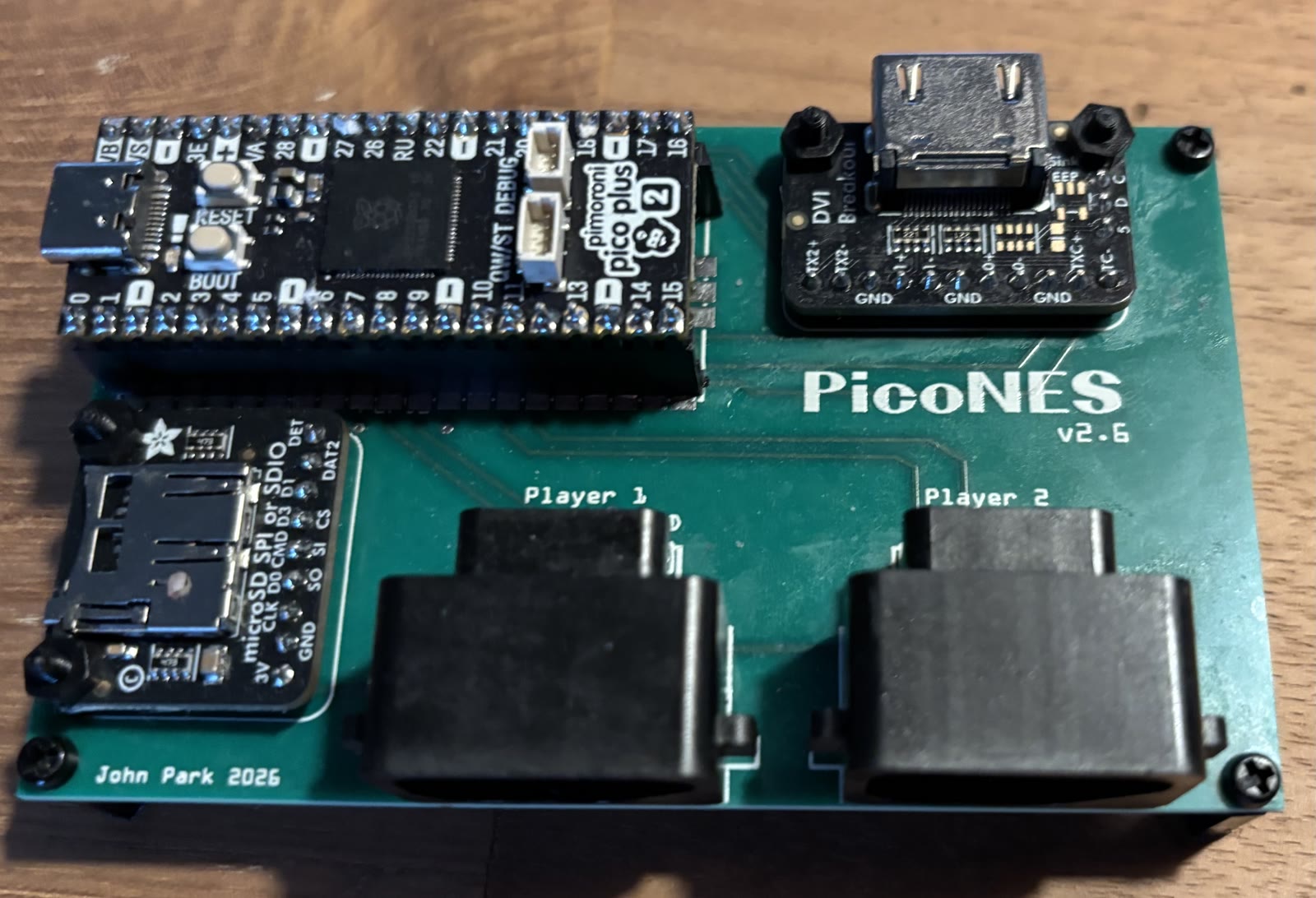 See note |
2 × NES | Pico 2, Pico 2 W or Pimoroni Pico Plus 2 | 2 | John Edgar Park |
| PicoNES v2.8 | 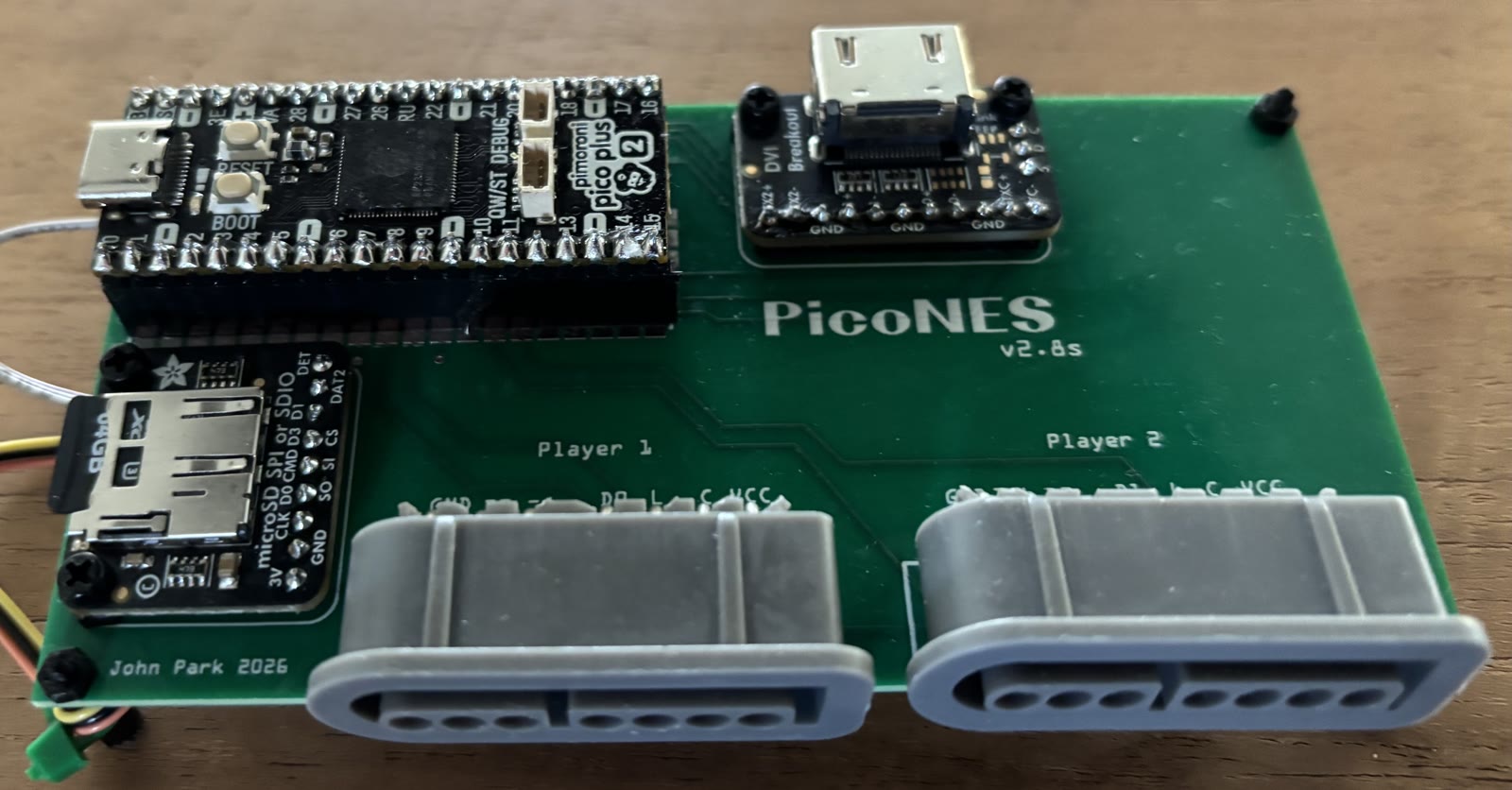 See note |
2 × SNES | Pico 2, Pico 2 W or Pimoroni Pico Plus 2 | 2 | John Edgar Park |
| PicoNES Mini |  |
2 × NES | Waveshare RP2350-Zero | 6 | Gavin Knight |
| PicoNES Micro |  |
None, USB controller only | Waveshare RP2350-USB-A | 9 | Gavin Knight |
| PicoSNES |  |
Built into a SNES controller | RP2350 Plus | 13 | Gavin Knight |
Note
The PicoNES v2.6 and v2.8 are shown with a Pimoroni Pico Plus 2. A Raspberry Pi Pico 2 or Pico 2 W can also be fitted.
Parts lists, ordering instructions, assembly notes, the pin assignment, the 3D-printed cases and the older design versions of the PicoNES boards are described in the PCB README. Their Gerber files are attached to every release of this project. The PicoSNES archive is published on its own release page.
The Waveshare RP2350-PiZero (HW_CONFIG 7) needs no PCB, since it already carries its own HDMI and microSD connectors, but it has a matching NES-like case: thingiverse.com/thing:6758682, designed for two NES controller ports.
Note
Sellers on AliExpress have copied the PicoNES design and sell pre-populated boards. For questions about those, contact the seller.
The PicoNES PCB, by John Edgar Park,
carries the Pico, the DVI and microSD breakouts and two controller ports. It
comes in two versions, which differ only in the controller ports: v2.6 with
NES controller ports and v2.8 with SNES controller ports. It runs the
AdafruitDVISD loader binary and reads its applications from /emu/2/.
A Pico 2 or Pico 2 W can be soldered flat onto the PCB or mounted on male pin headers. A Pimoroni Pico Plus 2 must be mounted on pin headers, because the SP/CE connector on its back prevents it from lying flat. Optional female socket headers, soldered into the PCB, let the board be plugged in and swapped without desoldering.
Controllers on the two GPIO controller ports:
- v2.8: original SNES controllers plug in directly.
- v2.6: NES controllers plug in directly. A SNES controller works as well, but needs an adapter cable — see here how to make one. Ready-made adapters are sold on AliExpress, but they do not always work and are not recommended.
Two controllers give a two-player setup; a USB controller for player 1 and a controller in either port for player 2 works just as well.
The parts lists and assembly notes are in the PCB README: PicoNES v2.6 and PicoNES v2.8.
| NES controller ports (v2.6) | SNES controller ports (v2.8) |
|---|---|
|
|
- Pico 2, Pico 2 W and Pimoroni Pico Plus 2 —
pico-bootLoader_AdafruitDVISD_pico2_arm.uf2
None of the three needs a build of its own. The loader reads the real flash size
from the chip at boot and detects PSRAM at runtime, so the same pico2 image
adapts to whichever board is plugged in. On a Pico 2 W the on-board LED stays
dark, since that LED is driven by the wireless chip; see
Pico 2 W.
The Pimoroni Pico Plus 2 brings 16 MB of flash and 8 MB of PSRAM, and both change what the menu can offer:
- Flash. The application partition is whatever is left after the loader's 512 KB — 15.5 MB on a Pimoroni Pico Plus 2, but only 3.5 MB on a 4 MB Pico 2. An application that does not fit is simply not listed in the menu rather than reported as an error, so on a Pico 2 some entries are missing.
- PSRAM. The entries that require it — Duke Nukem 3D, Quake II,
PCEngine CD and
doom_tiny_full— are the Pimoroni Pico Plus 2's alone; neither Pico 2 has PSRAM. Quake II also needs the 16 MB of flash. See Bootable applications.
Gavin Knight (DynaMight1124) designed an NES-like case for the v2.6 PCB: thingiverse.com/thing:6689537. It does not fit the v2.8 PCB. Two top covers are available, one with a button that presses the BOOTSEL button for firmware updates and one without. All parts are shown in the PCB README. For questions about the case, please contact the designer on the Thingiverse page.
Important
If the Pico is mounted with male headers, download the latest top cover. Headers raise the Pico, and only the newest cover leaves room for the USB cable — the older ones assume a Pico soldered flat onto the PCB.
| Top cover | Base |
|---|---|
 |
 |
The PicoNES Mini, by Gavin Knight (DynaMight1124), is a smaller PCB for a Waveshare RP2350-Zero, with two NES controller ports. It uses cheaper components that are harder to solder, and is recommended only for builders with good soldering skills.
Flash pico-bootLoader_WaveShareRP2350ZeroWithPCB_arm.uf2 and put the
applications in /emu/6/. The design also exists in an RP2040-Zero flavour,
which this bootloader cannot use — it is RP2350-only.
The parts list and build instructions are in the Instructables guide, step 1. See also PicoNES Mini in the PCB README. The 3D-printed case is available on Thingiverse.

The PicoNES Micro, by Gavin Knight (DynaMight1124), is a very small PCB for the Waveshare RP2350-USB-A, for one player with a USB controller. It uses 0603-size SMD components and requires micro-soldering skills.
Flash pico-bootLoader_WaveShare2350USBA_arm_piousb.uf2 and put the
applications in /emu/9/. The game controller plugs into the USB-A port; the
USB-C port is for power and for flashing the firmware.
The parts list, build instructions and case are in the Instructables guide, steps 2 and 3. See also PicoNES Micro in the PCB README.

The PicoSNES, by Gavin Knight (DynaMight1124),
is an excellent project and the most self-contained of the four designs: the
complete console is built into the shell of a SNES controller, original or
aftermarket. The HDMI and USB-C ports and the microSD slot are let into the
shell, and the controller's own buttons are read through CD4021 shift
registers, as in an original SNES pad. Powered through an HDMI 5 V injector, it
needs nothing more than a single cable to the display. The board it carries is
an RP2350 Plus (4 MB or 16 MB of flash), soldered flat onto the PCB.
The current design is v1.0 (Gerber_SNES_PicoSNES_v1.0.zip); order it at
1.6 mm thickness with the manufacturer's standard settings.
The PCB uses the Murmulator M2 pin map, so it runs the Murmulator M2 binary:
flash pico-bootLoader_MurmulatorM2_arm.uf2 and put the applications in
/emu/13/. The built-in controller is player 1; there is no second controller
port.
- First flash. Flash the loader before closing the shell — the BOOT button on the RP2350 Plus is only reachable while the controller is open. Later loader updates do not need it: Enter BOOTSEL mode in the options menu does the same over the USB-C port.
- PSRAM. The RP2350 Plus has no PSRAM. The build guide shows how to add a PSRAM chip piggybacked on the flash chip, with its chip-select pin wired to GPIO 8. Without it, the entries that require PSRAM still appear in the menu but do not run — see Bootable applications.
- Power. The USB-C port powers the board, and its data lines are also used for flashing and for USB drive mode. Alternatively, an HDMI 5 V injector powers it through the HDMI cable.
Warning
Never connect the HDMI 5 V injector and the USB-C cable at the same time; the supply can feed back into the other source.
Note
Good soldering skills are required: the HDMI and USB-C connectors are fine pitch, the resistor networks are 0603 size, and the USB data lines are soldered through the PCB onto the test points of the RP2350 Plus. The controller shell also has to be cut and filed to make room for the ports and the microSD slot.
Gavin's build guide on Instructables is thorough and well illustrated. It covers the component list, the order in which to assemble the PCB, the PSRAM modification and the trimming of the controller shell: https://www.instructables.com/PicoSNES-RP2350-Retro-Gaming-Inside-a-Controller
Many thanks to Gavin for this amazing work, and for designing it around this project.
/boot.txt                                  configuration (created/updated by the menu)
/emu/                                      BASEDIR (default /emu, override in boot.txt)
/emu/<HW_CONFIG>/*.uf2                     applications for this board (e.g. /emu/8/)
/emu/<HW_CONFIG>/.flashed                  what the loader last flashed (written by the loader)
/emu/emulators.txt                         the index / allow-list (name set by INDEX)
/emu/categories.txt                        optional category list (see Categories)
/emu/<category>.txt                        one index file per category, named by categories.txt
/emu/versions.txt                          which version each application was built from (informational)
/emu/assets/themes/0/<image_key>.png|.jpg  default artwork theme, converted on first use
/emu/assets/themes/0/Categories/*.png|.jpg category artwork (with categories.txt)
/emu/assets/themes/1..9/                   optional extra themes (UP/DOWN to switch)
/emu/assets/screensaver/*.png|.jpg         screensaver images (optional, not themed)
/roms/doom/doom1-whx-bootloader.uf2        Doom!'s WAD data image, flashed by the loader (from updateAll)
/updateAll/                                ROM set and game data installer, run on a computer (optional)
/ld2pico/                                  Dragon's Lair laserdisc converter, run on a computer (optional)
Applications live in a subfolder named after the board's HW_CONFIG number, so
one card can carry builds for several boards side by side.
A file in the root of the SD card. If it is absent, the defaults below
apply. A commented sample ships in the repository root: boot.txt.
- One
KEY=VALUEper line; whitespace around=and the value is trimmed. - Lines starting with
#or;are comments; blank lines are ignored. - Keys are case-insensitive.
SCREENSAVERvalues are case-insensitive;BASEDIR/INDEXvalues are filesystem paths and case-sensitive. - A malformed file (unknown key, duplicate key, missing
=or value) produces an on-screen error at boot — correct the file and reset.
| Key | Default | Meaning |
|---|---|---|
BASEDIR |
/emu |
Absolute SD path (must start with /, max 63 characters) under which everything lives: application folders, the index, artwork, screensaver images. |
INDEX |
emulators.txt |
Bare file name (no slashes) of the index file inside BASEDIR. Only read when BASEDIR holds no categories.txt — see Categories. |
SCREENSAVER |
see note | STARFIELD — images fly outward from the screen centre, growing toward the camera. BLOCKS — images float and bounce off the edges; the on-screen set is re-picked every 15 s. The screensaver starts after ~30 s of inactivity and any button press exits it. |
GUI |
1 |
0 = text menu, 1 = graphical menu. Rewritten whenever SELECT toggles the mode. Replaces the .guimode file used by earlier releases, which is migrated and deleted automatically. |
THEME |
0 |
Active artwork theme, 0–9 — see Artwork themes. Rewritten whenever UP/DOWN changes the theme in graphical mode. A theme that is not on the card falls back to 0. |
VIEW |
CATEGORIES |
Which level the menu was left on: CATEGORIES or APPS. Ignored without a categories.txt. |
CATEGORY |
— | category_name of the category last opened. |
APP |
— | program_name of the application last selected. |
VIEW, CATEGORY and APP record where you were so the menu returns there on
the next boot. The bootloader maintains them; there is normally no reason to
edit them by hand. Both names are matched against what is actually on the card,
so renaming a category or an application starts you at the first entry rather
than at the wrong one. To remember nothing, leave the key out altogether — an
empty value (CATEGORY= with nothing after it) is a syntax error.
Screensaver default. When
/boot.txtis absent the default isSTARFIELD; when the file is present but the key is omitted, it isBLOCKS. Set the key explicitly if the choice matters.
The bootloader writes this file. Changing the menu mode or the artwork
theme rewrites the corresponding GUI= / THEME= line, and moving around the
menu rewrites VIEW=, CATEGORY= and APP=. Nothing else is
touched: comments, blank lines, key order, spacing and any other keys are
copied through unchanged, so the file stays yours to edit. If /boot.txt does
not exist, the first such change creates it with the current effective value of
every key — SCREENSAVER included, so that materialising the file cannot
quietly change the screensaver through the asymmetry noted above.
Updates are written to /boot.txt.tmp, re-parsed to confirm they are valid,
and only then renamed into place; if a power cut interrupts the rename, the
next boot adopts the .tmp. A card that cannot be written to (write-protected
or full) is not an error — the change applies for the session and the help
screen reports that it was not saved.
<BASEDIR>/<INDEX> — by default /emu/emulators.txt — determines what appears
in the menu, and in what order. Only .uf2 files whose embedded program name
matches a row are listed; anything else in the application folder is ignored.
The same format is used by each category's config file (see
Categories). One row per application:
<program_name>;<image_key>;<display_name>[;<aux_uf2>]
# program_name  ; image_key ; display_name              ; optional aux data uf2
piconesPlus     ; nes       ; Nintendo Entertainment System
picogenesisPlus ; md        ; Sega Genesis/Mega Drive
doom_tiny       ; doom      ; Doom!                     ; doom/doom1-whx-bootloader.uf2
- Fields are separated by
;, whitespace is trimmed, and#starts a comment line. A maximum of 32 rows is allowed. - Applications are shown in the order the rows are written.
program_name(max 32 characters) — matched case-insensitively against the name each.uf2embeds viapico_set_program_name()(read from itsbinary_info, without flashing anything). The.uf2file name is irrelevant; files may be renamed freely.image_key(max 16 characters) — basename of the menu artwork:<BASEDIR>/assets/<image_key>.png(or.jpg/.jpeg).display_name(max 40 characters) — the label shown in the menu.aux_uf2(optional, max 64 characters) — path of a companion data.uf2, relative to/roms, flashed alongside the application. The loader looks for it in/romsfirst, then for its file name in the<BASEDIR>/<HW_CONFIG>/folder (see Auxiliary data images).
With many applications on a card, one flat list becomes tedious to page
through. Placing a file named categories.txt in BASEDIR adds a level above
it: the menu opens on a list of categories, and opening one shows the
applications it holds. Remove the file and the menu is a single flat list again,
driven by INDEX. The file's presence is the only switch; there is no key in
boot.txt for it.
# category_name ; image_key ; config_file
Arcade          ; arcade    ; arcade.txt
Computer        ; computer  ; computer.txt
Console         ; console   ; console.txt
Handheld        ; handheld  ; handheld.txt
Ports           ; ports     ; ports.txt
Settings        ; settings  ;
- Fields are separated by
;, whitespace is trimmed, and#starts a comment line. A maximum of 16 rows is allowed. - Categories are shown in the order the rows are written.
category_name(max 32 characters) — the label shown in the text menu. The graphical menu does not draw it: the artwork carries its own label.image_key(max 16 characters) — basename of the category artwork, in theCategoriessubfolder of each theme:<BASEDIR>/assets/themes/<N>/Categories/<image_key>.png(or.jpg/.jpeg). Application artwork stays in the theme folder itself.config_file(max 64 characters) — a file insideBASEDIRlisting the applications of this category, in exactly the format described in The index file above. Leaving it empty makes the entry open the options screen instead of an application list, which is what theSettingsrow above does.
An application may appear in more than one category, or in none. A category whose config file is missing, or whose applications are not on the card, is still shown — opening it reports that there is nothing in it — so a category never silently disappears from the menu.
Controls, in both menu modes:
| Category list | Application list | |
|---|---|---|
| LEFT / RIGHT (graphical), UP / DOWN (text) | choose a category | choose an application |
first button (A on a NES pad) |
open the category | start the application |
second button (B on a NES pad) |
— | back to the category list |
The menu remembers which level you were on, which category, and which
application, and returns there on the next boot — see VIEW, CATEGORY and
APP in Configuration.
Ordinary images are placed on the card and converted by the bootloader itself:
- Menu artwork —
<BASEDIR>/assets/themes/<N>/<image_key>.png|.jpg|.jpeg, one per index row, shown full-screen in graphical mode.<N>is the theme number; theme0is the default — see Artwork themes. - Category artwork —
<BASEDIR>/assets/themes/<N>/Categories/<image_key>.png|.jpg|.jpeg, one per row ofcategories.txt. Same rules, same theme fallback; only the folder differs. - Screensaver images — any
*.png|.jpg|.jpegin<BASEDIR>/assets/screensaver/(file names do not matter; more images give more variety). These are not themed.
On first use each source image is converted and cached next to it as
<name>.444 (RGB444, used by PicoDVI boards) and <name>.555 (RGB555, used by
HSTX boards). Both are always written, so the same card works in every supported
board. The .444/.555 files must not be authored by hand; when a source image
is replaced under the same name, its stale .444/.555 files should be deleted
so they regenerate. Nothing detects a cache that no longer matches its source:
the board converts an image only when a cache is missing, so a card that already
holds the old .444/.555 keeps showing the old artwork until they are removed.
Two host-side tools in tools/ support this, both needing only
ffmpeg and numpy. Neither is part of any build; they are run by hand.
tools/png2raw.pywrites the.444/.555caches for an image or a folder of them, byte-identically to the board, so the SD-card bundle can ship them ready-made.--checkcompares against the committed caches instead of writing, which is the quickest way to confirm a source and its caches are still in step. Point it at a specific folder, never at a theme root — it converts every image it finds, including unused spares.tools/make_category_art.pygenerates the six category tiles shipped for themes0and1, each in that theme's own visual idiom. It is the source of record for that artwork; the tiles are regenerated from it rather than edited as images.
The released SD-card archive ships the cached .444/.555 files rather than the
source images — they are far smaller, and shipping both would roughly double the
download. Where a theme has no cache for an entry, its source image ships instead
and the first boot converts it, so nothing in the menu is ever left without
artwork.
| Menu artwork | Screensaver | |
|---|---|---|
| Accepted formats | PNG, baseline JPEG | PNG, baseline JPEG |
| Maximum source size | 1280 × 960 | 1280 × 960 |
| Rendered as | scaled down (never up) to fit, letterboxed on black to 320 × 240 | scaled down to fit 80 × 60 |
| Recommendation | 4:3 aspect (e.g. 320 × 240 or 640 × 480) to avoid black bars | small and legible — it moves around the screen |
Progressive JPEG, interlaced PNG, 16-bit PNG, and oversized images are not
supported; they are skipped and moved to an unsupported/ subfolder so they are
not retried on every boot. Re-export as baseline/non-interlaced 8-bit and copy
again.
Boards with PSRAM convert images lazily, as they first appear on screen. Boards without PSRAM convert everything in one batch during boot, for every theme on the card, not just the active one — the converter needs SRAM that is no longer free once the menu is running, so a theme cannot be converted at the moment you switch to it. The first boot after adding images takes noticeably longer, after which the cache makes it immediate.
The graphical menu can carry up to ten sets of artwork. Each is a folder:
/emu/assets/themes/0/     theme 0 — the default, and the fallback
/emu/assets/themes/1/     theme 1
...                       up to theme 9
A theme folder holds one image per application, named after the image_key
from the index file — so a theme might contain nes.png, md.png, doom.png.
On a card with categories it also holds a Categories subfolder
with one image per category. Only the folders that exist are used; the numbers
need not be contiguous.
Switching — press UP or DOWN in the graphical menu. Only themes that are
actually on the card are reachable, so with themes 0, 1 and 3 present,
UP/DOWN cycles 0 → 1 → 3 → 0. The choice is saved to THEME= in
/boot.txt immediately and restored on the next boot.
UP/DOWN keep their usual meaning (choosing an application) in text mode, where
artwork is not shown.
Incomplete themes are fine. An application the active theme has no image for falls back to theme 0's image, and to a black screen if theme 0 has none either. A theme can therefore restyle just a few entries.
Existing cards are migrated automatically. Releases before v0.2 kept menu
artwork loose in <BASEDIR>/assets. On the first boot the bootloader creates
assets/themes/0 and moves those image files into it — including the cached
.444/.555 files, so nothing has to be re-converted. The screensaver/
folder and any other subfolder are left alone, as are files that are not
images. The move is resumable: if it is interrupted, the next boot finishes it.
Press START in either menu mode, or choose Help from the options menu, for
a full-screen summary of the controls, the meaning of the * and ! markers,
and the current mode, theme, board configuration and index file (or, on a card
with categories, categories.txt). Press START, the launch button, B or SELECT
to return. It is also where a failed configuration write is reported.
Any RP2350 application built for the application partition can appear in the
menu — it need not be an emulator. Making one bootable requires compiling its
.uf2 to the loader's layout and adding it to the SD card.
A normal Pico SDK application links at 0x10000000. For the bootloader it must
be relinked into the application partition at 0x10080000. Three changes to the
build are required.
Give the application a name — the loader identifies applications by it:
pico_set_program_name(${projectname} "my_app")Relink into the application partition. Add the following near the end of the
CMakeLists.txt (after the target exists, before pico_add_extra_outputs),
with BootPartition.cmake taken from the
pico_shared repository:
if(BUILD_FOR_BOOTLOADER)
    include("pico_shared/BootPartition.cmake")
    frens_offset_for_bootloader(${projectname})
endif()
Build as a secure-Arm RP2350 image (the default SDK Arm build). The loader
only flashes UF2 blocks with family RP2350 ARM_S (0xe48bff59):
mkdir build && cd build
cmake -DCMAKE_BUILD_TYPE=Release -DPICO_BOARD=pico2 \
      -DPICO_PLATFORM=rp2350-arm-s -DBUILD_FOR_BOOTLOADER=ON ..
make -j
Applications based on pico_shared can use its build script instead:
./bld.sh -2 -c <HW_CONFIG> -b (the -b switch passes
-DBUILD_FOR_BOOTLOADER=ON).
The loader validates every image before erasing anything: UF2 magic, family ID,
page alignment, and that every block lands inside the application partition. A
standalone build still linked at 0x10000000 is rejected on-screen and can
never overwrite the bootloader. The rejection screen names the problem — the
address the image was actually linked at, the family it was built for, or that
the file is corrupt — and repeats the build flags above; press any button to
return to the menu.
Copy the .uf2 to <BASEDIR>/<HW_CONFIG>/ and add a row to the index file
(emulators.txt) with the program name set in step 1, an image_key, and a
display name. See The index file. The row's
position in the file is where the application appears in the menu.
On a card that uses categories, add the row to the config file of the category it belongs in instead — or to several, if it fits more than one.
- Menu image — place
<image_key>.png(or.jpg/.jpeg) in<BASEDIR>/assets/themes/0/, using theimage_keyfrom the index row. It is shown full-screen in graphical mode. Add the same file name to any otherthemes/<N>/folder to give the application a different look in that theme; themes you skip fall back to this one. - Screensaver images — place any
*.png|.jpg|.jpegin<BASEDIR>/assets/screensaver/.
Conversion is automatic; the format and size constraints are those listed under Artwork.
For payloads too large to embed in the application (game data, filesystems), a
second .uf2 with family RP2350 DATA (0xe48bff58) can target free flash
above the application. Name it in the index row's fourth field, as a path
relative to /roms, and the loader flashes it alongside the application,
skipping the write when the CRC already matches. The loader looks for the file
in /roms first, then for the same file name in the application's
<BASEDIR>/<HW_CONFIG>/ folder. When it is in neither, the application is
started only if flash still holds the data from an earlier start; otherwise the
menu names the file and the folder it belongs in. Doom is distributed this
way: the engine (doom_tiny.uf2, ARM_S) plus the WAD
(/roms/doom/doom1-whx-bootloader.uf2, DATA), which updateAll installs.
Optionally, an application can detect that it was started by the loader and offer
a "return to menu" action. The protocol uses two watchdog scratch registers,
which survive watchdog_reboot() but are cleared on power cycle:
scratch[6] == 0xB007ED01— set by the loader immediately before starting the application ("you were launched from the bootloader").scratch[7] = 0xB007BACE— set by the application, followed by a watchdog reboot ("show the menu instead of resuming").
With pico_shared these are Frens::isLaunchedFromBootloader() and
Frens::rebootToBootloader()
(pico_shared/FrensHelpers.h); its SELECT + START
menu shows Return to emulator selection automatically. Without pico_shared,
the raw equivalent is:
#include "hardware/watchdog.h"

bool launched_by_loader = (watchdog_hw->scratch[6] == 0xB007ED01u);

void return_to_menu(void) {
    watchdog_hw->scratch[7] = 0xB007BACEu;
    watchdog_reboot(0, 0, 0);
}mkdir build && cd build
cmake -DCMAKE_BUILD_TYPE=Release -DPICO_BOARD=pico2 -DHW_CONFIG=8 \
-DPICO_PLATFORM=rp2350-arm-s -DENABLE_PIO_USB=1 -DUSE_PICO_EXTRAS_I2S=0 ..
make -j
# -> build/pico-bootLoader.uf2 (flash via BOOTSEL)The wrapper ./bld.sh -2 -c <HW_CONFIG> performs the same build; -w adds the
CYW43 driver for the Pico 2 W LED, which is no longer released (see
Pico 2 W). ./buildAll.sh builds every supported board into
releases/ (requires picotool).
The serial log marks each start-up phase with the time since power-on
(T+<ms> (+<ms>): <phase>). Output is held in an 8 KB RAM buffer and sent in
the background, so logging does not hold up the start-up; it may therefore
continue for a moment after the menu has appeared. A crash that stops the
board without a panic message (a hard fault) loses whatever was still in the
buffer. The log lists every .uf2, index row and category only in a build
configured with -DBOOT_VERBOSE_LOG=ON
(EXTRA_CMAKE_ARGS=-DBOOT_VERBOSE_LOG=ON ./bld.sh ...); by default those lines
are left out so that they do not fill the buffer.
The image must fit the 512 KB bootloader region; the linker errors out if it
does not, and every link prints its occupancy. The released binaries sit between
53% and 60% with USB drive mode built in. A -w build is the tight one: it
reaches 97.8% on HW_CONFIG 1 even with USB drive mode left out, which is why the
whole project is compiled -Os — -O2 no longer links there (see the comment
in CMakeLists.txt).
To build the emulators and the native ports themselves,
build_emulators.sh clones each source repository and
produces the bootloader-format .uf2 files, placing them under emu/<HW_CONFIG>/.
By default each repository is built from its latest release tag, with the tag
stamped into that repository's own pico_shared/menu.h SWVERSION so the
emulator reports its version instead of a build date. -B asks interactively for
a branch instead, and -m builds each repository's default branch; neither
stamps a version.
pico_sharedis taken frommain, not from the revision the tag pins. Tag mode builds each emulator's tagged source againstpico_sharedmain; every other submodule stays at the revision the tag pins, andemu/versions.txtrecords both refs. The reason is historical:bld.shonly learned-b(BUILD_FOR_BOOTLOADER) inpico_sharedf2c8be9, and the emulator release tags of the time predated it — their pinnedpico_sharedrejected-boutright, so no bootloader-format.uf2could be produced from it. That reason no longer applies, but the substitution still matters: in the v0.7.2 bundle 1943 pins82ac5d8, which ismain, while Galagino and OutRun pin9d81d14, Phoenix and Moon Crestace03f96, Dragon's Lair929281dand the other emulators the older6e65df4, and are built against82ac5d8all the same.emu/versions.txtrecordsmain, the revision every emulator was actually built against.
The native ports and ColecoVision are the exception to all of the above.
pico-doom,
pico-duke3D,
pico-quake2 and
Adafruit_ColecoJam have no
pico_shared, so there is no SWVERSION to stamp, and all four build through
their own per-board <board>-build-forbootloader.sh scripts rather than
bld.sh. Each targets only the boards it has a script for — Doom 2, 8, 13, 14
and 15, Duke Nukem 3D 2, 8, 13 and 15, Quake II 2 and 8, ColecoVision 8 —
and is reported as SKIP for every other configuration. The ColecoVision
build downloads its own dependencies, so it needs network access. The Quake II
build produces quake2.uf2, which is installed as pico-quake2.uf2 (the
SCRIPTED_UF2_OF table), and needs PICO_PIO_USB_PATH on both of its boards;
without it, it is skipped on HW_CONFIG 2 as well.
All four repositories are tagged and are built from their latest tag like the
emulators, so versions.txt records a real version for doom_tiny,
doom_tiny_full, duke3d_game, pico-quake2 and colecojam. The tag is simply the newest by
version order, whether or not it carries a v prefix (Adafruit_ColecoJam's
tags do not), so later tags are picked up with no change here. This applies to
the emulators as well: a tag whose GitHub release is marked as a pre-release,
such as Adafruit_ColecoJam's beta 2.0b1, is skipped in favour of the newest
full release. build_emulators.sh asks the GitHub API through gh for this,
and warns when it cannot, in which case every tag is a candidate. The
SCRIPTED_BRANCH table in build_emulators.sh — main
for Doom, Quake II and ColecoVision, fix/audio-production-rate for Duke Nukem 3D —
is now only the fallback for a repository that has no tag at all.
Repositories are cloned from the PicoPlus-devel organisation by default. An
entry in the REPO_OF table of build_emulators.sh may
name a repository elsewhere as owner/repo, as the ColecoVision entry
(cogliano/Adafruit_ColecoJam) does; versions.txt then records it in that same
form.
Doom additionally needs PICO_EXTRAS_PATH pointing at a
pico-extras checkout, since it
resolves its whole toolchain from the environment. Without it the two Doom
variants are skipped with that reason and everything else — Duke Nukem 3D
and Quake II included — still builds.
./build_emulators.sh -c 8            # one board, latest tags
./build_emulators.sh -c all -j 3     # every board
./build_emulators.sh -c all -j 3 -z  # ... and pack the SD-card archive
./build_emulators.sh -c 8 -B         # pick a branch interactively
-z writes emu/versions.txt — the manifest of what each
emulator was built from, one <program_name>;<repo>;<ref>;<pico_shared> row per
shipped emulator — and packs
releases/pico-bootLoader_sdcard.zip via
.github/scripts/pack_sdcard.sh. The packer
takes the emu/ tree as its only source of truth and refuses to build an archive
containing an empty .uf2, so a half-finished build cannot ship. It requires
-c all, since an archive built from one board would be missing the others.
Besides emu/, the archive holds updateAll/, with updateAll.exe built by
-z (mingw-w64), and ld2pico/, with the ld2pico.exe that -z downloads
with curl from the pico-dragonslair release it bundled. Doom's WAD data image
is not packed, although build_emulators.sh still installs it in
emu/<HW_CONFIG>/ for a card copied straight from the tree; on a card made
from the archive, updateAll installs it in /roms/doom/.
The loader .uf2s are built by CI; the SD-card archive is built locally, because
it needs the toolchain of every application. An emulator-only refresh still gets its own
release so users find out about it — that is what the v0.N.M form is for.
The full maintainer checklist — per-scenario steps, dry runs, verification and
rollback — is in RELEASING.md. The short version:
./build_emulators.sh -c all -j 3 -z            # emulators + archive (local)
git add emu/versions.txt && git commit -m "Refresh emulator bundle" && git push
gh workflow run BuildAndRelease.yml -f tag=v0.2.1   # builds loader, creates tag, publishes
gh release upload v0.2.1 releases/pico-bootLoader_sdcard.zip- Menu and screensaver artwork is taken from Ducalex — retro-go (github.com/ducalex/retro-go).
- Additional theme and category artwork, metadata and testing done by Gavin Knight
- The emulator cores and the native ports are the work of their upstream authors; see the repository links under Bootable applications.
- The ColecoVision emulator, ColecoJam, is the work of Dan Cogliano (@cogliano). Many thanks to him for writing it and for making it available to this project.
- The games of Galagino are emulated by Galagino, by Till Harbaum, and its fork GalaginoPlus, by VirtualClaudioBoy, of which pico-galagino is a port.
- 1943 follows MAME's 1943 driver, and the research of Liu Szuping for an earlier RP2350 port of the game served as a reference; see the pico-1943 README.
- updateAll downloads missing ROM zips from ArcadeROMsDB_MiSTer, a database maintained by zakk4223 for the MiSTer FPGA project, and reads databases in the format of the MiSTer Downloader. Neither is part of this project.
- The PicoNES PCB was designed by John Edgar Park.
- The PicoNES Mini, PicoNES Micro and PicoSNES PCBs, and the 3D-printed cases for the three PicoNES designs and for the Waveshare RP2350-PiZero, were designed by Gavin Knight.
- Support for the Olimex RP2040-PICO-PC was contributed by DnCraptor.
- This project was developed with the assistance of AI (Anthropic Claude / Claude Code).
This project is licensed under the GNU General Public License, version 3. See
the LICENSE file for the full text.