
🇬🇧 English | 🇮🇹 Italiano




Extract hardcoded (burned-in) subtitles to clean SRT files using Apple's native Vision OCR — fast, offline, no hallucinations.
SubVision reads the subtitles pressed into the video frames and turns them
into a proper .srt, with an interactive review editor on the side. It is
built for maximum accuracy: the defaults always favor quality over speed,
with the goal of minimizing manual rework.
Why Apple Vision instead of an LLM/VLM:
- It does not hallucinate: it reads the glyphs that are there; if there is no text, it returns nothing.
- ~50-100x faster than a VLM: it runs on the Neural Engine (~18 frames/s).
- Deterministic and 100% offline.
| Main screen | Preview with crop bands |
|---|---|
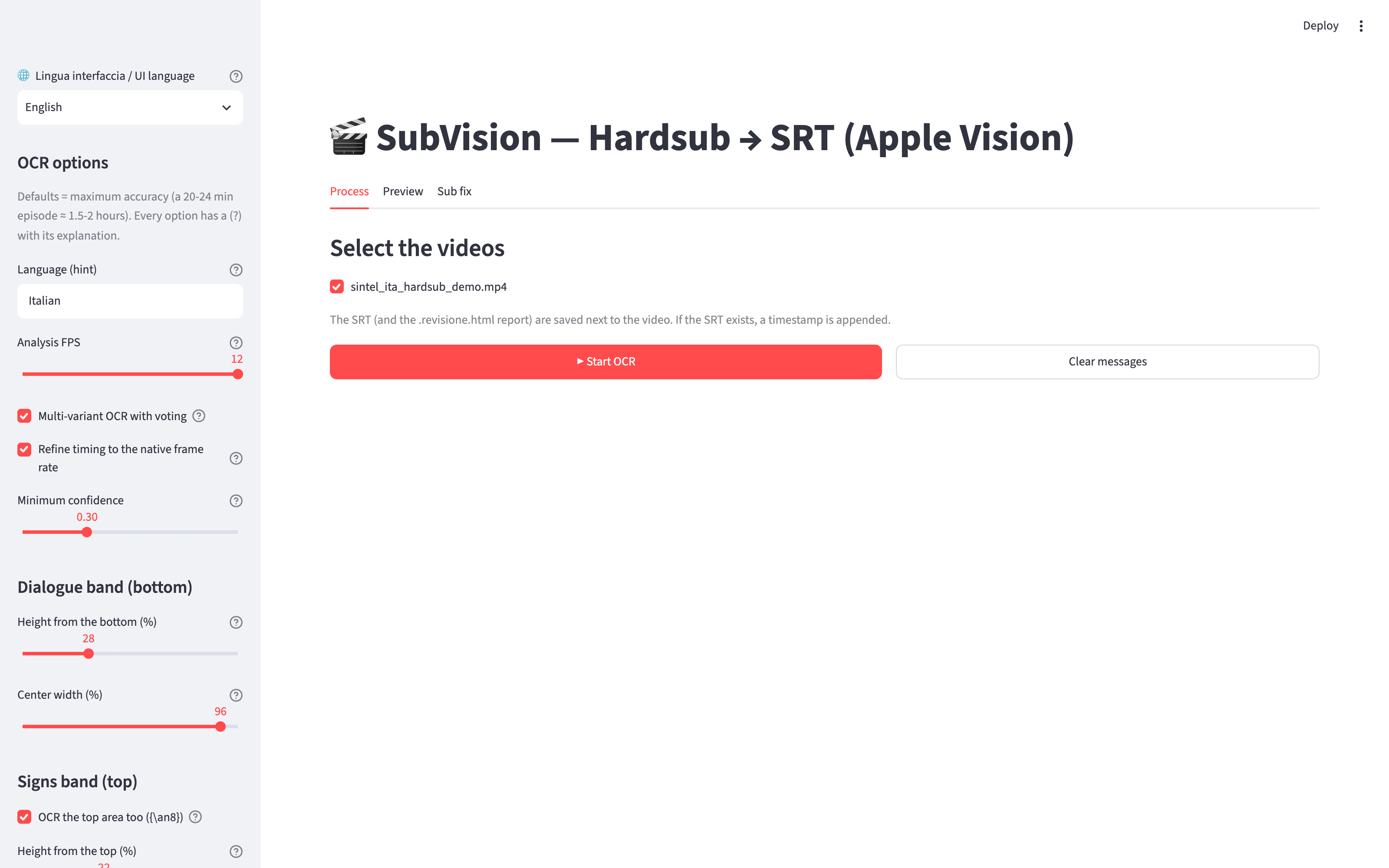 |
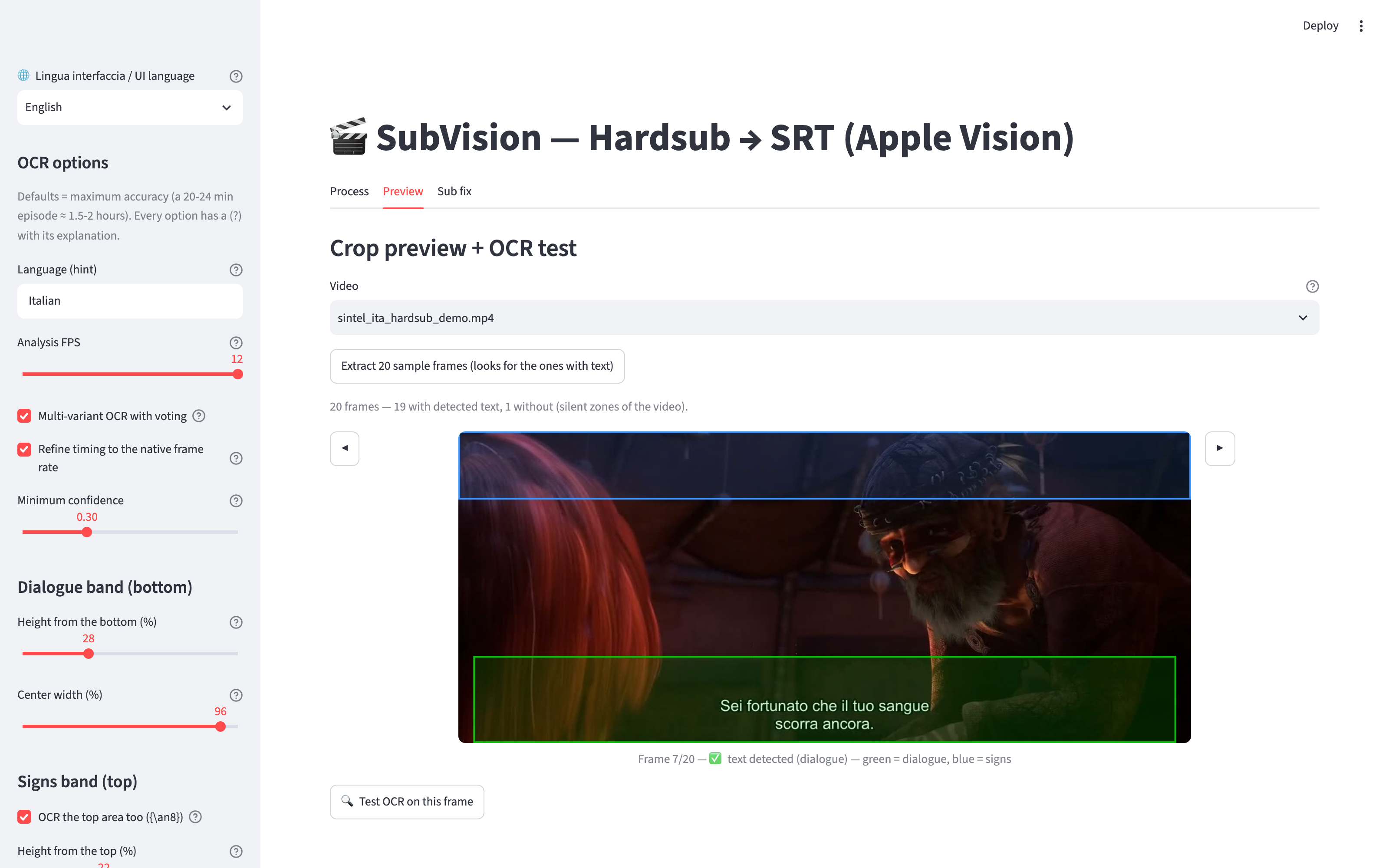 |
| Batch processing (per-step progress, ETA, live speed) | One-frame OCR test (voting + confidence) |
|---|---|
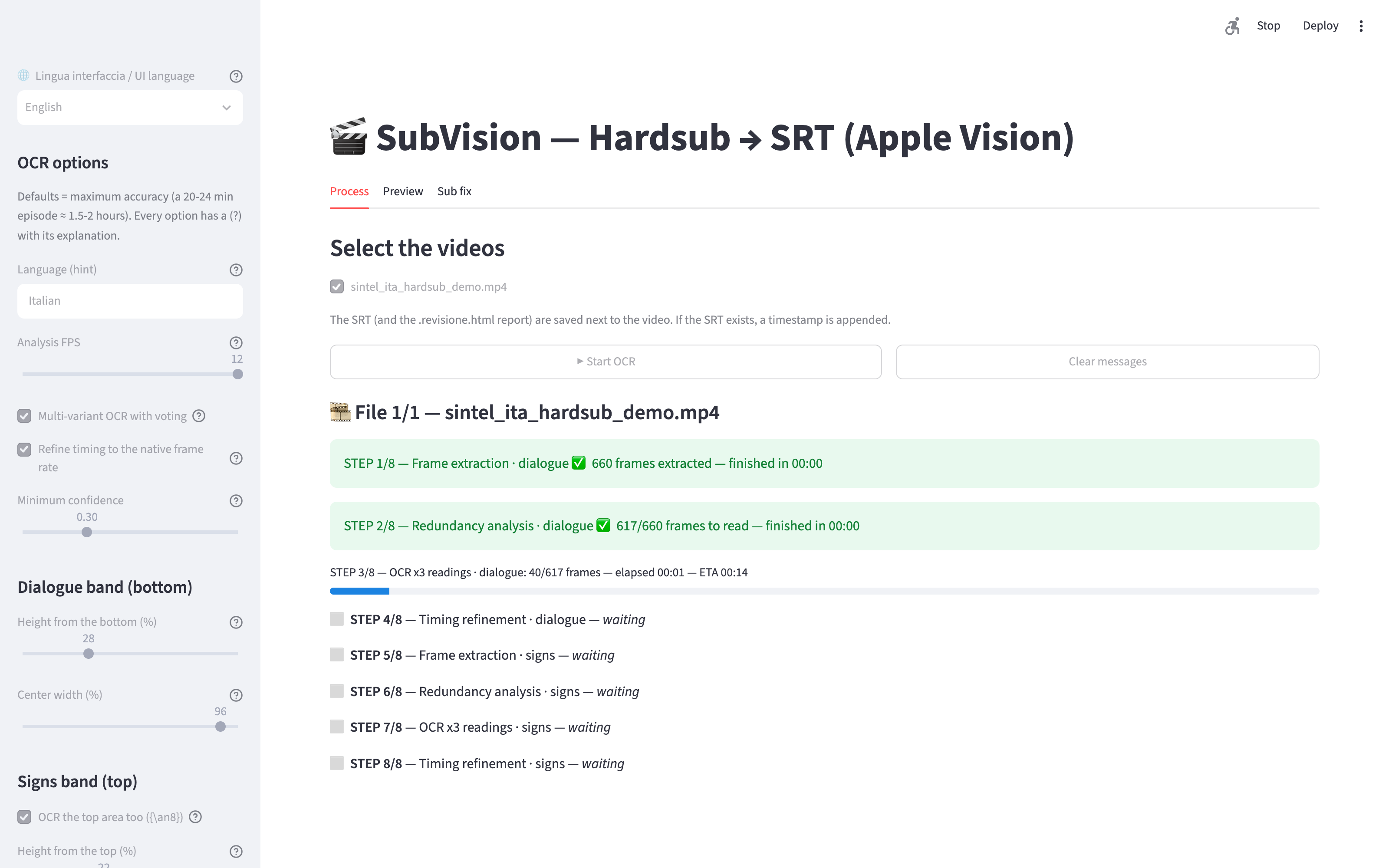 |
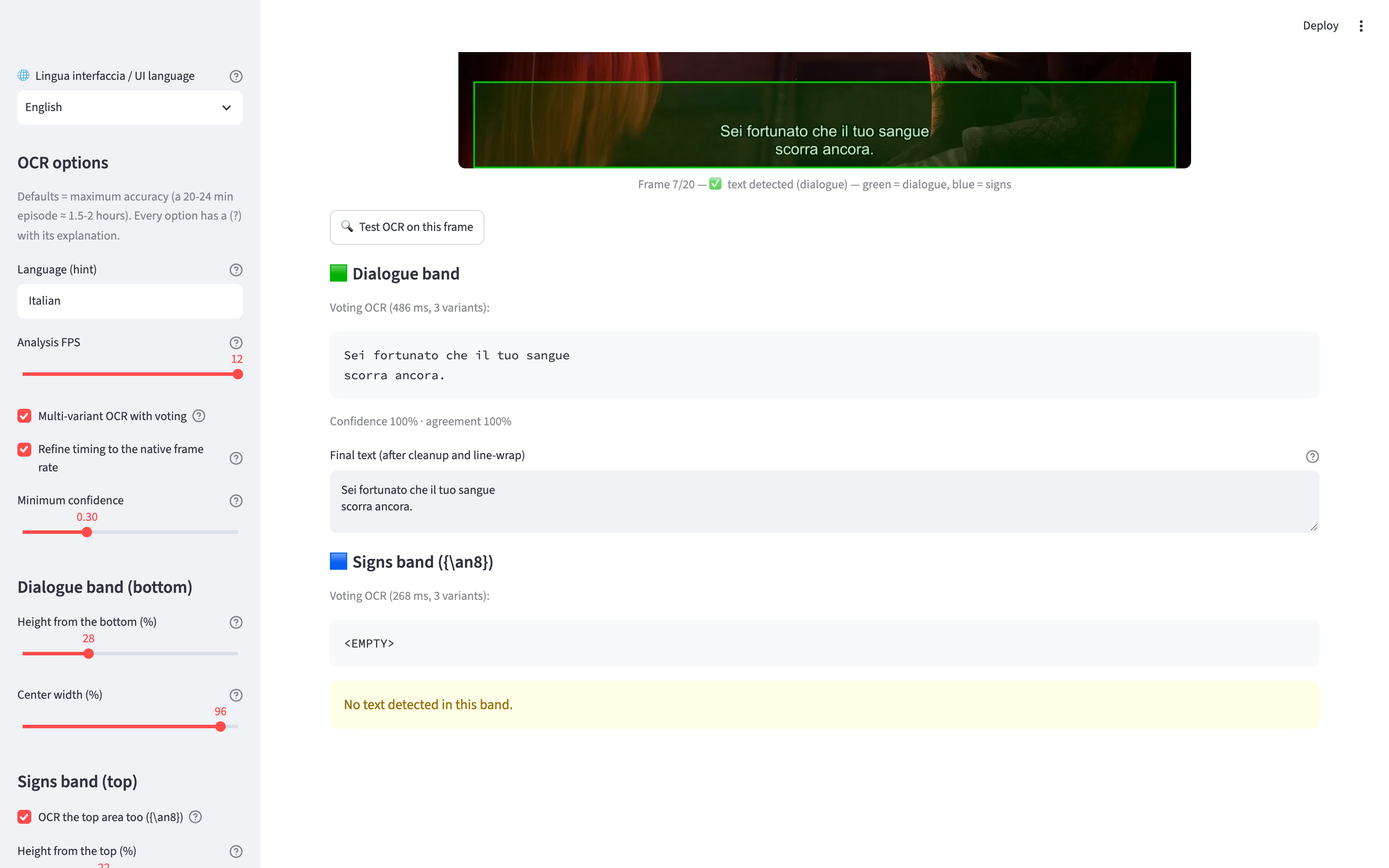 |
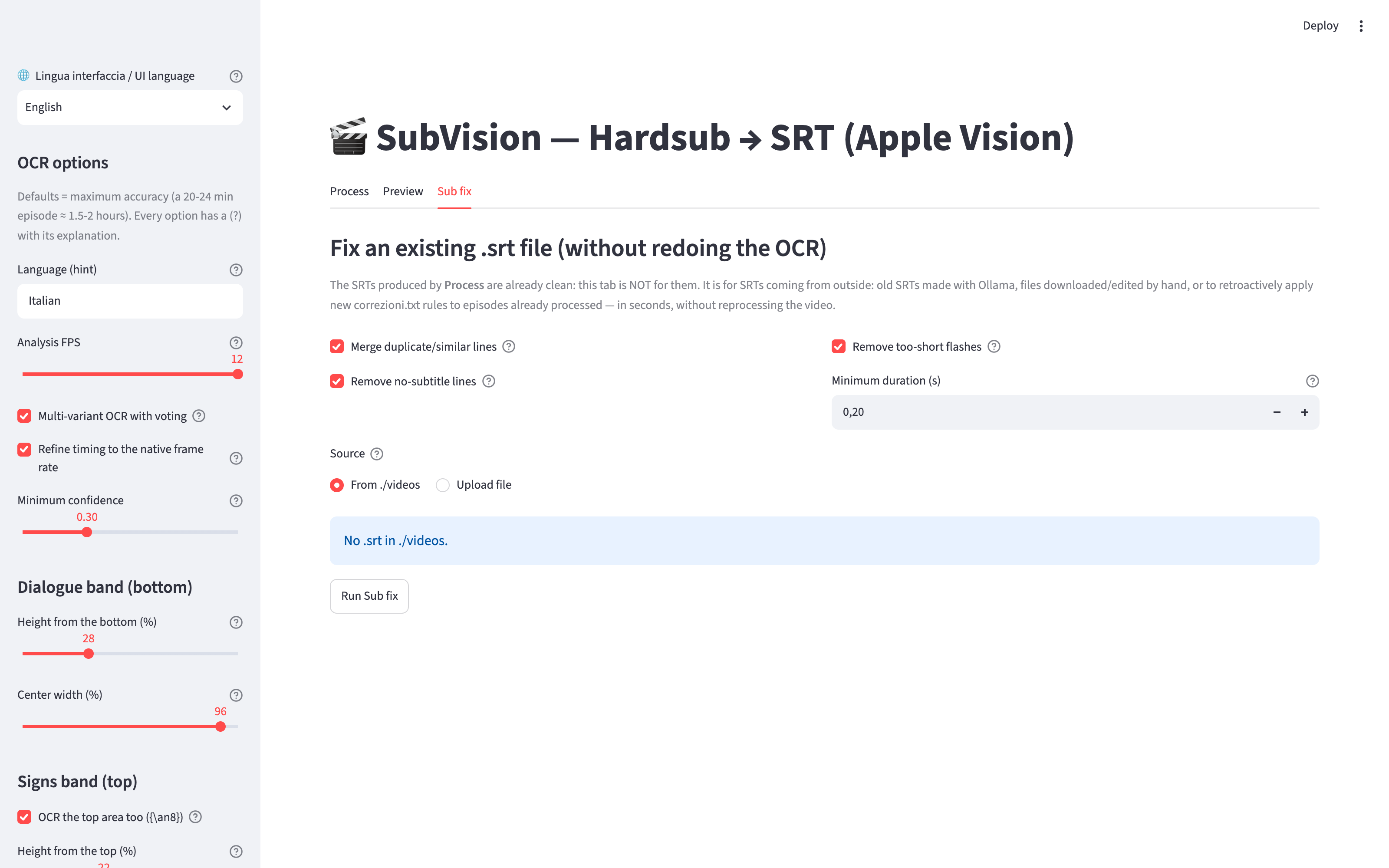
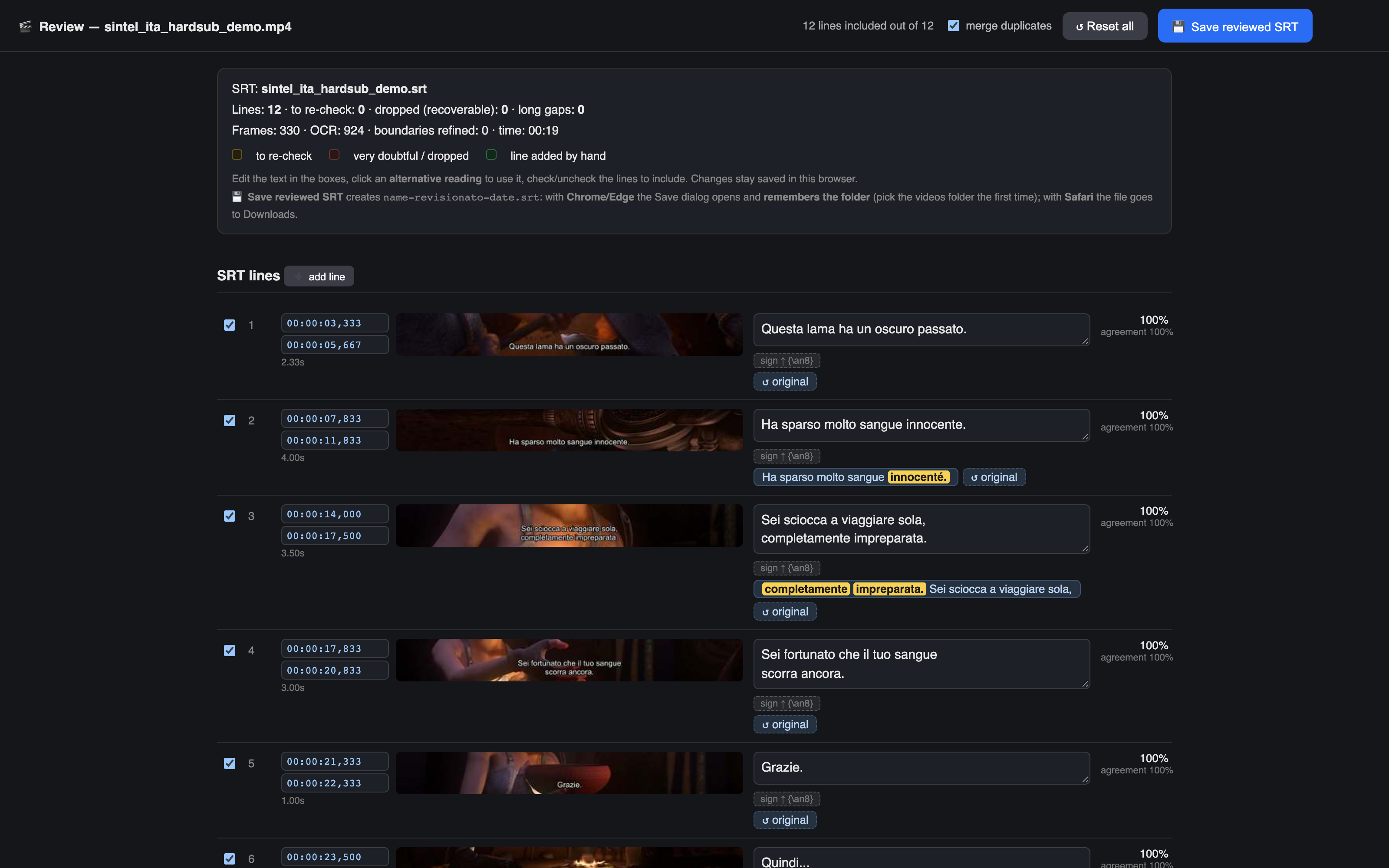
| Sub fix (clean an external SRT) | The interactive review report (an editor, not just a report) |
|---|---|
 |
 |
The demo uses a 55-second dialogue clip from Sintel, the Blender Foundation open movie (CC-BY 3.0, © copyright Blender Foundation | durian.blender.org), with Italian and English subtitles burned in. To keep the repo light, the demo files are attached to the Demo material release (direct download links):
| File | What it is |
|---|---|
sintel_ita_hardsub_demo.mp4 / sintel_eng_hardsub_demo.mp4 |
55s clips with burned-in subs (IT / EN), ~9 MB each |
sintel_ita_hardsub_demo.srt / sintel_eng_hardsub_demo.srt |
the SRT extracted by SubVision |
sintel_ita_hardsub_demo.revisione.html / sintel_eng_hardsub_demo.revisione.html |
the interactive review report of each run (download, then open it in a browser) |
Measured accuracy on the demo (fast profile: fps=6, skip_hamming=1,
no timing refinement, no signs band — ~20s of processing per clip on an
Apple Silicon Mac):
- Italian clip: 12 of 12 subtitle lines found, text character-for-character identical to Sintel's official SRT.
- English clip: 12 of 12 lines found, text identical to the official SRT.
- Timing within ~±0.1s of the official subs even in this fast profile (the default profile also refines boundaries to the native frame rate, ~±20ms).
To reproduce it yourself: download a demo clip from the release, put it in
./videos, start the app and
press Start OCR — or run the pipeline headless (see below).
- macOS 10.15+ (Apple Vision is the OCR engine; on macOS 13+ the LiveText engine is used as an extra voting variant)
- ffmpeg:
brew install ffmpeg - Python 3.10+
Two ways to get SubVision:
- Download the latest release — grab the source zip from
Releases → latest,
unzip it and double-click
run.command(first time: right-click → Open). - Clone the repo:
git clone https://github.com/Interstellar0verdrive/SubVision.git
cd SubVision
./run.command
The app checks GitHub for a newer release at most once a day (2.5s timeout, silent when offline) and shows a small notice in the sidebar if there is one.
run.command creates a virtualenv, installs the dependencies (only the first
time or when requirements.txt changes) and starts the GUI. Or manually:
python3 -m venv .venv && source .venv/bin/activate
pip install -r requirements.txt
streamlit run app.py
Put your videos in ./videos (.mkv .mp4 .mov .avi .m4v .webm); the .srt,
the .revisione.html review report and a .log are saved next to each video.
The interface is available in English and Italian (selector at the top of the sidebar; the choice is remembered across launches). The review report is generated in the selected UI language.
- Multi-variant OCR with voting — every frame is read 3 times (Vision raw, Vision contrast-enhanced, and LiveText, Apple's second independent OCR engine) and the text with the most confidence-weighted votes wins.
- Segment voting — the final text of a line is the one that won across ALL the frames where it was visible (dozens of readings), not a single read.
- Timing refinement — start/end boundaries are recomputed at the video's NATIVE frame rate: ~±20ms precision instead of ±40-120ms.
- Signs band — an optional second pass on the top of the frame for signs
and translator notes, written to the SRT with the
{\an8}tag. - Interactive review report — a single offline HTML file next to the SRT: every line with thumbnail, confidence and agreement; editable text; alternative readings applied with one click (differences highlighted); recoverable dropped lines; addable lines in long gaps; export of the reviewed SRT.
| Option | Default | Notes |
|---|---|---|
| Language (hint) | Italian | dictionary used by the OCR (accents); set it to your subs' language |
| Analysis FPS | 12 | frames analyzed per second; lower = faster, may miss short subs |
| Multi-variant OCR | ON | 3 reads + voting, ~3x OCR time |
| Refine timing | ON | boundaries at the native frame rate |
| Minimum confidence | 0.30 | below = ignored (but kept in the review report) |
| Dialogue band | 28% × 96% | bottom area scanned; verify in the Preview tab (green box) |
| Signs band | ON, 22% × 100% | top area for signs → {\an8}; OFF halves the time |
| Min line duration | 0.20s | shorter "flashes" are dropped but recoverable in the report |
| Merge gap | 0.6s | merges similar lines across fades |
| Line-wrap width | 42 | balanced 2-3 line wrapping, professional subtitling style |
| Hamming skip | 0 | skip OCR of near-identical frames (1 = ~25% faster, measured safe) |
| ignore.txt | ON | phrases to discard (watermarks, fansub logos) |
| correzioni.txt | ON | automatic wrong => right replacements for recurring typos |
Every option in the GUI has a (?) tooltip with a full explanation.
Three tabs: Process (batch OCR with per-step progress, ETA and live
speed), Preview (finds 20 sample frames containing text to calibrate the
crop bands, with a one-frame OCR test), Sub fix (clean an external .srt
without redoing the OCR).
source .venv/bin/activate
python3 -c "import ocr_core as C; \
  C.process_video('videos/ep.mkv', 'videos/ep.srt', C.OcrParams(lang_hint='English'))"
OcrParams() with no arguments = maximum-accuracy defaults. Fast profile:
OcrParams(fps=6, skip_hamming=1, multi_variant=False, top_band=False, refine_timing=False). process_video(..., ui_lang="en") controls the review
report language.
SubVision stands on the shoulders of these projects (not distributed with
this repository — they are installed via pip from requirements.txt, or
separately for ffmpeg):
- ocrmac — the key enabler: a thin Python wrapper around Apple's Vision / LiveText OCR frameworks, which is what makes native, offline macOS OCR usable from Python.
- Streamlit — the GUI framework.
- Pillow — image handling and the OCR variants.
- NumPy — numeric helpers.
- ffmpeg — required external dependency (installed
separately, e.g.
brew install ffmpeg), invoked as an external binary for frame extraction. - Apple's Vision and LiveText frameworks — the OCR engines themselves, part of macOS.
MIT © 2026 Interstellar0verdrive.
Demo videos: clips from Sintel, the Blender Foundation open movie — © copyright Blender Foundation | durian.blender.org — licensed under CC-BY 3.0.